Справочник команд ZPL (eng).
Bar Code Commands
^B1
Code 11 Bar Code
Description The ^B1 command produces the Code 11 bar code, also known as USD-8 code. In a Code 11 bar code, each character is composed of three bars and two spaces, and the character set includes 10 digits and the hyphen (-).
^B1 supports print ratios of 2.0:1 to 3.0:1.
Field data (^FD) is limited to the width (or length, if rotated) of the label.
Parameter |
Description |
Accepted Values: |
|---|---|---|
o |
orientation |
N = normal |
R = rotated 90 degrees (clockwise) |
||
I = inverted 180 degrees |
||
B = read from bottom up, 270 degrees |
||
Default Value: current ^FW value |
||
e |
check digit |
Y = 1 digit |
N = 2 digits |
||
Default Value: N |
||
h |
bar code height (in dots) |
1 to 32000 |
Default Value: value set by ^BY |
||
f |
print interpretation line |
Y = yes |
N = no |
||
Default Value: Y |
||
g |
print interpretation line above code |
Y = yes |
N = no |
||
Default Value: N |
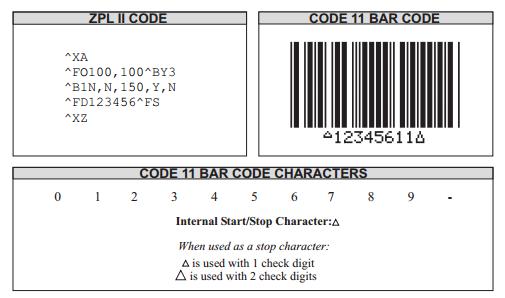
Example • This is an example of the Code 11 bar code:
Example • This is an example of the Code 11 bar code(Rotating Test):
^XA
^PW800
^LL640
^FO100,10^A0,32,25^FDCodebar 11 Orientation Test:^FS
^FO100,100^BY2^B1N,Y,100,Y,Y^FD12345678901^FS
^FO550,100^BY2^B1R,Y,100,Y,Y^FD12345678902^FS
^FO500,430^BY2^B1I,Y,100,Y,Y^FD12345678903^FS
^FO100,300^BY2^B1B,Y,100,Y,Y^FD12345678904^FS
^XZ
Example • This is an example of the Code 11 bar code(Check Bit Test)
The first bar code set the check bit to 1, and check bit is 8.
The second bar code set the check bit to 2, and check bit is 8.
^XA
^PW800
^LL640
^FO100,10^A0,32,25^FDCodebar 11 CheckDigit Test:^FS
^FO100,100^BY2^B1N,Y,100,Y,Y^FD12-12345-67890^FS
^FO100,250^BY2^B1N,N,100,Y,Y^FD12-12345-67890^FS
^XZ
Example • This is an example of the Code 11 bar code(Width and Height Test)
^XA
^LL640
^FO40,10^A0,32,25^FDCodebar 11 Size Test:^FS
^FO40,80^BY1^B1N,Y,40,Y,Y^FD12345678901^FS
^FO40,180^BY2,2^B1N,Y,80,Y,Y^FD12345678901^FS
^FO40,320^BY2,3,100^B1N,Y,120,Y,Y^FD12345678901^FS
^FO40,480^BY3,,160^B1N,Y,,Y,Y^FD12345678901^FS
^XZ
Example • This is an example of the Code 11 bar code(Whether the comment line is printedandthetestof print location)
^XA
^LL640
^FO40,10^A0,32,25^FDCodebar 11 Interpretation Line Test:^FS
^FO40,80^BY2^B1N,Y,100,Y,Y^FD12345678901^FS
^FO40,220^BY2^B1N,Y,100,Y,N^FD12345678901^FS
^FO40,360^BY2^B1N,Y,100,N,Y^FD12345678901^FS
^FO40,500^BY2^B1N,Y,100,N,N^FD12345678901^FS
^XZ
Note: If the bar code contains invalid characters, it will not be printed.
^B2
Interleaved 2 of 5 Bar Code
Description The ^B2 command produces the Interleaved 2 of 5 bar code, a high-density, self-checking, continuous, numeric symbology.
Each data character for the Interleaved 2 of 5 bar code is composed of five elements: fivebarsor five spaces. Of the five elements, two are wide and three are narrow. The bar codeisformedby interleaving characters formed with all spaces into characters formed with all bars.
^B2 supports print ratios of 2.0:1 to 3.0:1.
Field data (^FD) is limited to the width (or length, if rotated) of the label.
Parameter |
Description |
Accepted Values: |
|---|---|---|
o |
orientation |
N = normal |
R = rotated 90 degrees (clockwise) |
||
I = inverted 180 degrees |
||
B = read from bottom up, 270 degrees |
||
Default Value: current ^FW value |
||
h |
bar code height (in dots) |
1 to 32000 |
Default Value: value set by ^BY |
||
f |
print interpretation line |
Y = yes |
N = no |
||
Default Value: Y |
||
g |
print interpretation line above code |
Y = yes |
N = no |
||
Default Value: N |
||
e |
calculate and print Mod 10 check digit |
Y = yes |
N = no |
||
Default Value: N |
Example • This is an example of the Interleaved 2 of 5 bar code:
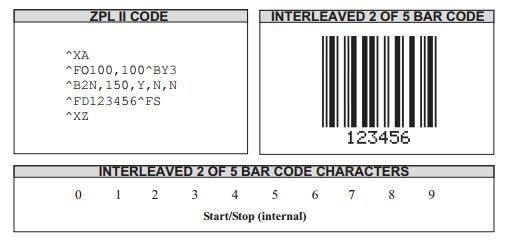
Note: If the bar code contains invalid characters, it will not be printed.
^XA
^FO100,100
^B2N,100,Y,N,N
^FD1234567890^FS
^XZ
Example • This is an example of an Interleaved 2 of 5 bar code(Rotating Test of Bar Code ):
^XA
^PW800
^LL640
^FO40,10^A0,32,25^FDInterleaved 2 of 5 Orientation Test:^FS
^FO40,100^BY2^B2N,100,Y,N,N^FD1234567890^FS
^FO600,100^BY2^B2R,100,Y,N,N^FD1234567890^FS
^FO500,400^BY2^B2I,100,Y,N,N^FD1234567890^FS
^FO40,300^BY2^B2B,100,Y,N,N^FD1234567890^FS
^XZ
Example • This is an example of an Interleaved 2 of 5 bar code(Width and Height Test of Bar Code):
^XA
^LL640
^FO40,10^A0,32,25^FDInterleaved 2 of 5 Size Test:^FS
^FO40,80^BY1^B2N,40,Y,Y,N^FD1234567890^FS
^FO40,180^BY2,2^B2N,80,Y,Y,N^FD1234567890^FS
^FO40,320^BY2,3,100^B2N,120,Y,Y,N^FD1234567890^FS
^FO40,480^BY3,,160^B2N,,Y,Y,N^FD1234567890^FS
^XZ
Example • This is an example of an Interleaved 2 of 5 bar code(Whether the comment line is printedandthetest of print location):
^XA
^LL640
^FO40,10^A0,32,25^FDInterleaved 2 of 5 Interpretation Line Test:^FS
^FO40,80^BY2^B2N,80,Y,Y,N^FD1234567890^FS
^FO40,180^BY2^B2N,80,Y,N,N^FD1234567890^FS
^FO40,320^BY2^B2N,80,N,Y,N^FD1234567890^FS
^FO40,480^BY2^B2N,80,N,Y,N^FD1234567890^FS
^XZ
Example • This is an example of an Interleaved 2 of 5 bar code(Check Bit Test of Mod 10 Bar Code)
The first bar code is not checked.
The second bar code has check code = 2, total 9 digits, padded with 0 in the first place.
The third bar code has check code = 1, total 11 digits, padded with 0 in the first place.
The fourth bar code has check code = 8, total 11 digits, padded with 0 in the first place.
^XA
^LL640
^FO40,10^A0,32,25^FDInterleaved 2 of 5 Mod 10 check digit Test:^FS
^FO40,80^BY2^B2N,80,Y,Y,N^FD25169858^FS
^FO40,220^BY2^B2N,80,Y,Y,Y^FD25169858^FS
^FO40,360^BY2^B2N,80,Y,Y,Y^FD3034567890^FS
^FO40,500^BY2^B2N,80,Y,Y,Y^FD1234567897^FS
^XZ
Comments The total number of digits in an Interleaved 2 of 5 bar code must be even. Theprinter automatically adds a leading 0 (zero) if an odd number of digits is received.
^B3
Code 39 Bar Code
Description The Code 39 bar code is the standard for many industries, including theU.S. Department of Defense. It is one of three symbologies identified in the AmericanNational Standards Institute (ANSI) standard MH10.8M-1983. Code 39 is also known as USD-3Codeand 3 of 9 Code.
Each character in a Code 39 bar code is composed of nine elements: five bars, four spaces, andan inter-character gap. Three of the nine elements are wide; the six remaining elementsarenarrow.
^B3 supports print ratios of 2.0:1 to 3.0:1.
Field data (^FD) is limited to the width (or length, if rotated) of the label.
Code 39 can encode the full 128-character ASCII set.
Parameter |
Description |
Accepted Values: |
|---|---|---|
o |
orientation |
N = normal |
R = rotated 90 degrees (clockwise) |
||
I = inverted 180 degrees |
||
B = read from bottom up, 270 degrees |
||
Default Value: current ^FW value |
||
e |
Mod-43 check digit |
Y = yes |
N = no |
||
Default Value: N |
||
h |
bar code height (in dots) |
1 to 32000 |
Default Value: value set by ^BY |
||
f |
print interpretation line |
Y = yes |
N = no |
||
Default Value: Y |
||
g |
print interpretation line above code |
Y = yes |
N = no |
||
Default Value: N |
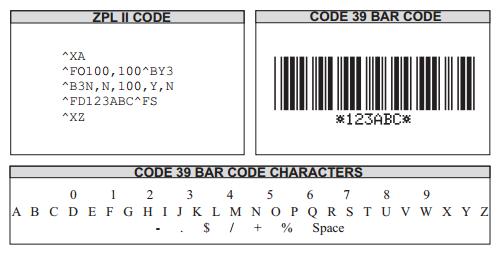
Example • This is an example of a Code 39 bar code:
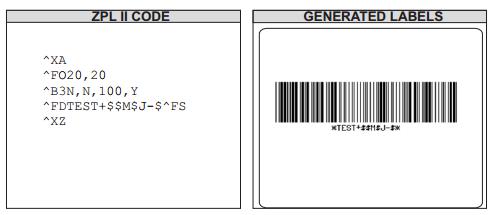
Comments Extended ASCII is a function of the scanner, not of the bar code. Your scannermust have extended ASCII enabled for this feature to work. To enable extended ASCII intheCode 39, you must first encode +$ in your ^FD statement. To disable extended ASCII, youmust encode -$ in your ^FD statement.
Example • This example encodes a carriage return with line feed into a Code 39 bar code:
Example • This is an example of Rotating Test:
^XA
^PW800
^LL640
^FO40,10^A0,32,25^FDCode 39 Orientation Test:^FS
^FO40,100^BY2^B3N,N,100,Y,Y^FD123-ABC.0^FS
^FO600,100^BY2^B3R,N,100,Y,Y^FD123-ABC.0^FS
^FO500,500^BY2^B3I,N,100,Y,Y^FD123-ABC.0^FS
^FO40,300^BY2^B3B,N,100,Y,Y^FD123-ABC.0^FS
^XZ
Example • This is an example of Width and Height Test:
^XA
^PW800
^LL640
^FO40,10^A0,32,25^FDCode 39 Size Test:^FS
^FO40,80^BY1^B3N,N,40,Y,Y^FD123-ABC^FS
^FO40,180^BY2,2^B3N,N,80,Y,Y^FD123-ABC^FS
^FO40,320^BY2,3,100^B3N,N,120,Y,Y^FD123-ABC^FS
^FO40,480^BY3,,160^B3N,N,,Y,Y^FD123-ABC^FS
^XZ
Example • This is an example of an Interleaved 2 of 5 bar code(Whether the comment line is printedandthetest of print location):
^XA
^PW800
^LL640
^FO40,10^A0,32,25^FDCode 39 Interpretation Line Test:^FS
^FO40,80^BY2^B3N,N,100,Y,Y^FD123-ABC^FS
^FO40,220^BY2^B3N,N,100,Y,N^FD123-ABC^FS
^FO40,360^BY2^B3N,N,100,N,Y^FD123-ABC^FS
^FO40,500^BY2^B3N,N,100,N,N^FD123-ABC^FS
^XZ
Example • This is an example of Check Test of Mod-43.
The first bar code is not checked.
The second bar code has check code W.
The third bar code has check code U.
^XA
^PW800
^LL640
^FO40,10^A0,32,25^FDCode 39 Mod 43 check digit Test:^FS
^FO40,80^BY2^B3N,N,100,Y,Y^FD123-ABC^FS
^FO40,220^BY2^B3N,Y,100,Y,Y^FD123-ABC^FS
^FO40,360^BY2^B3N,Y,100,Y,Y^FDAZ0123.5689^FS
^XZ
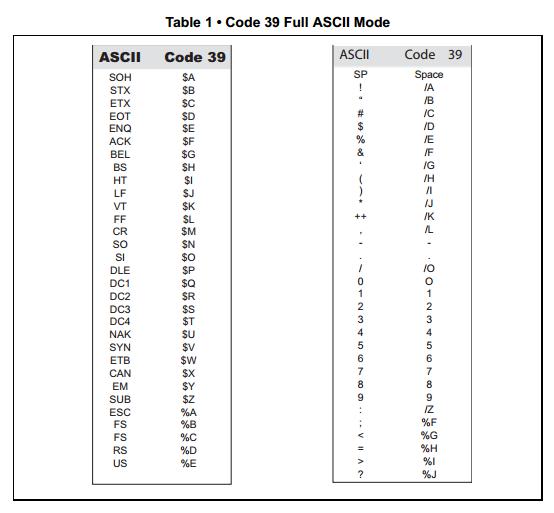
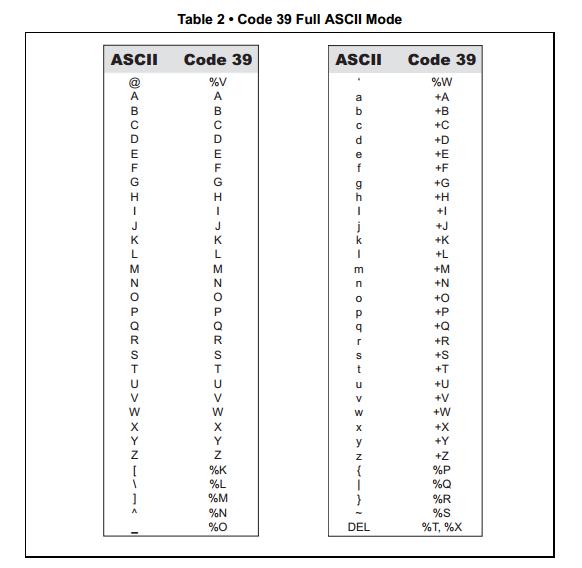
Full ASCII Mode for Code 39
Code 39 can generate the full 128-character ASCII set using paired characters as showninthese tables:
^B5
Planet Code Bar Code
Description The ^B5 command is supported in all printers as a resident bar code.
Accepted bar code characters are 0 – 9.
Parameter |
Description |
Accepted Values: |
|---|---|---|
o |
orientation code |
N = normal |
R = rotated |
||
I = inverted 180 degrees |
||
B = read from bottom up, 270 degrees |
||
Default Value: current ^FW value |
||
h |
bar code height (in dots) |
1 to 9999 |
Default Value: value set by ^BY |
||
f |
interpretation line |
N = no |
Y = yes |
||
Default Value: N |
||
g |
interpretation line above code |
N = no |
Y = yes |
||
Default Value: N |
Example • This is an example of Rotating Test of a Planet Code bar code:
^XA
^PW800
^LL640
^FO40,10^A0,32,25^FDPlanet Code Orientation Test:^FS
^FO40,100^BY2^B5N,100,Y,N^FD12345678901^FS
^FO500,100^BY2^B5R,100,Y,N^FD12345678901^FS
^FO300,500^BY2^B5I,100,Y,N^FD12345678901^FS
^FO40,300^BY2^B5B,100,Y,N^FD12345678901^FS
^XZ
Example • This is an example of Height and Width Test of a Planet Code bar code:
^XA
^PW800
^LL640
^FO40,10^A0,32,25^FDPlanet Code Size Test:^FS
^FO40,80^BY1^B5N,40,Y,Y^FD12345678901^FS
^FO40,180^BY2,2^B5N,80,Y,Y^FD12345678901^FS
^FO40,320^BY2,3,100^B5N,120,Y,Y^FD12345678901^FS
^FO40,500^BY3,,160^B5N,,Y,Y^FD12345678901^FS
^XZ
Example • This is an example of Comment line and printing position test of a Planet Code bar code:
^XA
^PW800
^LL640
^FO40,10^A0,32,25^FDPlanet Code Interpretation Line Test:^FS
^FO40,80^BY2^B5N,100,Y,Y^FD12345678901^FS
^FO40,220^BY2^B5N,100,Y,N^FD12345678901^FS
^FO40,360^BY2^B5N,100,N,Y^FD12345678901^FS
^FO40,500^BY2^B5N,100,N,N^FD12345678901^FS
^XZ
^B8
EAN-8 Bar Code
Description The ^B8 command is the shortened version of the EAN-13 bar code. EAN stands for European Article Numbering. Each character in the EAN-8 bar code is composed of four elements: two bars and two spaces.
^B8 supports a fixed ratio.
Field data (^FD) is limited to exactly seven characters. ZPL II automatically pads or truncates on the left with zeros to reach the required number.
When using JAN-8 (Japanese Article Numbering), the first two non-zero digits are always 49.
Parameter |
Description |
Accepted Values: |
|---|---|---|
o |
orientation |
N = normal |
R = rotated 90 degrees (clockwise) |
||
I = inverted 180 degrees |
||
B = read from bottom up, 270 degrees |
||
Default Value: current ^FW value |
||
h |
bar code height (in dots) |
1 to 32000 |
Default Value: value set by ^BY |
||
f |
print interpretation line |
N = no |
Y = yes |
||
Default Value: Y |
||
g |
print interpretation line above code |
N = no |
Y = yes |
||
Default Value: N |
Example • This is an example of Rotating Test of EAN-8 bar code:
^XA
^PW800
^LL640
^FO40,10^A0,32,25^FDEAN-8 Orientation Test:^FS
^FO40,80^BY2^B8N,100,Y,Y^FD1234567^FS
^FO350,80^BY2^B8R,100,Y,Y^FD1234567^FS
^FO40,300^BY2^B8I,100,Y,Y^FD1234567^FS
^FO350,300^BY2^B8B,100,Y,Y^FD1234567^FS
^XZ
Example • This is an example of Height and Width Test of EAN-8 bar code:
^XA
^PW800
^LL640
^FO40,10^A0,32,25^FDEAN-8 Size Test:^FS
^FO40,80^BY1^B8N,40,Y,Y^FD1234567^FS
^FO40,180^BY2,2^B8N,80,Y,Y^FD1234567^FS
^FO40,320^BY2,3,100^B8N,120,Y,Y^FD1234567^FS
^FO40,500^BY3,,160^B8N,,Y,Y^FD1234567^FS
^XZ
Example • This is an example of Comment line and printing position test of EAN-8 bar code:
^XA
^PW800
^LL640
^FO40,10^A0,32,25^FDEAN-8 Interpretation Line Test:^FS
^FO40,80^BY2^B8N,100,Y,Y^FD1234567^FS
^FO440,80^BY2^B8N,100,Y,N^FD1234567^FS
^FO40,220^BY2^B8N,100,N,Y^FD1234567^FS
^FO440,220^BY2^B8N,100,N,N^FD1234567^FS
^XZ
^B9
UPC-E Bar Code
Description The ^B9 command produces a variation of the UPC symbology usedfor numbersystem 0. It is a shortened version of the UPC-A bar code, where zeros are suppressed, resultingin codes that require less printing space. The 6 dot/mm, 12 dot/mm, and 24 dot/mmprintheadsproduce the UPC and EAN symbologies at 100 percent of their size. However, an8dot/mmprinthead produces the UPC and EAN symbologies at a magnification factor of 77 percent.
Each character in a UPC-E bar code is composed of four elements: two bars and twospaces. The ^BY command must be used to specify the width of the narrow bar.
^B9 supports a fixed ratio.
Field data (^FD) is limited to exactly 10 characters (five-digit manufacturer’s code + five-digit product code).
When using the zero-suppressed versions of UPC, you must enter the full 10-character sequence. ZPL II calculates and prints the shortened version.
Parameter |
Description |
Accepted Values: |
|---|---|---|
o |
orientation |
N = normal |
R = rotated 90 degrees (clockwise) |
||
I = inverted 180 degrees |
||
B = read from bottom up, 270 degrees |
||
Default Value: current ^FW value |
||
h |
bar code height (in dots) |
1 to 32000 |
Default Value: value set by ^BY |
||
f |
print interpretation line |
N = no |
Y = yes |
||
Default Value: Y |
||
g |
print interpretation line above code |
N = no |
Y = yes |
||
Default Value: N |
||
e |
print check digit |
N = no |
Y = yes |
||
Default Value: Y |
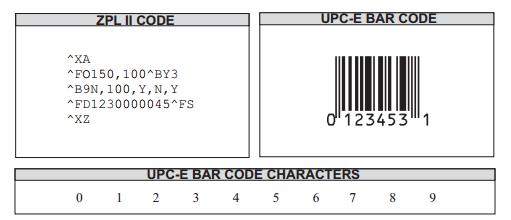
Example • This is an example of a UPC-E bar code:
Example • This is an example of Rotating Test of UPC-E bar code:
^XA
^PW800
^LL640
^FO40,10^A0,32,25^FDUPC-E Orientation Test:^FS
^FO40,80^BY2^B9N,100,Y,N,Y^FD1230000045^FS
^FO450,80^BY2^B9R,100,Y,N,Y^FD1230000045^FS
^FO40,300^BY2^B9I,100,Y,N,Y^FD1230000045^FS
^FO450,300^BY2^B9B,100,Y,N,Y^FD1230000045^FS
^XZ
Example • This is an example of Height and Width Test of UPC-E bar code:
^XA
^PW800
^LL640
^FO40,10^A0,32,25^FDUPC-E Size Test:^FS
^FO40,80^BY1^B9N,40,Y,N,Y^FD34100002312^FS
^FO40,180^BY2,2^B9N,80,Y,N,Y^FD34100002312^FS
^FO40,320^BY2,3,100^B9N,120,Y,N,Y^FD34100002312^FS
^FO440,80^BY3,,160^B9N,,Y,N,Y^FD34100002312^FS
^XZ
Example • This is an example of Comment Line and Printing Position Test of UPC-E bar code:
^XA
^PW800
^LL640
^FO40,10^A0,32,25^FDUPC-E Interpretation Line Test:^FS
^FO40,80^BY2^B9N,100,Y,Y,Y^FD34100002312^FS
^FO440,80^BY2^B9N,100,Y,N,Y^FD34100002312^FS
^FO40,300^BY2^B9N,100,N,N,Y^FD34100002312^FS
^FO440,300^BY2^B9N,100,N,N,Y^FD34100002312^FS
^XZ
Rules for Proper Product Code
If the last three digits in the manufacturer’s number are 000, 100, or 200, valid product code numbers are 00000 to 00999.
If the last three digits in the manufacturer’s number are 300, 400, 500, 600, 700, 800, or900, valid product code numbers are 00000 to 00099.
If the last two digits in the manufacturer’s number are 10, 20, 30, 40, 50, 60, 70, 80, or 90, valid product code numbers are 00000 to 00009.
If the manufacturer’s number does not end in zero (0), valid product code numbers are00005 to 00009.
^BA
Code 93 Bar Code
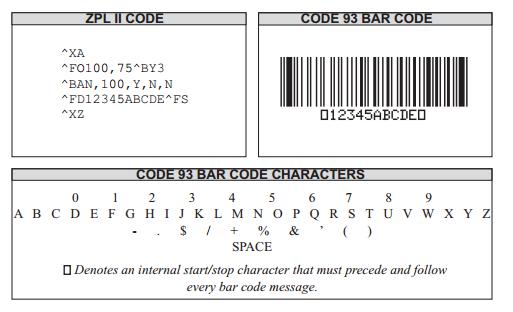
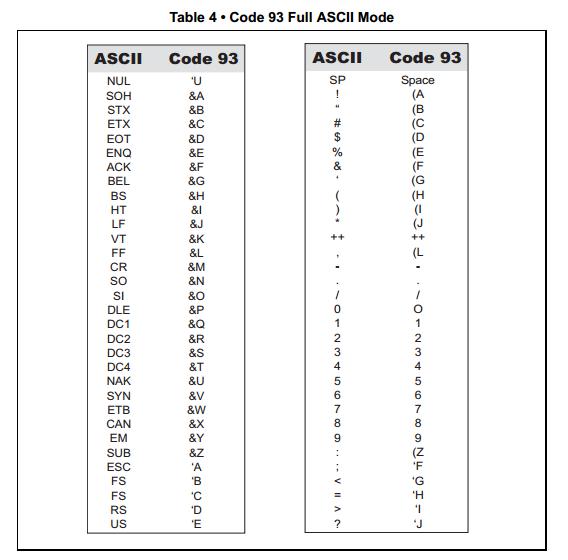
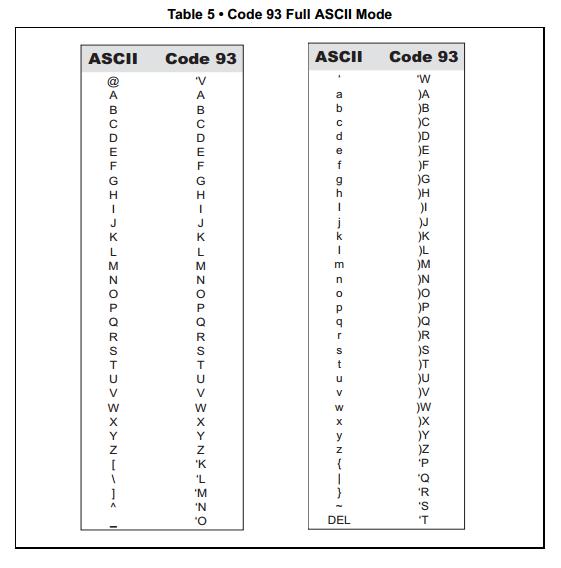
Description The ^BA command creates a variable length, continuous symbology. TheCode 93 bar code is used in many of the same applications as Code 39. It uses the full 128- character ASCII set. ZPL II, however, does not support ASCII control codes or escapesequences. It uses the substitute characters shown below.
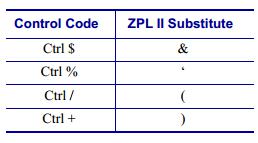
Each character in the Code 93 bar code is composed of six elements: three bars andthreespaces. Although invoked differently, the human-readable interpretation line prints asthoughthe control code has been used.
^BA supports a fixed print ratio.
Field data (^FD) is limited to the width (or length, if rotated) of the label.
Parameter |
Description |
Accepted Values: |
|---|---|---|
o |
orientation |
N = normal |
R = rotated 90 degrees (clockwise) |
||
I = inverted 180 degrees |
||
B = read from bottom up, 270 degrees |
||
Default Value: current ^FW value |
||
h |
bar code height (in dots) |
1 to 32000 |
Default Value: value set by ^BY |
||
f |
print interpretation line |
Y = yes |
N = no |
||
Default Value: Y |
||
g |
print interpretation line above code |
Y = yes |
N = no |
||
Default Value: N |
||
e |
print check digit |
Y = yes |
N = no |
||
Default Value: N |
Example • This is an example of a Code 93 bar code:
Example • This is an example of Rotating test of Code 93 bar code:
^XA
^PW800
^LL640
^FO40,10^A0,32,25^FDStandard Code 93 Orientation Test^FS
^FO40,100^BY2^BAN,100,Y,Y,N^FD12345ABCDE^FS
^FO600,100^BY2^BAR,100,Y,Y,N^FD12345ABCDE^FS
^FO500,440^BY2^BAI,100,Y,Y,N^FD12345ABCDE^FS
^FO40,300^BY2^BAB,100,Y,Y,N^FD12345ABCDE^FS
^XZ
Example • This is an example of Width and Height test of Code 93 bar code:
^XA
^PW800
^LL640
^FO40,10^A0,32,25^FDStandard Code 93 Size Test^FS
^FO40,80^BY1^BAN,40,Y,Y,N^FD12345ABCDE^FS
^FO40,160^BY2,2^BAN,80,Y,Y,N^FD12345ABCDE^FS
^FO40,300^BY2,3,120^BAN,100,Y,Y,N^FD12345ABCDE^FS
^FO40,460^BY3,,160^BAN,,Y,Y,N^FD12345ABCDE^FS
^XZ
Example • This is an example of Comment line and printing position test of Code 93 bar code:
^XA
^PW800
^LL640
^FO40,10^A0,32,25^FDStandard Code 93 Interpretation Line Test^FS
^FO40,80^BY2^BAN,80,Y,Y,N^FD12345ABCDE^FS
^FO40,220^BY2^BAN,80,Y,N,N^FD12345ABCDE^FS
^FO40,360^BY2^BAN,80,N,N,N^FD12345ABCDE^FS
^XZ
Example • This is an example of Check Code test of Code 93 bar code:
The first code doesn’t print a check digit.
The second code prints check «EO».
The third code prints check «3L».
^XA
^PW800
^LL640
^FO40,10^A0,32,25^FDStandard Code 93 Check Digit Test^FS
^FO40,80^BY2^BAN,80,Y,Y,N^FDCODE 93^FS
^FO40,200^BY2^BAN,80,Y,Y,Y^FDCODE 93^FS
^FO40,360^BY2^BAN,80,Y,Y,Y^FD1239-AZK/0^FS
^XZ
Comments: All control codes are used in pairs.
^BC
Code 128 Bar Code (Subsets A, B, and C)
Description The ^BC command creates the Code 128 bar code, a high-density, variablelength,continuous, alphanumeric symbology. It was designed for complexly encodedproductidentification.
Code 128 has three subsets of characters. There are 106 encoded printing characters ineachset,and each character can have up to three different meanings, depending on the charactersubsetbeing used. Each Code 128 character consists of six elements: three bars and threespaces.
^BC supports a fixed print ratio.
Field data (^FD) is limited to the width (or length, if rotated) of the label.
Parameter |
Description |
Accepted Values: |
|---|---|---|
o |
orientation |
N = normal |
R = rotated 90 degrees (clockwise) |
||
I = inverted 180 degrees |
||
B = read from bottom up, 270 degrees |
||
Default Value: current ^FW value |
||
h |
bar code height (in dots) |
1 to 32000 |
Default Value: value set by ^BY |
||
f |
print interpretation line |
Y = yes |
N = no |
||
Default Value: Y |
||
g |
print interpretation line above code |
Y = yes |
N = no |
||
Default Value: N |
||
e |
UCC check digit |
Y = turns on |
N = turns off |
||
Default Value: N |
||
m |
mode |
N = no selected mode |
U = UCC Case Mode |
||
A = Automatic Mode |
||
D = UCC/EAN Mode |
||
Default Value: N |
Example • This is an example of a Code 128 bar code:
The fifth code is Subset A, which includes invalid character “a”.
The sixth code is Subset C, which includes invalid character “A” and “@”.
^XA
^PW800
^LL640
^FO40,10^A0,32,25^FDCode 128 A&B&C Test:^FS
^FO40,80^BY2^BCN,100,Y,N,N^FD>935473637171824^FS
^FO440,80^BY2^BCN,100,Y,N,N^FD>:CODE128^FS
^FO40,250^BY2^BCN,100,Y,N,N^FD>;00015059909918^FS
^FO440,250^BY2^BCN,100,Y,N,N^FDCODE128^FS
^FO40,420^BY2^BCN,100,Y,N,N^FD>9354736a37171824^FS
^FO440,420^BY2^BCN,100,Y,N,N^FD>;000150A599099@18^FS
^XZ
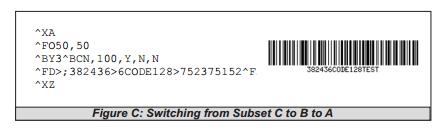
Figures A and B are examples of identical bar codes, and Figure C is an exampleof switchingfrom Subset C to B to A, as follows:
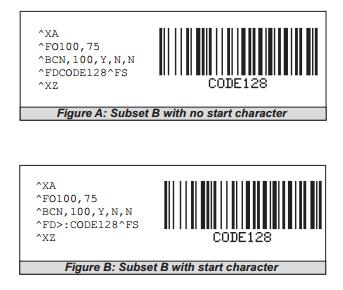
Because Code 128 Subset B is the most commonly used subset, ZPL II defaults toSubset Bifno start character is specified in the data string
Example • This is an example of the interconversion test for A & B & C of Code 128 bar code:
^XA
^PW800
^LL640
^FO40,10^A0,32,25^FDCode 128 A&B&C Switching Test:^FS
^FO40,80^BY2^BCN,100,Y,N,N^FD>93547363733>6Code B>5382436^FS
^FO40,220^BY2^BCN,100,Y,N,N^FD>:CODE-B>73547363733>5382436^FS
^FO40,360^BY2^BCN,100,Y,N,N^FD>;382436>6CODE128>752375152^FS
^XZ
Example • This is an example of Rotating Test of Code 128 bar code:
^XA
^PW800
^LL640
^FO40,10^A0,32,25^FDCode 128 Orientation Test:^FS
^FO40,80^BY2^BCN,100,Y,N,N^FD>935473637171824^FS
^FO600,80^BY2^BCR,100,Y,N,N^FD>:CODE128^FS
^FO500,400^BY2^BCI,100,Y,N,N^FD>;00015059909918^FS
^FO40,300^BY2^BCB,100,Y,N,N^FDCODE128^FS
^XZ
Example • This is an example of Height and Width Test of Code 128 bar code:
^XA
^PW800
^LL640
^FO40,10^A0,32,25^FDCode 128 Size Test:^FS
^FO40,80^BY1^BCN,40,Y,N,N^FD0123-CODE128^FS
^FO40,150^BY2,2^BCN,80,Y,N,N^FD0123-CODE128^FS
^FO40,280^BY2,3,100^BCN,120,Y,N,N^FD0123-CODE128^FS
^FO40,440^BY3,,160^BCN,,Y,N,N^FD0123-CODE128^FS
^XZ
Example • This is an example of Comment Line and Printing Position Test of Code 128 bar code:
^XA
^PW800
^LL640
^FO40,10^A0,32,25^FDCode 128 Interpretation Line Test:^FS
^FO40,80^BY2^BCN,80,Y,Y,N^FD0123-CODE128^FS
^FO40,200^BY2^BCN,80,Y,N,N^FD0123-CODE128^FS
^FO40,360^BY2^BCN,80,N,N,N^FD0123-CODE128^FS
^FO40,480^BY2^BCN,80,N,N,N^FD0123-CODE128^FS
^XZ
Code 128 Subsets
The Code 128 character subsets are referred to as Subset A, Subset B, and Subset C. Asubsetcan be selected in these ways:
A special Invocation Code can be included in the field data (^FD) string associatedwiththat bar code.
The desired Start Code can be placed at the beginning of the field data. If no Start Codeisentered, Subset B are used.
To change subsets within a bar code, place the Invocation Code at the appropriatepointswithin the field data (^FD) string. The new subset stays in effect until changed withtheInvocation Code. For example, in Subset C, >7 in the field data changes the Subset to A.
Table 6 shows the Code 128 Invocation Codes and Start Characters for the three subsets
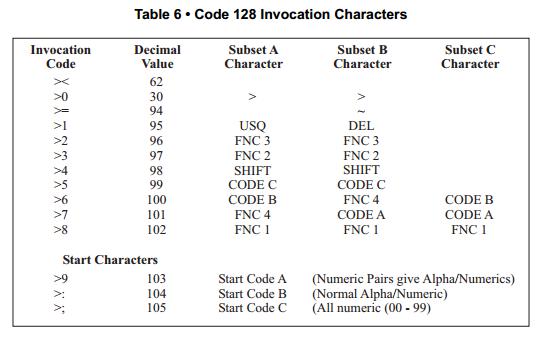
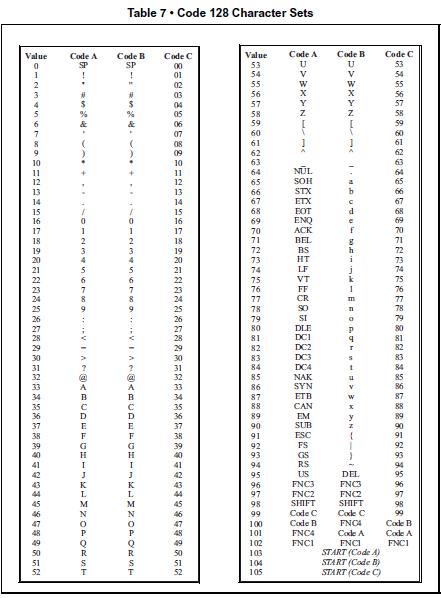
Table 7 shows the character sets for Code 128:
How ^BC Works Within a ZPL II Script
^XA – the first command starts the label format.
^FO100,75 – the second command sets the field origin at 100 dots across the x-axis and75dotsdown the y-axis from the upper-left corner.
^FDCODE128^FS (Figure A) ^FD>:CODE128^FS (Figure B) – the field data commandspecifiesthe content of the bar code.
^XZ – the last command ends the field data and indicates the end of the label.
The interpretation line prints below the code with the UCC check digit turned off.
The ^FD command for Figure A does not specify any subset, so Subset B is used. InFigureB, the ^FD command specifically calls Subset B with the >: Start Code. Although ZPL II defaultsto Code B, it is good practice to include the Invocation Codes in the command.
Code 128 – Subset B is programmed directly as ASCII text, except for values greater than94decimal and a few special characters that must be programmed using the invocationcodes. Those characters are:
^ > ~
Example • Code 128 – Subsets A and C
Code 128, Subsets A and C are programmed in pairs of digits, 00 to 99, in the fielddatastring.
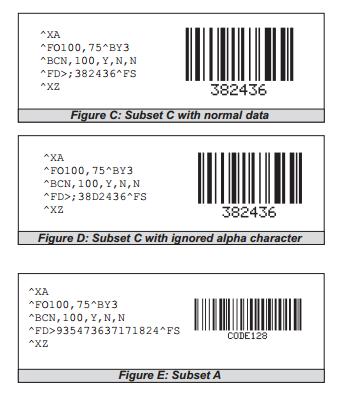
In Subset A, each pair of digits results in a single character being encoded in the bar code; inSubset C, characters are printed as entered. Figure E below is an example of Subset A(>9isthe Start Code for Subset A).
Nonintegers programmed as the first character of a digit pair (D2) are ignored. However, nonintegers programmed as the second character of a digit pair (2D) invalidate theentiredigit pair, and the pair is ignored. An extra unpaired digit in the field data string just beforeacode shift is also ignored.
Figure C and Figure D below are examples of Subset C. Notice that the bar codes areidentical.Inthe program code for Figure D, the D is ignored and the 2 is paired with the 4.
The UCC/EAN-128 Symbology
The symbology specified for the representation of Application Identifier data is UCC/EAN- 128,avariant of Code 128, exclusively reserved to EAN International and the UniformCodeCouncil (UCC).
Note: It is not intended to be used for data to be scanned at the point of sales in retail outlets.
UCC/EAN-128 offers several advantages. It is one of the most complete, alphanumeric,onedimensional symbologies available today. The use of three different character sets(A, BandC), facilitates the encoding of the full 128 ASCII character set. Code 128 is oneof themostcompact linear bar code symbologies. Character set C enables numeric data toberepresentedin a double density mode. In this mode, two digits are represented by only onesymbolcharacter saving valuable space. The code is concatenated. That means that multipleAIsandtheir fields may be combined into a single bar code. The code is also very reliable. Code128symbols use two independent self-checking features which improves printing andscanningreliability.
UCC/EAN-128 bar codes always contain a special non-data character known as function1(FNC 1), which follows the start character of the bar code. It enables scanners andprocessingsoftware to auto-discriminate between UCC/EAN-128 and other bar code symbologies, andsubsequently only process relevant data.
The UCC/EAN-128 bar code is made up of a leading quiet zone, a Code 128 start characterA, B, or C, a FNC 1 character, Data (Application Identifier plus data field), a symbol checkcharacter, a stop character, and a trailing quiet zone.
UCC/EAN, UCC/128 are a couple of ways you’ll hear someone refer to the code. This just indicates that the code is structured as dictated by the application identifiers that areused.
SSCC (Serial Shipping Container Code) formatted following the data structure layout for Application Identifier 00. See Table 8, UCC Application Identifier Table on page 93. It couldbe 00 which is the SSCC code. The customer needs to let us know what applicationidentifiersare used for their bar code so we can help them.
There are several ways of writing the code to print the code to Application Identifier „00“ structure.
Using U for the mode (m) parameter
Example • This example shows with application identifier 00 structure:
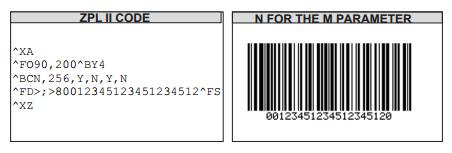
>;>8“ sets it to subset C, function 1
„00“ is the application identifier followed by „17 characters“, the check digit is selectedusingthe „Y“ for the (e) parameter to automatically print the 20th character.
you are not limited to 19 characters with mode set to N
Using D for the mode (m) parameter
Example • The example shows the application identifier 00 format:
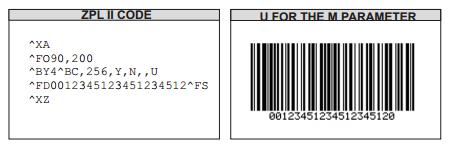
UCC Case Mode
Choosing U selects UCC Case mode. You will have exactly 19 characters availablein^FD.
Subset C using FNC1 values are automatically selected.
Check digit is automatically inserted.
Using D for the mode (m) parameter
Example • This example shows application identifier 00 format:
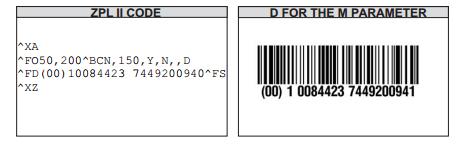
(0 at end of field data is a bogus character that is inserted as a place holder for thecheckdigitthe printer will automatically insert.
Subset C using FNC1 values are automatically selected.
Parentheses and spaces can be in the field data. „00“ application identifier, followedby17characters, followed by bogus check digit place holder.
Check digit is automatically inserted. The printer will automatically calculate thecheckdigitand put it into the bar code and interpretation line.
The interpretation line will also show the parentheses and spaces but will stripthemoutfromthe actual bar code.
^BE
EAN-13 Bar Code
Description The ^BE The ^BE command is similar to the UPC-A bar code. It is widely usedthroughoutEurope and Japan in the retail marketplace.
The EAN-13 bar code has 12 data characters, one more data character than the UPC-Acode.AnEAN-13 symbol contains the same number of bars as the UPC-A, but encodes a 13thdigitintoaparity pattern of the left-hand six digits. This 13th digit, in combination withthe12thdigit,represents a country code.
^BE supports fixed print ratios.
Field data (^FD) is limited to exactly 12 characters. ZPL II automatically truncates or padsonthe left with zeros to achieve the required number of characters.
When using JAN-13 (Japanese Article Numbering), a specialized applicationof EAN-13, thefirst two non-zero digits sent to the printer must be 49.
Parameter |
Description |
Accepted Values: |
|---|---|---|
o |
orientation |
N = normal |
R = rotated 90 degrees (clockwise) |
||
I = inverted 180 degrees |
||
B = read from bottom up, 270 degrees |
||
Default Value: current ^FW value |
||
h |
bar code height (in dots) |
1 to 32000 |
Default Value: value set by ^BY |
||
f |
print interpretation line |
Y = yes |
N = no |
||
Default Value: Y |
||
g |
print interpretation line above code |
Y = yes |
N = no |
||
Default Value: N |
Example • This is an example of an EAN-13 bar code:
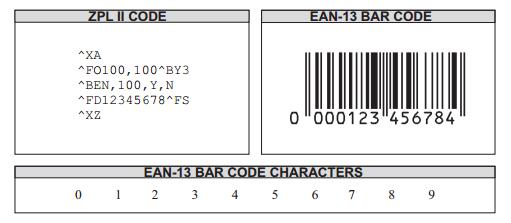
Note: Only when the data bits is 12bits or less than 12 bits to print, less than 12 bits cancomplement0in front of it and that can be scanned.
Example • This is an example of Rotating Test of EAN-13 bar code:
^XA
^PW800
^LL640
^FO40,10^A0,32,25^FDEAN-13 orientation Test:^FS
^FO40,80^BY2^BEN,100,Y,Y^FD123456789065^FS
^FO350,80^BY2^BER,100,Y,Y^FD123456789065^FS
^FO40,300^BY2^BEI,100,Y,Y^FD123456789065^FS
^FO350,300^BY2^BEB,100,Y,Y^FD123456789065^FS
^XZ
Example • This is an example of Height and Width Test of EAN-13 bar code:
^XA
^PW800
^LL640
^FO40,10^A0,32,25^FDEAN-13 Size Test:^FS
^FO40,80^BY1^BEN,40,Y,Y^FD123456789065^FS
^FO40,180^BY2,2^BEN,80,Y,Y^FD123456789065^FS
^FO40,320^BY2,3,100^BEN,120,Y,Y^FD123456789065^FS
^FO440,80^BY3,,160^BEN,,Y,Y^FD123456789065^FS
^XZ
Example • This is an example of Comment Line and Printing position Test of EAN-13 bar code:
^PW800
^LL640
^FO40,10^A0,32,25^FDEAN-13 Interpretation Line Test:^FS
^FO40,80^BY2^BEN,100,Y,Y^FD123456789065^FS
^FO440,80^BY2^BEN,100,Y,N^FD123456789065^FS
^FO40,220^BY2^BEN,100,N,Y^FD123456789065^FS
^FO440,220^BY2^BEN,100,N,N^FD123456789065^FS
^XZ
^BI
Industrial 2 of 5 Bar Codes
Description The ^BI command is a discrete, self-checking, continuous numeric symbology. TheIndustrial 2 of 5 bar code has been in use the longest of the 2 of 5 family of bar codes. Ofthatfamily, the Standard 2 of 5 (^BJ) and Interleaved 2 of 5 (^B2) bar codes are alsoavailableinZPL II.
With Industrial 2 of 5, all of the information is contained in the bars. Two bar widthsareemployed in this code, the wide bar measuring three times the width of the narrowbar
^BI supports a print ratio of 2.0:1 to 3.0:1.
Field data (^FD) is limited to the width (or length, if rotated) of the label.
Parameter |
Description |
Accepted Values: |
|---|---|---|
o |
orientation |
N = normal |
R = rotated 90 degrees (clockwise) |
||
I = inverted 180 degrees |
||
B = read from bottom up, 270 degrees |
||
Default Value: current ^FW value |
||
h |
bar code height (in dots) |
1 to 32000 |
Default Value: value set by ^BY |
||
f |
print interpretation line |
Y = yes |
N = no |
||
Default Value: Y |
||
g |
print interpretation line above code |
Y = yes |
N = no |
||
Default Value: N |
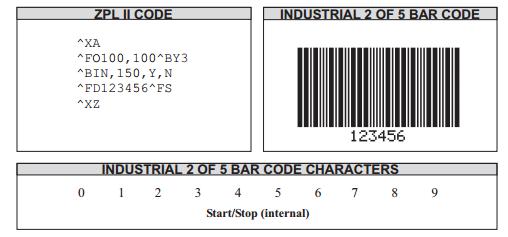
Example • This is an example of an Industrial 2 of 5 bar code:
^BJ
Standard 2 of 5 Bar Code
Description The ^BJ command is a discrete, self-checking, continuous numeric symbology.
With Standard 2 of 5, all of the information is contained in the bars. Two bar widths areemployed in this code, the wide bar measuring three times the width of the narrowbar.
^BJ supports a print ratio of 2.0:1 to 3.0:1.
Field data (^FD) is limited to the width (or length, if rotated) of the label.
Parameter |
Description |
Accepted Values: |
|---|---|---|
o |
orientation |
N = normal |
R = rotated 90 degrees (clockwise) |
||
I = inverted 180 degrees |
||
B = read from bottom up, 270 degrees |
||
Default Value: current ^FW value |
||
h |
bar code height (in dots) |
1 to 32000 |
Default Value: value set by ^BY |
||
f |
print interpretation line |
Y = yes |
N = no |
||
Default Value: Y |
||
g |
print interpretation line above code |
Y = yes |
N = no |
||
Default Value: N |
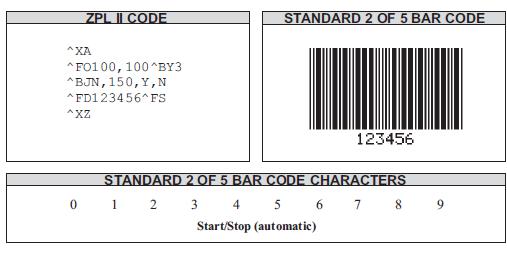
Example • This is an example of a Standard 2 of 5 bar code:
^BK
ANSI Codabar Bar Code
Description The ANSI Codabar bar code is used in a variety of informationprocessingapplications such as libraries, the medical industry, and overnight package delivery companies.This bar code is also known as USD-4 code, NW-7, and 2 of 7 code. It was originallydevelopedfor retail price labeling.
Each character in this code is composed of seven elements: four bars and three spaces. Codabar bar codes use two character sets, numeric and control (start and stop) characters.
^BK supports a print ratio of 2.0:1 to 3.0:1.
Field data (^FD) is limited to the width (or length, if rotated) of the label.
Parameter |
Description |
Accepted Values: |
|---|---|---|
o |
orientation |
N = normal |
R = rotated 90 degrees (clockwise) |
||
I = inverted 180 degrees |
||
B = read from bottom up, 270 degrees |
||
Default Value: current ^FW value |
||
e |
check digit |
Fixed Value: N |
h |
bar code height (in dots) |
1 to 32000 |
Default Value: value set by ^BY |
||
f |
print interpretation line |
Y = yes |
N = no |
||
Default Value: Y |
||
g |
print interpretation line above code |
Y = yes |
N = no |
||
Default Value: N |
||
k |
start character |
A, B, C, D |
Default Value: A |
||
l |
stop character |
A, B, C, D |
Default Value: A |
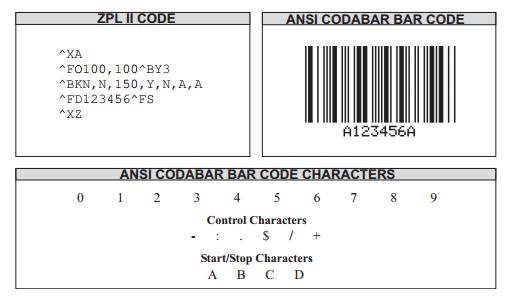
Example • This is an example of an ANSI Codabar bar code:
Example • This is an example of an ANSI Codabar bar code:
The first code is A123456B.
The second code is A0123456789776B.
^XA
^PW800
^LL640
^FO40,10^A0,32,25^FDANSI Codabar Test:^FS
^FO40,80^BY2^BKN,N,80,Y,N,A,B^FD123456^FS
^FO40,200^BY2^BKN,N,80,Y,N,A,B^FD0123456789776^FS
^FO40,340^BY2^BKN,N,80,Y,N,A,B^FD12A45*^FS
^XZ
Example • This is an example of Comment Line and Printing Position Test of ANSI Codabar bar code:
The position of comment line of the first code is above the code.
The position of comment line of the first code is below the code.
The third and fourth code does not print the comment line.
^XA
^PW800
^LL640
^FO40,10^A0,32,25^FDANSI Codabar Interpretation Line Test:^FS
^FO40,80^BY2^BKN,N,80,Y,Y,A,D^FD123456^FS
^FO40,220^BY2^BKN,N,80,Y,N,B,C^FD123456^FS
^FO40,360^BY2^BKN,N,80,N,Y,C,B^FD123456^FS
^FO40,500^BY2^BKN,N,80,N,N,D,A^FD123456^FS
^XZ
Example • This is an example of Start and Stop Character Test of ANSI Codabar bar code:
^XA
^PW800
^LL640
^FO40,10^A0,32,25^FDANSI Codabar Start&Stop Character Test:^FS
^FO40,80^BY2^BKN,N,80,Y,N,A,B^FD01234569^FS
^FO440,80^BY2^BKN,N,80,Y,N,B,A^FD01234569^FS
^FO40,200^BY2^BKN,N,80,Y,N,C,D^FD01234569^FS
^FO440,200^BY2^BKN,N,80,Y,N,D,C^FD01234569^FS
^FO40,340^BY2^BKN,N,80,Y,N,E,E^FD01234569^FS
^FO440,340^BY2^BKN,N,80,Y,N,c,f^FD01234569^FS
^FO40,460^BY2^BKN,N,80,Y,N,3,F^FD01234569^FS
^FO440,460^BY2^BKN,N,80,Y,N^FD01234569^FS
^XZ
Example • This is an example of Rotating Test of ANSI Codabar bar code:
^XA
^PW800
^LL640
^FO100,10^A0,32,25^FDANSI Codabar Orientation Test:^FS
^FO100,100^BY2^BKN,N,100,Y,N,A,A^FD123456^FS
^FO550,100^BY2^BKR,N,100,Y,N,B,B^FD123456^FS
^FO400,420^BY2^BKI,N,100,Y,N,C,C^FD123456^FS
^FO100,350^BY2^BKB,N,100,Y,N,D,D^FD123456^FS
^XZ
Example • This is an example of Height and Width Test of ANSI Codabar bar code:
^XA
^PW800
^LL640
^FO40,10^A0,32,25^FDANSI Codabar Size Test:^FS
^FO40,80^BY1^BKN,N,40,Y,N,A,B^FD123456^FS
^FO40,180^BY2,2^BKN,N,80,Y,N,B,C^FD123456^FS
^FO40,360^BY2,3,100^BKN,N,120,Y,N,C,D^FD123456^FS
^FO440,80^BY3,,160^BKN,N,,Y,N,D,A^FD123456^FS
^XZ
^BL
LOGMARS Bar Code
Description The ^BL command is a special application of Code 39 used by the DepartmentofDefense. LOGMARS is an acronym for Logistics Applications of Automated MarkingandReadingSymbols.
^BL supports a print ratio of 2.0:1 to 3.0:1.
Field data (^FD) is limited to the width (or length, if rotated) of the label.Lowercase letters in the ^FD string are automatically converted to uppercase LOGMARS characters.
Parameter |
Description |
Accepted Values: |
|---|---|---|
o |
orientation |
N = normal |
R = rotated 90 degrees (clockwise) |
||
I = inverted 180 degrees |
||
B = read from bottom up, 270 degrees |
||
Default Value: current ^FW value |
||
h |
bar code height (in dots) |
1 to 32000 |
Default Value: value set by ^BY |
||
g |
print interpretation line above code |
Y = yes |
N = no |
||
Default Value: N |
Example • This is an example of a LOGMARS bar code:
The first code is 019987562 (check bit = 4).
The second code is ABGTTKLZRT (check bit = C).
The third code is IDPL+/2.-%$12AB (check bit = “.”).
The fourth code includes invalid character: 1, *.
^XA
^PW800
^LL640
^FO40,10^A0,32,25^FDLOGMARS Barcode Test:^FS
^FO40,80^BY2^BLN,100,N^FD019987562^FS
^FO40,220^BY2^BLN,100,N^FDABGTTKLZRT^FS
^FO40,360^BY2^BLN,100,N^FDIDPL+/2.-%$12AB^FS
^FO40,500^BY2^BLN,100,N^FDIDPl+/-%*12A5^FS
^XZ
Note: This command will not print if invalid characters are included.
Example • This is an example of Rotating Test of LOGMARS bar code:
^XA
^PW800
^LL640
^FO40,10^A0,32,25^FDLOGMARS Barcode Orientation Test:^FS
^FO40,80^BY2^BLN,100,N^FDPL+/$12^FS
^FO600,100^BY2^BLR,100,N^FDPL+/$12^FS
^FO500,460^BY2^BLI,100,N^FDPL+/$12^FS
^FO40,300^BY2^BLB,100,N^FDPL+/$12^FS
^XZ
Example • This is an example of Height and Width Test of LOGMARS bar code:
^XA
^PW800
^LL640
^FO40,10^A0,32,25^FDLOGMARS Barcode Size Test:^FS
^FO40,80^BY1^BLN,40,N^FDIDPL+/-%$12AB^FS
^FO40,150^BY2,2^BLN,80,N^FDIDPL+/-%$12AB^FS
^FO40,260^BY2,3,120^BLN,120,N^FDIDPL+/-%$12AB^FS
^FO40,420^BY3,,160^BLN,,N^FDIDPL+/-%$12AB^FS
^XZ
Example • This is an example of Comment Line and Printing Position Test of LOGMARS bar code:
^XA
^PW800
^LL640
^FO40,10^A0,32,25^FDLOGMARS Barcode Test:^FS
^FO40,80^BY2^BLN,100,Y^FDIDPL+/-%$12AB^FS
^FO40,260^BY2^BLN,100,N^FDIDPL+/-%$12AB^FS
^XZ
^BM
MSI Bar Code
Description The ^BM command is a pulse-width modulated, continuous, non-selfcheckingsymbology. It is a variant of the Plessey bar code (^BP). Each character in the MSI bar code is composed of eight elements: four bars andfour adjacentspaces.
^BM supports a print ratio of 2.0:1 to 3.0:1.
For the bar code to be valid, field data (^FD) is limited to 1 to 14 digits when parametereisB,C, or D. ^FD is limited to 1 to 13 digits when parameter e is A, plus a quiet zone
Parameter |
Description |
Accepted Values: |
|---|---|---|
o |
orientation |
N = normal |
R = rotated 90 degrees (clockwise) |
||
I = inverted 180 degrees |
||
B = read from bottom up, 270 degrees |
||
Default Value: current ^FW value |
||
e |
check digit selection |
A = no check digits |
B = 1 Mod 10 |
||
C = 2 Mod 10 |
||
D = 1 Mod 11 and 1 Mod 10 |
||
Default Value: B |
||
h |
bar code height (in dots) |
1 to 32000 |
Default Value: value set by ^BY |
||
f |
print interpretation line |
Y = yes |
N = no |
||
Default Value: Y |
||
g |
print interpretation line above code |
Y = yes |
N = no |
||
Default Value: N |
||
e2 |
insert check digit into interpretation line |
Y = yes |
N = no |
||
Default Value: N |
Example • This is an example of an MSI bar code:
^XA
^PW800
^LL640
^FO40,10^A0,32,25^FDMSI Code Test:^FS
^FO40,80^BY2^BMN,A,100,Y,N,N^FD1234567^FS
^FO40,220^BY2^BMN,A,100,Y,N,N^FD1234567890^FS
^FO40,360^BY2^BMN,A,100,Y,N,N^FD1234A67@^FS
^XZ
Note: The first and second codes print successfully, but the third code cannot print because it includes invalid characters (A and @).
Example • This is an example of Rotating Test of MSI bar code:
^XA
^PW800
^LL640
^FO40,10^A0,32,25^FDMSI Code Orientation Test:^FS
^FO40,80^BY2^BMN,A,100,Y,N,N^FD12345678^FS
^FO600,80^BY2^BMR,A,100,Y,N,N^FD12345678^FS
^FO460,420^BY2^BMI,A,100,Y,N,N^FD12345678^FS
^FO40,260^BY2^BMB,A,100,Y,N,N^FD12345678^FS
^XZ
Example • This is an example of Height and Width Test of MSI bar code:
^XA
^PW800
^LL640
^FO40,10^A0,32,25^FDMSI Code Size Test:^FS
^FO40,60^BY1^BMN,A,40,Y,N,N^FD1234567890^FS
^FO40,150^BY2,2^BMN,A,80,Y,N,N^FD1234567890^FS
^FO40,270^BY2,3,100^BMN,A,120,Y,N,N^FD1234567890^FS
^FO40,440^BY3,,160^BMN,A,,Y,N,N^FD1234567890^FS
^XZ
Example • This is an example of Check Code Test of MSI bar code:
^XA
^PW800
^LL640
^FO40,10^A0,32,25^FDMSI check digit Test^FS
^FO40,80^BY2^BMN,A,100,Y,N,Y^FD1234567890^FS
^FO40,220^BY2^BMN,B,100,Y,N,Y^FD1234567890^FS
^FO40,360^BY2^BMN,C,100,Y,N,Y^FD1234567890^FS
^FO40,500^BY2^BMN,D,100,Y,N,Y^FD1234567890^FS
^XZ
Note: The content of each code is 1234567890.
Example • This is an example of Comment Line and Printing Position Test of MSI bar code:
^XA
^PW800
^LL640
^FO40,10^A0,32,25^FDMSI check digit Print Test^FS
^FO40,80^BY2^BMN,D,100,Y,N,N^FD1234567890^FS
^FO40,220^BY2^BMN,D,100,Y,N,Y^FD1234567890^FS
^FO40,360^BY2^BMN,D,100,Y,N,Y^FD123456789^FS
^XZ
^BP
Plessey Bar Code
Description The ^BP command is a pulse-width modulated, continuous, non-selfcheckingsymbology.
Each character in the Plessey bar code is composed of eight elements: four bars andfour adjacent spaces.
^BP supports a print ratio of 2.0:1 to 3.0:1.
Field data (^FD) is limited to the width (or length, if rotated) of the label.
Parameter |
Description |
Accepted Values: |
|---|---|---|
o |
orientation |
N = normal |
R = rotated 90 degrees (clockwise) |
||
I = inverted 180 degrees |
||
B = read from bottom up, 270 degrees |
||
Default Value: current ^FW value |
||
e |
print check digit |
Y = yes |
N = no |
||
Default Value: N |
||
h |
bar code height (in dots) |
1 to 32000 |
Default Value: value set by ^BY |
||
f |
print interpretation line |
Y = yes |
N = no |
||
Default Value: Y |
||
g |
print interpretation line above code |
Y = yes |
N = no |
||
Default Value: N |
Example • This is an example of a Plessey bar code:
12345
A123BCDEF7
01234567890D0
12a4G5$, which includes invalid characters.
^XA
^PW800
^LL640
^FO40,10^A0,32,25^FDPlessey Code Test:^FS
^FO40,80^BY2^BPN,N,100,Y,N^FD12345^FS
^FO40,220^BY2^BPN,N,100,Y,N^FDA123BCDEF7^FS
^FO40,360^BY2^BPN,N,100,Y,N^FD01234567890D0^FS
^FO40,500^BY2^BPN,N,100,Y,N^FD12a4G5$^FS
^XZ
Example • This is an example of Rotating Test of Plessey bar code:
^XA
^PW800
^LL640
^FO40,10^A0,32,25^FD Plessey Code Orientation Test:^FS
^FO40,80^BY2^BPN,N,100,Y,N^FD123CF^FS
^FO600,80^BY2^BPR,N,100,Y,N^FD123CF^FS
^FO460,420^BY2^BPI,N,100,Y,N^FD123CF^FS
^FO40,260^BY2^BPB,N,100,Y,N^FD123CF^FS
^XZ
Example • This is an example of Height and Width Test of Plessey bar code:
^XA
^PW800
^LL640
^FO40,10^A0,32,25^FD Plessey Code Size Test:^FS
^FO40,60^BY1^BPN,N,40,Y,N^FD12345ABCF^FS
^FO40,150^BY2,2^BPN,N,80,Y,N^FD12345ABCF^FS
^FO40,270^BY2,3,100^BPN,N,120,Y,N^FD12345ABCF^FS
^FO40,440^BY3,,160^BPN,N,,Y,N^FD12345ABCF^FS
^XZ
Example • This is an example of Check Code Test of Plessey bar code:
^XA
^PW800
^LL640
^FO40,10^A0,32,25^FD Plessey Code check digit Test:^FS
^FO40,80^BY2^BPN,N,100,Y,N^FD12345ACF^FS
^FO40,220^BY2^BPN,Y,100,Y,N^FD12345ACF^FS
^FO40,360^BY2^BPN,Y,100,Y,N^FDDE0B9445679^FS
^FO40,500^BY2^BPN,Y,100,Y,N^FD12#45aCF^FS
^XZ
Example • This is an example of Comment Line and Printing Position Test of Plessey bar code:
^XA
^PW800
^LL640
^FO40,10^A0,32,25^FD Plessey Code Interpretation Line Test:^FS
^FO40,80^BY2^BPN,N,80,Y,Y^FD12345ABCF^FS
^FO40,180^BY2^BPN,N,80,Y,N^FD12345ABCF^FS
^FO40,300^BY2^BPN,N,80,N,Y^FD12345ABCF^FS
^FO40,440^BY2^BPN,N,80,N,N^FD12345ABCF^FS
^XZ
^BS
UPC/EAN Extensions
Description The ^BS command is the two-digit and five-digit add-on used primarilybypublishers to create bar codes for ISBNs (International Standard Book Numbers). Theseextensions are handled as separate bar codes.
The ^BS command is designed to be used with the UPC-A bar code (^BU) and theUPC-Ebarcode (^B9).
^BS supports a fixed print ratio.
Field data (^FD) is limited to exactly two or five characters. ZPL II automatically truncatesorpads on the left with zeros to achieve the required number of characters.
Parameter |
Description |
Accepted Values: |
|---|---|---|
o |
orientation |
N = normal |
R = rotated 90 degrees (clockwise) |
||
I = inverted 180 degrees |
||
B = read from bottom up, 270 degrees |
||
Default Value: current ^FW value |
||
h |
bar code height (in dots) |
1 to 32000 |
Default Value: value set by ^BY |
||
f |
print interpretation line |
Y = yes |
N = no |
||
Default Value: Y |
||
g |
print interpretation line above code |
Y = yes |
N = no |
||
Default Value: Y |
Example • This is an example of a UPC/EAN Two-digit bar code:
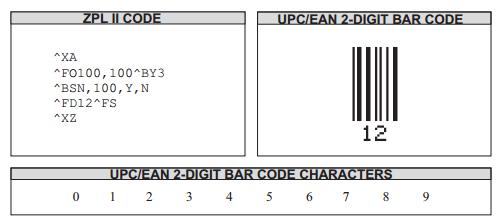
This is an example of a UPC/EAN Five-digit bar code:
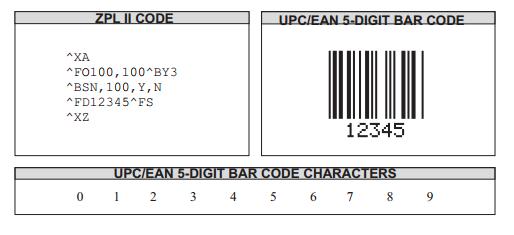
Care should be taken in positioning the UPC/EAN extension with respect to the UPC-AorUPC-Ecode to ensure the resulting composite code is within the UPC specification.
For UPC codes, with a module width of 2 (default), the field origin offsets for the extensionare:
Example •This is an example of a UPC-A:
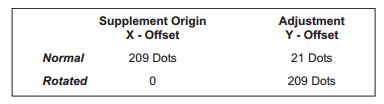
This is an example of a UPC-E:
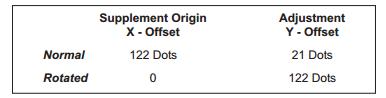
Additionally, the bar code height for the extension should be 27 dots (0.135 inches) shorterthan that of the primary code. A primary UPC code height of 183 dots (0.900 inches) requiresanextension height of 155 dots (0.765 inches).
Example •This example illustrates how to create a normal UPC-A bar code for the value 7000002198 with an extension equal to 04414:
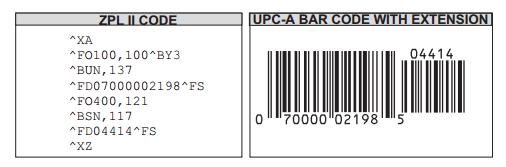
^BU
UPC-A Bar Code
Description The ^BU cmmand produces a fixed length, numeric symbology. It isprimarilyused in the retail industry for labeling packages. The UPC-A bar code has 11 data characters. The6 dot/mm, 12 dot/mm, and 24 dot/mm printheads produce the UPC-A bar code(UPC/EANsymbologies) at 100 percent size. However, an 8 dot/mm printhead produces theUPC/EANsymbologies at a magnification factor of 77 percent.
^BU supports a fixed print ratio.
Field data (FD) is limited to exactly 11 characters. ZPL II automatically truncates or pads on the left with zeros to achieve the required number of characters.
Parameter |
Description |
Accepted Values: |
|---|---|---|
o |
orientation |
N = normal |
R = rotated 90 degrees (clockwise) |
||
I = inverted 180 degrees |
||
B = read from bottom up, 270 degrees |
||
Default Value: current ^FW value |
||
h |
bar code height (in dots) |
1 to 9999 |
Default Value: value set by ^BY |
||
f |
print interpretation line |
Y = yes |
N = no |
||
Default Value: Y |
||
g |
print interpretation line above code |
Y = yes |
N = no |
||
Default Value: N |
||
e |
print check digit |
Y = yes |
N = no |
||
Default Value: Y |
The font style of the interpretation line depends on the modulus (width of narrowbar) selectedin ^BY:
Note: Zero is not allowed.
6 dot/mm printer: a modulus of 2 dots or greater prints with an OCR-B interpretationline; a modulus of 1 dot prints font A.
8 dot/mm printer: a modulus of 3 dots or greater prints with an OCR-B interpretationline; a modulus of 1 or 2 dots prints font A.
12 dot/mm printer: a modulus of 5 dots or greater prints with an OCR-B interpretationline; a modulus of 1, 2, 3, or 4 dots prints font A.
24 dot/mm printer: a modulus of 9 dots or greater prints with an OCR-B interpretationline; a modulus of 1 to 8 dots prints font A.
Example • This is an example of a UPC-A bar code:
The first code is 1234567893 (10bits, less than 11bits).
The second code is 1234567893079 (13bits, more than 12bits).
The third code is 123456789302 (12bits: the last one—2 is check bit).
The fourth code is 123456789307 (12bits: the last one is check bit).
The fifth code is 12345678930 (11bits: check bit is 2).
The sixth code is 1234*67A930 (11 bits: include * & A).
^XA
^PW800
^LL640
^FO40,10^A0,32,25^FDUPC-A Test:^FS
^FO40,80^BY2^BUN,100,Y,Y,Y^FD1234567893^FS
^FO440,80^BY2^BUN,100,Y,Y,Y^FD1234567893079^FS
^FO40,220^BY2^BUN,100,Y,Y,Y^FD123456789302^FS
^FO440,220^BY2^BUN,100,Y,Y,Y^FD123456789307^FS
^FO40,360^BY2^BUN,100,Y,Y,Y^FD12345678930^FS
^FO440,360^BY2^BUN,100,Y,Y,Y^FD1234*67A930^FS
^XZ
Example • This is an example of Rotating Test of UPC-A bar code:
^XA
^PW800
^LL640
^FO40,10^A0,32,25^FDUPC-A orientation Test:^FS
^FO40,80^BY2^BUN,100,Y,Y,Y^FD07000002198^FS
^FO450,80^BY2^BUR,100,Y,Y,Y^FD07000002198^FS
^FO40,300^BY2^BUI,100,Y,Y,Y^FD07000002198^FS
^FO450,300^BY2^BUB,100,Y,Y,Y^FD07000002198^FS
^XZ
Example • This is an example of Height and Width Test of UPC-A bar code:
^XA
^PW800
^LL640
^FO40,10^A0,32,25^FDUPC-A Size Test:^FS
^FO40,80^BY1^BUN,40,Y,Y,Y^FD07000002198^FS
^FO40,180^BY2,2^BUN,80,Y,Y,Y^FD07000002198^FS
^FO40,320^BY2,3,100^BUN,120,Y,Y,Y^FD07000002198^FS
^FO440,80^BY3,,160^BUN,,Y,Y,Y^FD07000002198^FS
^XZ
Example • This is an example of Interpretation Line Test of UPC-A bar code:
^XA
^PW800
^LL640
^FO40,10^A0,32,25^FDUPC-A Interpretation Line Test:^FS
^FO40,80^BY2^BUN,80,Y,Y^FD07000002198^FS
^FO40,200^BY2^BUN,80,Y,N^FD07000002198^FS
^FO40,340^BY2^BUN,80,N,Y^FD07000002198^FS
^FO40,500^BY2^BUN,80,N,N^FD07000002198^FS
^XZ
Example • This is an example of Check Digit Test of UPC-A bar code:
The first and second code is 12345678930 (11bits, check bit is
The third and fourth code is 1234567893 (10bits, less than 11bits)
The fifth and sixth code is 123456789079 (13bits, more than 12bits).
The seventh and eighth code is 1234*67A930 (11bits: include * & A).
^XA
^PW800
^LL640
^FO40,10^A0,32,25^FDUPC-A check digit Test:^FS
^FO40,80^BY2^BUN,100,Y,N,N^FD12345678930^FS
^FO440,80^BY2^BUN,100,Y,N,Y^FD12345678930^FS
^FO40,220^BY2^BUN,100,Y,N,N^FD1234567893^FS
^FO440,220^BY2^BUN,100,Y,N,Y^FD1234567893^FS
^FO40,360^BY2^BUN,100,Y,N,N^FD1234567893079^FS
^FO440,360^BY2^BUN,100,Y,N,Y^FD1234567893079^FS
^FO40,500^BY2^BUN,100,Y,N,N^FD1234*67A930^FS
^FO440,500^BY2^BUN,100,Y,N,Y^FD1234*67A930^FS
^XZ
^BZ
POSTAL Bar Code
Description The POSTAL bar code is used to automate the handling of mail. POSTAL codesuseaseries of tall and short bars to represent the digits.
^BZ supports a print ratio of 2.0:1 to 3.0:1.
Field data (^FD) is limited to the width (or length, if rotated) of the label and by the bar code specification.
Parameter |
Description |
Accepted Values: |
|---|---|---|
o |
orientation |
N = normal |
R = rotated 90 degrees (clockwise) |
||
I = inverted 180 degrees |
||
B = read from bottom up, 270 degrees |
||
Default Value: current ^FW value |
||
h |
bar code height (in dots) |
1 to 32000 |
Default Value: value set by ^BY |
||
f |
print interpretation line |
Y = yes |
N = no |
||
Default Value: N |
||
g |
print interpretation line above code |
Y = yes |
N = no |
||
Default Value: N |
||
t |
Postal code type |
0 = Postnet bar code |
1 = Plant Bar Code |
||
2 = Reserved |
||
3 = USPS Intelligent Mail bar code |
||
Default Value: 0 |
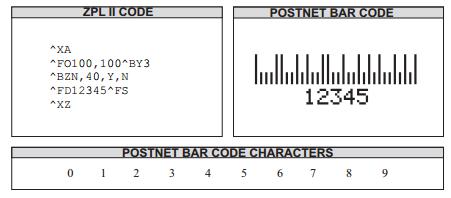
Example •This is an example of a POSTNET bar code:
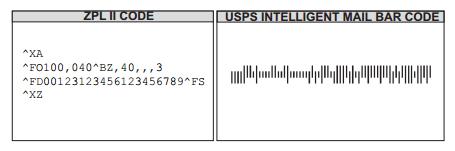
Example •This is an example of a USPS Intelligent Mail bar code:
Characters Command
^A
Scalable / Bitmapped Font
Description The ^A command specifies the font to use in a text field. ^A designates thefontforthe current ^FD statement or field. The font specified by ^A is used only once for that ^FDentry.If a value for ^A is not specified again, the default ^CF font is used for the next ^FD entry.
Parameter |
Description |
Accepted Values: |
|---|---|---|
f |
font name |
A–Z, 0–9 (any font in printer: downloaded, EPROM, stored, A–Z, 0–9) |
o |
field orientation |
N = normal |
R = rotated 90° (clockwise) |
||
I = inverted 180° |
||
B = read from bottom up (270°) |
||
Default: last accepted ^FW value or ^FW default |
||
h |
character height (dots) |
Scalable: 10–32000 |
Bitmapped: 1–10× standard height (integer increments) |
||
Default: last accepted ^CF |
||
w |
character width (dots) |
Scalable: 10–32000 |
Bitmapped: 1–10× standard width (integer increments) |
||
Default: last accepted ^CF |
Example • This is an example of Basic Test:
^XA
^LL640
^LH0,0
^FO50,50^AAN,36,20^FDFONT A, Resident Bitmap 36x20^FS
^FO50,100^ABN,33,14^FDFONT B, Resident Bitmap 33x14^FS
^FO50,150^ACN,36,20^FDFONT C, Resident Bitmap 36x20^FS
^FO50,200^ADN,36,20^FDFONT D, Resident Bitmap 36x20^FS
^FO50,250^AEN,28,15^FDFONT E, Resident OCR-B 28x15^FS
^FO50,300^AFN,26,13^FDFONT F, Resident Bitmap 26x13^FS
^FO50,340^AGN,60,40^FDFONT G, 60x40^FS
^FO50,410^AHN,41,13^FDFONT H, RESIDENT OCR-A 21X13^FS
^FO50,480^ADN,36,20^FDFONT GS^FS
^FO238,480^GS^FDABCDE^FS
^FO365,480^ADN,36,20^FDSymbol 36x20^FS
^FO50,550^A0N,50,40^FDFONT 0, Scalable Fonts 50x40^FS
^XZ
^XA
^FO50, 50^APN,20,18^FDFONT P, Resident Bitmap 20x18^FS
^FO50,100^AQN,28,24^FDFONT Q, Resident Bitmap 28x24^FS
^FO50,150^ARN,35,31^FDFONT R, Resident Bitmap 35x31^FS
^FO50,205^ASN,40,35^FDFONT S, Resident Bitmap 40x35^FS
^FO50,265^ATN,48,42^FDFONT T, Resident Bitmap 48x42^FS
^FO50,330^AUN,59,53^FDFONT U, Resident Bitmap 59x53^FS
^FO50,410^AVN,80,71^FDFONT V, Resident Bitmap 80x71^FS
^XZ
Example •This is an example of Basic Test for 20-7F(Front A-V, except the bitmap front 0 andvectorfrontGS):
20-7F(FrontA-V) Test
^XA
^LL120
^FO0,0^A0N,15,12^FD !»#$%&“()*+,-./^FS
^FO0,15^A0N,15,12^FD0123456789:;<=>?^FS
^FO0,30^A0N,15,12^FD@ABCDEFGHIJKLMNO^FS
^FO0,45^A0N,15,12^FH^FDPQRSTUVWXYZ[]_5E_5F^FS
^FO0,60^A0N,15,12^FDabcdefghijklmno^FS
^FO0,75^A0N,15,12^FH^FDpqrstuvwxyz{|}_7E_7F^FS
^XZ
^XA
^LL80
^FO0,0^AAN,9,5^FD !»#$%&“()*+,-./^FS
^FO0,9^AAN,9,5^FD0123456789:;<=>?^FS
^FO0,18^AAN,9,5^FD@ABCDEFGHIJKLMNO^FS
^FO0,27^AAN,9,5^FH^FDPQRSTUVWXYZ[]_5E_5F^FS
^FO0,36^AAN,9,5^FDabcdefghijklmno^FS
^FO0,45^AAN,9,5^FH^FDpqrstuvwxyz{|}_7E_7F^FS
^XZ
^XA
^LL80
^FO0,0^ABN,11,7^FD !»#$%&“()*+,-./^FS
^FO0,11^ABN,11,7^FD0123456789:;<=>?^FS
^FO0,22^ABN,11,7^FD@ABCDEFGHIJKLMNO^FS
^FO0,33^ABN,11,7^FH^FDPQRSTUVWXYZ[]_5E_5F^FS
^FO0,44^ABN,11,7^FDabcdefghijklmno^FS
^FO0,55^ABN,11,7^FH^FDpqrstuvwxyz{|}_7E_7F^FS
^XZ
^XA
^LL140
^FO0,0^ACN,18,10^FD !»#$%&“()*+,-./^FS
^FO0,18^ACN,18,10^FD0123456789:;<=>?^FS
^FO0,36^ACN,18,10^FD@ABCDEFGHIJKLMNO^FS
^FO0,54^ACN,18,10^FH^FDPQRSTUVWXYZ[]_5E_5F^FS
^FO0,72^ACN,18,10^FDabcdefghijklmno^FS
^FO0,90^ACN,18,10^FH^FDpqrstuvwxyz{|}_7E_7F^FS
^XZ
^XA
^LL140
^FO0,0^ADN,18,10^FD !»#$%&“()*+,-./^FS
^FO0,18^ADN,18,10^FD0123456789:;<=>?^FS
^FO0,36^ADN,18,10^FD@ABCDEFGHIJKLMNO^FS
^FO0,54^ADN,18,10^FH^FDPQRSTUVWXYZ[]_5E_5F^FS
^FO0,72^ADN,18,10^FDabcdefghijklmno^FS
^FO0,90^ADN,18,10^FH^FDpqrstuvwxyz{|}_7E_7F^FS
^XZ
^XA
^LL200
^FO0,0^AEN,28,15^FD !»#$%&“()*+,-./^FS
^FO0,28^AEN,28,15^FD0123456789:;<=>?^FS
^FO0,56^AEN,28,15^FD@ABCDEFGHIJKLMNO^FS
^FO0,84^AEN,28,15^FH^FDPQRSTUVWXYZ[]_5E_5F^FS
^FO0,112^AEN,28,15^FDabcdefghijklmno^FS
^FO0,140^AEN,28,15^FH^FDpqrstuvwxyz{|}_7E_7F^FS
^XZ
^XA
^LL200
^FO0,0^AFN,26,13^FD !»#$%&“()*+,-./^FS
^FO0,26^AFN,26,13^FD0123456789:;<=>?^FS
^FO0,52^AFN,26,13^FD@ABCDEFGHIJKLMNO^FS
^FO0,78^AFN,26,13^FH^FDPQRSTUVWXYZ[]_5E_5F^FS
^FO0,104^AFN,26,13^FDabcdefghijklmno^FS
^FO0,130^AFN,26,13^FH^FDpqrstuvwxyz{|}_7E_7F^FS
^XZ
^XA
^LL400
^FO0,0^AGN,60,40^FD !»#$%&“()*+,-./^FS
^FO0,60^AGN,60,40^FD0123456789:;<=>?^FS
^FO0,120^AGN,60,40^FD@ABCDEFGHIJKLMNO^FS
^FO0,180^AGN,60,40^FH^FDPQRSTUVWXYZ[]_5E_5F^FSS
^FO0,240^AGN,60,40^FDabcdefghijklmno^FSS
^FO0,300^AGN,60,40^FH^FDpqrstuvwxyz{|}_7E_7F^FS
^XZ
^XA
^LL140
^FO0,0^AHN,21,13^FD !»#$%&“()*+,-./^FS
^FO0,21^AHN,21,13^FD0123456789:;<=>?^FS
^FO0,42^AHN,21,13^FD@ABCDEFGHIJKLMNO^FS
^FO0,63^AHN,21,13^FH^FDPQRSTUVWXYZ[]_5E_5F^FSS
^FO0,84^AHN,21,13^FDabcdefghijklmno^FSS
^FO0,105^AHN,21,13^FH^FDpqrstuvwxyz{|}_7E_7F^FS
^XZ
^XA
^LL140
^FO0,0^APN,20,18^FD !»#$%&“()*+,-./^FS
^FO0,20^APN,20,18^FD0123456789:;<=>?^FS
^FO0,40^APN,20,18^FD@ABCDEFGHIJKLMNO^FS
^FO0,60^APN,20,18^FH^FDPQRSTUVWXYZ[]_5E_5F^FS
^FO0,80^APN,20,18^FDabcdefghijklmno^FS
^FO0,100^APN,20,18^FH^FDpqrstuvwxyz{|}_7E_7F^FS
^XZ
^XA
^LL200
^FO0,0^AQN,28,24^FD !»#$%&“()*+,-./^FS
^FO0,28^AQN,28,24^FD0123456789:;<=>?^FS
^FO0,56^AQN,28,24^FD@ABCDEFGHIJKLMNO^FS
^FO0,84^AQN,28,24^FH^FDPQRSTUVWXYZ[]_5E_5F^FS
^FO0,112^AQN,28,24^FDabcdefghijklmno^FS
^FO0,140^AQN,28,24^FH^FDpqrstuvwxyz{|}_7E_7F^FS
^XZ
^XA
^LL220
^FO0,0^ARN,35,31^FD !»#$%&“()*+,-./^FS
^FO0,35^ARN,35,31^FD0123456789:;<=>?^FS
^FO0,70^ARN,35,31^FD@ABCDEFGHIJKLMNO^FS
^FO0,105^ARN,35,31^FH^FDPQRSTUVWXYZ[]_5E_5F^FS
^FO0,140^ARN,35,31^FDabcdefghijklmno^FS
^FO0,175^ARN,35,31^FH^FDpqrstuvwxyz{|}_7E_7F^FS
^XZ
^XA
^LL260
^FO0,0^ASN,40,35^FD !»#$%&“()*+,-./^FS
^FO0,40^ASN,40,35^FD0123456789:;<=>?^FS
^FO0,80^ASN,40,35^FD@ABCDEFGHIJKLMNO^FS
^FO0,120^ASN,40,35^FH^FDPQRSTUVWXYZ[]_5E_5F^FS
^FO0,160^ASN,40,35^FDabcdefghijklmno^FS
^FO0,200^ASN,40,35^FH^FDpqrstuvwxyz{|}_7E_7F^FS
^XZ
^XA
^LL300
^FO0,0^ATN,48,42^FD !»#$%&“()*+,-./^FS
^FO0,48^ATN,48,42^FD0123456789:;<=>?^FS
^FO0,96^ATN,48,42^FD@ABCDEFGHIJKLMNO^FS
^FO0,144^ATN,48,42^FH^FDPQRSTUVWXYZ[]_5E_5F^FS
^FO0,192^ATN,48,42^FDabcdefghijklmno^FS
^FO0,240^ATN,48,42^FH^FDpqrstuvwxyz{|}_7E_7F^FS
^XZ
^XA
^LL400
^FO0,0^AUN,59,53^FD !»#$%&“()*+,-./^FS
^FO0,59^AUN,59,53^FD0123456789:;<=>?^FS
^FO0,118^AUN,59,53^FD@ABCDEFGHIJKLMNO^FS
^FO0,190^AUN,59,53^FH^FDPQRSTUVWXYZ[]_5E_5F^FS
^FO0,236^AUN,59,53^FDabcdefghijklmno^FS
^FO0,295^AUN,59,53^FH^FDpqrstuvwxyz{|}_7E_7F^FS
^XZ
^XA
^LL520
^FO0,0^AVN,80,71^FD !»#$%&“()*+,-./^FS
^FO0,80^AVN,80,71^FD0123456789:;<=>?^FS
^FO0,160^AVN,80,71^FD@ABCDEFGHIJKLMNO^FS
^FO0,240^AVN,80,71^FH^FDPQRSTUVWXYZ[]_5E_5F^FS
^FO0,320^AVN,80,71^FDabcdefghijklmno^FS
^FO0,400^AVN,80,71^FH^FDpqrstuvwxyz{|}_7E_7F^FS
^XZ
Example • This is an example of Character Rotating Test (90, 180, 270):
^XA
^LL240
^FO10,30^AFN,26,13^FDAB1201^FS
^FO10,70^AFN,52,26^FDAB1202^FS
^FO10,130^AFN,104,52^FDAB1203^FS
^XZ
^XA
^FO10,30^AFI,26,13^FDAB1204^FS
^FO10,70^AFI,52,26^FDAB1205^FS
^FO10,130^AFI,104,52^FDAB1206^FS
^XZ
^XA
^LL480
^FO10,30^AFR,26,13^FDAB1207^FS
^FO50,30^AFR,52,26^FDAB1208^FS
^FO120,30^AFR,104,52^FDAB1209^FS
^FO240,30^AFB,26,13^FDAB1210^FS
^FO280,30^AFB,52,26^FDAB1211^FS
^FO350,30^AFB,104,52^FDAB1212^FS
^XZ
Example • This is an example of Enlarging Front Test (Front A-V, except the bitmap front 0 andvectorfront GS):
^XA
^PW800
^LL800
^FO50, 50^AAN, 9, 5^FDFont A,(x1)9x5^FS
^FO50,100^AAN,18,10^FDFont-A,(x2)9x5^FS
^FO50,150^AAN,27,15^FDFont-A,(x3)9x5^FS
^FO50,200^AAN,36,20^FDFont-A,(x4)9x5^FS
^FO50,250^AAN,45,25^FDFont-A,(x5)9x5^FS
^FO50,310^AAN,54,30^FDFont-A,(x6)9x5^FS
^FO50,380^AAN,63,35^FDFont-A,(x7)9x5^FS
^FO50,460^AAN,72,40^FDFont-A,(x8)9x5^FS
^FO50,550^AAN,81,45^FDFont-A,(x9)9x5^FS
^FO50,670^AAN,90,50^FDFont-A,(x10)9x5^FS
^XZ
^XA
^FO50, 50^AAN, 9,25^FDFont A,(x1,5)9x5^FS
^FO50,100^AAN,18,25^FDFont-A,(x2,5)9x5^FS
^FO50,150^AAN,27,25^FDFont-A,(x3,5)9x5^FS
^FO50,200^AAN,36,25^FDFont-A,(x4,5)9x5^FS
^FO50,250^AAN,45,25^FDFont-A,(x5,5)9x5^FS
^FO50,310^AAN,54,25^FDFont-A,(x6,5)9x5^FS
^FO50,380^AAN,63,25^FDFont-A,(x7,5)9x5^FS
^FO50,460^AAN,72,25^FDFont-A,(x8,5)9x5^FS
^FO50,550^AAN,81,25^FDFont-A,(x9,5)9x5^FS
^FO50,670^AAN,90,25^FDFont-A,(x10,5)9x5^FS
^XZ
^XA
^FO50, 50^ABN,11, 7^FDFont-B,(x1)11x7, auto change to uppercase^FS
^FO50, 80^ABN,22,14^FDFont-B,(x2)11x7^FS
^FO50,130^ABN,33,21^FDFont-B,(x3)11x7^FS
^FO50,180^ABN,44,28^FDFont-B,(x4)11x7^FS
^FO50,230^ABN,55,35^FDFont-B,(x5)11x7^FS
^FO50,300^ABN,66,42^FDFont-B,(x6)11x7^FS
^FO50,380^ABN,77,49^FDFont-B,(x7)11x7^FS
^FO50,470^ABN,88,58^FDFont-B,(x8)11x7^FS
^FO50,570^ABN,99,63^FDFont-B,(x9)11x7^FS
^FO50,680^ABN,110,70^FDFont-B,(x10)11x7^FS
^XZ
^XA
^FO50, 50^ABN,11,28^FDFont-B,(x1,4)11x7, auto changetouppercase^FS
^FO50, 80^ABN,22,28^FDFont-B,(x2,4)11x7^FS
^FO50,130^ABN,33,28^FDFont-B,(x3,4)11x7^FS
^FO50,180^ABN,44,28^FDFont-B,(x4,4)11x7^FS
^FO50,230^ABN,55,28^FDFont-B,(x5,4)11x7^FS
^FO50,300^ABN,66,28^FDFont-B,(x6,4)11x7^FS
^FO50,380^ABN,77,28^FDFont-B,(x7,4)11x7^FS
^FO50,470^ABN,88,28^FDFont-B,(x8,4)11x7^FS
^FO50,570^ABN,99,28^FDFont-B,(x9,4)11x7^FS
^FO50,680^ABN,110,24^FDFont-B,(x10,4)11x7^FS
^XZ
^XA
^FO50, 50^ACN,18,10^FDFont-C,(x1)18x10^FS
^FO50,100^ACN,36,20^FDFont-C,(x2)18x10^FS
^FO50,150^ACN,54,30^FDFont-C,(x3)18x10^FS
^FO50,220^ACN,72,40^FDFont-C,(x4)18x10^FS
^FO50,310^ACN,90,50
^FDFont-C,(x5)18x10^FS
^FO50,420^ACN,108,60^FDFont-C,(x6)18x10^FS
^FO50,540^ACN,126,70^FDFont-C,(x7)18x10^FS
^FO50,686^ACN,144,80^FDFont-C,(x8)18x10^FS
^XZ
^XA
^FO50, 50^ACN,18,30^FDFont-C,(x1,3)18x10^FS
^FO50,100^ACN,36,30^FDFont-C,(x2,3)18x10^FS
^FO50,150^ACN,54,30^FDFont-C,(x3,3)18x10^FS
^FO50,220^ACN,72,30^FDFont-C,(x4,3)18x10^FS
^FO50,310^ACN,90,30^FDFont-C,(x5,3)18x10^FS
^FO50,420^ACN,108,30^FDFont-C,(x6,3)18x10^FS
^FO50,540^ACN,126,30^FDFont-C,(x7,3)18x10^FS
^FO50,686^ACN,144,30^FDFont-C,(x8,3)18x10^FS
^XZ
^XA
^FO50, 50^ADN,18,10^FDFont-D,(x1)18x10^FS
^FO50,100^ADN,36,20^FDFont-D,(x2)18x10^FS
^FO50,150^ADN,54,30^FDFont-D,(x3)18x10^FS
^FO50,220^ADN,72,40^FDFont-D,(x4)18x10^FS
^FO50,310^ADN,90,50^FDFont-D,(x5)18x10^FS
^FO50,420^ADN,108,60^FDFont-D,(x6)18x10^FS
^FO50,540^ADN,126,70^FDFont-D,(x7)18x10^FS
^FO50,686^ADN,144,80^FDFont-D,(x8)18x10^FS
^XZ
^XA
^FO50, 50^ADN,18,30^FDFont-D,(x1,3)18x10^FS
^FO50,100^ADN,36,30^FDFont-D,(x2,3)18x10^FS
^FO50,150^ADN,54,30^FDFont-D,(x3,3)18x10^FS
^FO50,220^ADN,72,30^FDFont-D,(x4,3)18x10^FS
^FO50,310^ADN,90,30^FDFont-D,(x5,3)18x10^FS
^FO50,420^ADN,108,30^FDFont-D,(x6,3)18x10^FS
^FO50,540^ADN,126,30^FDFont-D,(x7,3)18x10^FS
^FO50,686^ADN,144,30^FDFont-D,(x8,3)18x10^FS
^XZ
^XA
^FO50, 50^AEN,28,15^FDFont-E,OCR-B,(x1)28x15^FS
^FO50,100^AEN,56,30^FDFont-E,OCR-B,(x2)28x15^FS
^FO50,170^AEN,84,45^FDFont-E,OCR-B,(x3)28x15^FS
^FO50,270^AEN,112,60^FDFont-E,OCR-B,(x4)28x15^FS
^FO50,400^AEN,140,75^FDFont-E,OCR-B,(x5)28x15^FS
^FO50,560^AEN,168,90^FDFont-E,OCR-B,(x6)28x15^FS
^XZ
^XA
^FO50, 50^AEN,28,30^FDFont-E,OCR-B,(x1,2)28x15^FS
^FO50,100^AEN,56,30^FDFont-E,OCR-B,(x2,2)28x15^FS
^FO50,170^AEN,84,30^FDFont-E,OCR-B,(x3,2)28x15^FS
^FO50,270^AEN,112,30^FDFont-E,OCR-B,(x4,2)28x15^FS
^FO50,400^AEN,140,30^FDFont-E,OCR-B,(x5,2)28x15^FS
^FO50,560^AEN,168,30^FDFont-E,OCR-B,(x6,2)28x15^FS
^XZ
^XA
^FO50, 50^AFN,26,13^FDFont-F,(x1)26x13^FS
^FO50,100^AFN,52,26^FDFont-F,(x2)26x13^FS
^FO50,170^AFN,78,39^FDFont-F,(x3)26x13^FS
^FO50,270^AFN,104,52^FDFont-F,(x4)26x13^FS
^FO50,400^AFN,130,65^FDFont-F,(x5)26x13^FS
^FO50,560^AFN,156,78^FDFont-F,(x6)26x13^FS
^XZ
^XA
^FO50, 50^AFN,26,26^FDFont-F,(x1,2)26x13^FS
^FO50,100^AFN,52,26^FDFont-F,(x2,2)26x13^FS
^FO50,170^AFN,78,26^FDFont-F,(x3,2)26x13^FS
^FO50,270^AFN,104,26^FDFont-F,(x4,2)26x13^FS
^FO50,400^AFN,130,26^FDFont-F,(x5,2)26x13^FS
^FO50,560^AFN,156,26^FDFont-F,(x6,2)26x13^FS
^XZ
^XA
^FO50, 50^AHN,21,13^FDFONT-H,OCR-A,(X1)21X13 UPPER CASEONLY^FS^FO50,100^AHN,42,26^FDFONT-H,OCR-A,(X2)21x13^FS
^FO50,170^AHN,62,39^FDFONT-H,OCR-A,(x3)21x13^FS
^FO50,270^AHN,84,52^FDFONT-H,OCR-A,(x4)21x13^FS
^FO50,400^AHN,105,65^FDFONT-H,OCR-A,(x5)21x13^FS
^FO50,560^AHN,126,78^FDFONT-H,OCR-A,(x6)21x13^FS
^XZ
^XA
^FO50, 50^AHN,21,26^FDFONT-H,OCR-A,(X1,2)21X13 UPPERCASEONLY^FS^FO50,100^AHN,42,26^FDFONT-H,OCR-A,(X2,2)21x13^FS
^FO50,170^AHN,62,26^FDFONT-H,OCR-A,(x3,2)21x13^FS
^FO50,270^AHN,84,26^FDFONT-H,OCR-A,(x4,2)21x13^FS
^FO50,400^AHN,105,26^FDFONT-H,OCR-A,(x5,2)21x13^FS
^FO50,560^AHN,126,26^FDFONT-H,OCR-A,(x6,2)21x13^FS
^XZ
^XA
^FO50, 50^APN,20,18^FDFont P,20x18^FS
^FO50,100^APN,28,24^FDFont P,28x24^FS
^FO50,150^APN,35,31^FDFont P,35x31^FS
^FO50,205^APN,40,35^FDFont P,40x35^FS
^FO50,265^APN,48,42^FDFont P,48x42^FS
^FO50,330^APN,59,53^FDFont P,59x53^FS
^FO50,410^APN,80,71^FDFont P,80x71^FS
^FO50,510^APN,100,85^FDFont P,100x85^FS
^XZ
^XA
^FO50, 50^AQN,20,18^FDFont Q,20x18^FS
^FO50,100^AQN,28,24^FDFont Q,28x24^FS
^FO50,150^AQN,35,31^FDFont Q,35x31^FS
^FO50,205^AQN,40,35^FDFont Q,40x35^FS
^FO50,265^AQN,48,42^FDFont Q,48x42^FS
^FO50,330^AQN,59,53^FDFont Q,59x53^FS
^FO50,410^AQN,80,71^FDFont Q,80x71^FS
^FO50,510^AQN,100,85^FDFont Q,100x85^FS
^XZ
^XA
^FO50, 50^ARN,20,18^FDFont R,20x18^FS
^FO50,100^ARN,28,24^FDFont R,28x24^FS
^FO50,150^ARN,35,31^FDFont R,35x31^FS
^FO50,205^ARN,40,35^FDFont R,40x35^FS
^FO50,265^ARN,48,42^FDFont R,48x42^FS
^FO50,330^ARN,59,53^FDFont R,59x53^FS
^FO50,410^ARN,80,71^FDFont R,80x71^FS
^FO50,510^ARN,100,85^FDFont R,100x85^FS
^XZ
^XA
^FO50, 50^ASN,20,18^FDFont S,20x18^FS
^FO50,100^ASN,28,24^FDFont S,28x24^FS
^FO50,150^ASN,35,31^FDFont S,35x31^FS
^FO50,205^ASN,40,35^FDFont S,40x35^FS
^FO50,265^ASN,48,42^FDFont S,48x42^FS
^FO50,330^ASN,59,53^FDFont S,59x53^FS
^FO50,410^ASN,80,71^FDFont S,80x71^FS
^FO50,510^ASN,100,85^FDFont S,100x85^FS
^XZ
^XA
^FO50, 50^ATN,20,18^FDFont T,20x18^FS
^FO50,100^ATN,28,24^FDFont T,28x24^FS
^FO50,150^ATN,35,31^FDFont T,35x31^FS
^FO50,205^ATN,40,35^FDFont T,40x35^FS
^FO50,265^ATN,48,42^FDFont T,48x42^FS
^FO50,330^ATN,59,53^FDFont T,59x53^FS
^FO50,410^ATN,80,71^FDFont T,80x71^FS
^FO50,510^ATN,100,85^FDFont T,100x85^FS
^XZ
^XA
^FO50, 50^AUN,20,18^FDFont U,20x18^FS
^FO50,100^AUN,28,24^FDFont U,28x24^FS
^FO50,150^AUN,35,31^FDFont U,35x31^F
^FO50,205^AUN,40,35^FDFont U,40x35^FS
^FO50,265^AUN,48,42^FDFont U,48x42^FS
^FO50,330^AUN,59,53^FDFont U,59x53^FS
^FO50,410^AUN,80,71^FDFont U,80x71^FS
^FO50,510^AUN,100,85^FDFont U,100x85^FS
^XZ
^XA
^FO50, 50^AVN,20,18^FDFont V,20x18^FS
^FO50,100^AVN,28,24^FDFont V,28x24^FS
^FO50,150^AVN,35,31^FDFont V,35x31^FS
^FO50,205^AVN,40,35^FDFont V,40x35^FS
^FO50,265^AVN,48,42^FDFont V,48x42^FS
^FO50,330^AVN,59,53^FDFont V,59x53^FS
^FO50,410^AVN,80,71^FDFont V,80x71^FS
^FO50,510^AVN,100,85^FDFont V,100x85^FS
^XZ
Example •This is an example of Front GS Test:
^XA
^LL680
^FO0,10^ADN^FDFONT GS Test:^FS
^FO20,50^GS,16,16^FDABCDE^FS
^FO20,100^GS,24,24^FDABCDE^FS
^FO20,150^GS,32,32^FDABCDE^FS
^FO20,200^GS,48,48^FDABCDE^FS
^FO20,270^GS,56,56^FDABCDE^FS
^FO20,350^GS,72,72^FDABCDE^FS
^FO20,440^GS,96,96^FDABCDE^FS
^FO20,560^GS,100,100^FDABCDE^FS
^XZ
Example •This is an example of Vector Front 0 Test:
^XA
^LL100
^FO0,0^A0N,15,12^FD !»#$%&“()*+,-./^FS
^FO0,15^A0N,15,12^FD0123456789:;<=>?^FS
^FO0,30^A0N,15,12^FD@ABCDEFGHIJKLMNO^FS
^FO0,45^A0N,15,12^FH^FDPQRSTUVWXYZ[]_5E_5F^FS
^FO0,60^A0N,15,12^FD`abcdefghijklmno^FS
^FO0,75^A0N,15,12^FH^FDpqrstuvwxyz{|}_7E_7F^FS
^XZ
^XA
^LL660
^FO50, 50^A0N,16,12^FDFont-0,16x12^FS
^FO50,100^A0N,24,18^FDFont-0,24x18^FS
^FO50,150^A0N,32,24^FDFont-0,32x24^FS
^FO50,200^A0N,48,32^FDFont-0,48x32^FS
^FO50,270^A0N,56,48^FDFont-0,56x48^FS
^FO50,350^A0N,72,56^FDFont-0,72x56^FS
^FO50,450^A0N,96,72^FDFont-0,96x72^FS
^FO50,560^A0N,100,80^FDFont-0,100x80^FS
^XZ
^XA
^FO50, 50^A0N,16,32^FDFont-0,16x32^FS
^FO50,100^A0N,24,32^FDFont-0,24x32^FS
^FO50,150^A0N,32,32^FDFont-0,32x32^FS
^FO50,200^A0N,48,32^FDFont-0,48x32^FS
^FO50,270^A0N,56,32^FDFont-0,56x32^FS
^FO50,350^A0N,72,32^FDFont-0,72x32^FS
^FO50,450^A0N,96,32^FDFont-0,96x32^FS
^FO50,560^A0N,100,32^FDFont-0,100x32^FS
^XZ
Example •ZPL2 Resident Fonts Analysis Cases Test:
^XA
^LL640
^PW800
^LH0,0
^MTD
~SD10
^MD6
^XZ
^XA
^FO50, 24^A0N,50,40^FDFont-A 9x5 (x10)^FS
^FO200,80^GB1,540,1,B,0^FS
^FO400,80^GB1,540,1,B,0^FS
^FO600,80^GB1,540,1,B,0^FS
^FO50,220^GB700,1,1,B,0^FS
^FO50,500^GB700,1,1,B,0^FS
^FO200,220,0^AAN,90,50^FPH^FDH^FS
^FT200,220,0^AAN,90,50^FPH^FDh^FS
^FO200,220,1^AAN,90,50^FPH^FDh^FS
^FT200,220,1^AAN,90,50^FPH^FDH^FS
^FO400,220,0^AAN,90,50^FPH^FD;^FS
^FT400,220,0^AAN,90,50^FPH^FD;^FS
^FO400,220,1^AAN,90,50^FPH^FD;^FS
^FT400,220,1^AAN,90,50^FPH^FD;^FS
^FO600,220,0^AAN,90,50^FPH^FDJ^FS
^FT600,220,0^AAN,90,50^FPH^FDj^FS
^FO600,220,1^AAN,90,50^FPH^FDj^FS
^FT600,220,1^AAN,90,50^FPH^FDJ^FS
^FO200,500,0^AAN,90,50^FPH^FDZ^FS
^FT200,500,0^AAN,90,50^FPH^FDz^FS
^FO200,500,1^AAN,90,50^FPH^FDz^FS
^FT200,500,1^AAN,90,50^FPH^FDZ^FS
^FO400,500,0^AAN,90,50^FPH^FD“^FS
^FT400,500,0^AAN,90,50^FPH^FD»^FS
^FO400,500,1^AAN,90,50^FPH^FD»^FS
^FT400,500,1^AAN,90,50^FPH^FD“^FS
^FO600,500,0^AAN,90,50^FPH^FDg^FS
^FT600,500,0^AAN,90,50^FPH^FDG^FS
^FO600,500,1^AAN,90,50^FPH^FDg^FS
^FT600,500,1^AAN,90,50^FPH^FDG^FS
^XZ
^XA
^FO50, 24^A0N,50,40^FDFont-B 11x7 (x10)^FS
^FO200,80^GB1,540,1,B,0^FS
^FO400,80^GB1,540,1,B,0^FS
^FO600,80^GB1,540,1,B,0^FS
^FO50,220^GB700,1,1,B,0^FS
^FO50,500^GB700,1,1,B,0^FS
^FO200,220,0^ABN,110,70^FPH^FDH^FS
^FT200,220,0^ABN,110,70^FPH^FDh^FS
^FO200,220,1^ABN,110,70^FPH^FDh^FS
^FT200,220,1^ABN,110,70^FPH^FDH^FS
^FO400,220,0^ABN,110,70^FPH^FD;^FS
^FT400,220,0^ABN,110,70^FPH^FD;^FS
^FO400,220,1^ABN,110,70^FPH^FD;^FS
^FT400,220,1^ABN,110,70^FPH^FD;^FS
^FO600,220,0^ABN,110,70^FPH^FDJ^FS
^FT600,220,0^ABN,110,70^FPH^FDj^FS
^FO600,220,1^ABN,110,70^FPH^FDj^FS
^FT600,220,1^ABN,110,70^FPH^FDJ^FS
^FO200,500,0^ABN,110,70^FPH^FDZ^FS
^FT200,500,0^ABN,110,70^FPH^FDz^FS
^FO200,500,1^ABN,110,70^FPH^FDz^FS
^FT200,500,1^ABN,110,70^FPH^FDZ^FS
^FO400,500,0^ABN,110,70^FPH^FD“^FS
^FT400,500,0^ABN,110,70^FPH^FD»^FS
^FO400,500,1^ABN,110,70^FPH^FD»^FS
^FT400,500,1^ABN,110,70^FPH^FD“^FS
^FO600,500,0^ABN,110,70^FPH^FDg^FS
^FT600,500,0^ABN,110,70^FPH^FDG^FS
^FO600,500,1^ABN,110,70^FPH^FDg^FS
^FT600,500,1^ABN,110,70^FPH^FDG^FS
^XZ
^XA
^FO50, 50^A0N,50,40^FDFont-C/D 18x10 (x6)^FS
^FO200,80^GB1,540,1,B,0^FS
^FO400,80^GB1,540,1,B,0^FS
^FO600,80^GB1,540,1,B,0^FS
^FO50,220^GB700,1,1,B,0^FS
^FO50,500^GB700,1,1,B,0^FS
^FO200,220,0^ACN,108,60^FPH^FDH^FS
^FT200,220,0^ACN,108,60^FPH^FDh^FS
^FO200,220,1^ACN,108,60^FPH^FDh^FS
^FT200,220,1^ACN,108,60^FPH^FDH^FS
^FO400,220,0^ACN,108,60^FPH^FD;^FS
^FT400,220,0^ACN,108,60^FPH^FD;^FS
^FO400,220,1^ACN,108,60^FPH^FD;^FS
^FT400,220,1^ACN,108,60^FPH^FD;^FS
^FO600,220,0^ACN,108,60^FPH^FDJ^FS
^FT600,220,0^ACN,108,60^FPH^FDj^FS
^FO600,220,1^ACN,108,60^FPH^FDj^FS
^FT600,220,1^ACN,108,60^FPH^FDJ^FS
^FO200,500,0^ACN,108,60^FPH^FDZ^FS
^FT200,500,0^ACN,108,60^FPH^FDz^FS
^FO200,500,1^ACN,108,60^FPH^FDz^FS
^FT200,500,1^ACN,108,60^FPH^FDZ^FS
^FO400,500,0^ACN,108,60^FPH^FD“^FS
^FT400,500,0^ACN,108,60^FPH^FD»^FS
^FO400,500,1^ACN,108,60^FPH^FD»^FS
^FT400,500,1^ACN,108,60^FPH^FD“^FS
^FO600,500,0^ACN,108,60^FPH^FDg^FS
^FT600,500,0^ACN,108,60^FPH^FDG^FS
^FO600,500,1^ACN,108,60^FPH^FDg^FS
^FT600,500,1^ACN,108,60^FPH^FDG^FS
^XZ
^XA
^FO50, 50^A0N,50,40^FDFont-E 28x15 (x4)^FS
^FO200,80^GB1,540,1,B,0^FS
^FO400,80^GB1,540,1,B,0^FS
^FO600,80^GB1,540,1,B,0^FS
^FO50,220^GB700,1,1,B,0^FS
^FO50,500^GB700,1,1,B,0^FS
^FO200,220,0^AEN,112,60^FPH^FDH^FS
^FT200,220,0^AEN,112,60^FPH^FDh^FS
^FO200,220,1^AEN,112,60^FPH^FDh^FS
^FT200,220,1^AEN,112,60^FPH^FDH^FS
^FO400,220,0^AEN,112,60^FPH^FD;^FS
^FT400,220,0^AEN,112,60^FPH^FD;^FS
^FO400,220,1^AEN,112,60^FPH^FD;^FS
^FT400,220,1^AEN,112,60^FPH^FD;^FS
^FO600,220,0^AEN,112,60^FPH^FDJ^FS
^FT600,220,0^AEN,112,60^FPH^FDj^FS
^FO600,220,1^AEN,112,60^FPH^FDj^FS
^FT600,220,1^AEN,112,60^FPH^FDJ^FS
^FO200,500,0^AEN,112,60^FPH^FDZ^FS
^FT200,500,0^AEN,112,60^FPH^FDz^FS
^FO200,500,1^AEN,112,60^FPH^FDz^FS
^FT200,500,1^AEN,112,60^FPH^FDZ^FS
^FO400,500,0^AEN,112,60^FPH^FD“^FS
^FT400,500,0^AEN,112,60^FPH^FD»^FS
^FO400,500,1^AEN,112,60^FPH^FD»^FS
^FT400,500,1^AEN,112,60^FPH^FD“^FS
^FO600,500,0^AEN,112,60^FPH^FDg^FS
^FT600,500,0^AEN,112,60^FPH^FDG^FS
^FO600,500,1^AEN,112,60^FPH^FDg^FS
^FT600,500,1^AEN,112,60^FPH^FDG^FS
^XZ
^XA
^FO50, 50^A0N,50,40^FDFont-F 26x13 (x4)^FS
^FO200,80^GB1,540,1,B,0^FS
^FO400,80^GB1,540,1,B,0^FS
^FO600,80^GB1,540,1,B,0^FS
^FO50,220^GB700,1,1,B,0^FS
^FO50,500^GB700,1,1,B,0^FS
^FO200,220,0^AFN,104,52^FPH^FDH^FS
^FT200,220,0^AFN,104,52^FPH^FDh^FS
^FO200,220,1^AFN,104,52^FPH^FDh^FS
^FT200,220,1^AFN,104,52^FPH^FDH^FS
^FO400,220,0^AFN,104,52^FPH^FD;^FS
^FT400,220,0^AFN,104,52^FPH^FD;^FS
^FO400,220,1^AFN,104,52^FPH^FD;^FS
^FT400,220,1^AFN,104,52^FPH^FD;^FS
^FO600,220,0^AFN,104,52^FPH^FDJ^FS
^FT600,220,0^AFN,104,52^FPH^FDj^FS
^FO600,220,1^AFN,104,52^FPH^FDj^FS
^FT600,220,1^AFN,104,52^FPH^FDJ^FS
^FO200,500,0^AFN,104,52^FPH^FDZ^FS
^FT200,500,0^AFN,104,52^FPH^FDz^FS
^FO200,500,1^AFN,104,52^FPH^FDz^FS
^FT200,500,1^AFN,104,52^FPH^FDZ^FS
^FO400,500,0^AFN,104,52^FPH^FD“^FS
^FT400,500,0^AFN,104,52^FPH^FD»^FS
^FO400,500,1^AFN,104,52^FPH^FD»^FS
^FT400,500,1^AFN,104,52^FPH^FD“^FS
^FO600,500,0^AFN,104,52^FPH^FDg^FS
^FT600,500,0^AFN,104,52^FPH^FDG^FS
^FO600,500,1^AFN,104,52^FPH^FDg^FS
^FT600,500,1^AFN,104,52^FPH^FDG^FS
^XZ
^XA
^FO50, 50^A0N,50,40^FDFont-G 60x40 (x2)^FS
^FO200,80^GB1,540,1,B,0^FS
^FO400,80^GB1,540,1,B,0^FS
^FO600,80^GB1,540,1,B,0^FS
^FO50,220^GB700,1,1,B,0^FS
^FO50,500^GB700,1,1,B,0^FS
^FO200,220,0^AGN,120,80^FPH^FDH^FS
^FT200,220,0^AGN,120,80^FPH^FDh^FS
^FO200,220,1^AGN,120,80^FPH^FDh^FS
^FT200,220,1^AGN,120,80^FPH^FDH^FS
^FO400,220,0^AGN,120,80^FPH^FD;^FS
^FT400,220,0^AGN,120,80^FPH^FD;^FS
^FO400,220,1^AGN,120,80^FPH^FD;^FS
^FT400,220,1^AGN,120,80^FPH^FD;^FS
^FO600,220,0^AGN,120,80^FPH^FDJ^FS
^FT600,220,0^AGN,120,80^FPH^FDj^FS
^FO600,220,1^AGN,120,80^FPH^FDj^FS
^FT600,220,1^AGN,120,80^FPH^FDJ^FS
^FO200,500,0^AGN,120,80^FPH^FDZ^FS
^FT200,500,0^AGN,120,80^FPH^FDz^FS
^FO200,500,1^AGN,120,80^FPH^FDz^FS
^FT200,500,1^AGN,120,80^FPH^FDZ^FS
^FO400,500,0^AGN,120,80^FPH^FD“^FS
^FT400,500,0^AGN,120,80^FPH^FD»^FS
^FO400,500,1^AGN,120,80^FPH^FD»^FS
^FT400,500,1^AGN,120,80^FPH^FD“^FS
^FO600,500,0^AGN,120,80^FPH^FDg^FS
^FT600,500,0^AGN,120,80^FPH^FDG^FS
^FO600,500,1^AGN,120,80^FPH^FDg^FS
^FT600,500,1^AGN,120,80^FPH^FDG^FS
^XZ
^XA
^FO50, 50^A0N,50,40^FDFont-H 21x13 (x5)^FS
^FO200,80^GB1,540,1,B,0^FS
^FO400,80^GB1,540,1,B,0^FS
^FO600,80^GB1,540,1,B,0^FS
^FO50,220^GB700,1,1,B,0^FS
^FO50,500^GB700,1,1,B,0^FS
^FO200,220,0^AHN,105,65^FPH^FDH^FS
^FT200,220,0^AHN,105,65^FPH^FDh^FS
^FO200,220,1^AHN,105,65^FPH^FDh^FS
^FT200,220,1^AHN,105,65^FPH^FDH^FS
^FO400,220,0^AHN,105,65^FPH^FD;^FS
^FT400,220,0^AHN,105,65^FPH^FD;^FS
^FO400,220,1^AHN,105,65^FPH^FD;^FS
^FT400,220,1^AHN,105,65^FPH^FD;^FS
^FO600,220,0^AHN,105,65^FPH^FDJ^FS
^FT600,220,0^AHN,105,65^FPH^FDj^FS
^FO600,220,1^AHN,105,65^FPH^FDj^FS
^FT600,220,1^AHN,105,65^FPH^FDJ^FS
^FO200,500,0^AHN,105,65^FPH^FDZ^FS
^FT200,500,0^AHN,105,65^FPH^FDz^FS
^FO200,500,1^AHN,105,65^FPH^FDz^FS
^FT200,500,1^AHN,105,65^FPH^FDZ^FS
^FO400,500,0^AHN,105,65^FPH^FD“^FS
^FT400,500,0^AHN,105,65^FPH^FD»^FS
^FO400,500,1^AHN,105,65^FPH^FD»^FS
^FT400,500,1^AHN,105,65^FPH^FD“^FS
^FO600,500,0^AHN,105,65^FPH^FDg^FS
^FT600,500,0^AHN,105,65^FPH^FDG^FS
^FO600,500,1^AHN,105,65^FPH^FDg^FS
^FT600,500,1^AHN,105,65^FPH^FDG^FS
^XZ
Example •ZPL International Character Sets Test:
^XA
^LL640
^LH0,0
^MTD
^FO50, 10^A0,32,25^FDZPL International Character Sets^FS
^FO50, 50^A1,18,16^FD HEX 2 3 4 5 5 5 5 6 7 7 7 7^FS
^FO50, 70^A1,18,16^FD 3 0 0 B C D E 0 B C D E^FS
^CI0 ^FO50,100^A1,18,16^FH^FDCI0 # 0 @ [ ] _5E ` { | } _7E^FS
^CI1 ^FO50,130^A1,18,16^FH^FDCI1 # 0 @ [ ] _5E ` { | } _7E^FS
^CI2 ^FO50,160^A1,18,16^FH^FDCI2 # 0 @ [ ] _5E ` { | } _7E^FS
^CI3 ^FO50,190^A1,18,16^FH^FDCI3 # 0 @ [ ] _5E ` { | } _7E^FS
^CI4 ^FO50,220^A1,18,16^FH^FDCI4 # 0 @ [ ] _5E ` { | } _7E^FS
^CI5 ^FO50,250^A1,18,16^FH^FDCI5 # 0 @ [ ] _5E ` { | } _7E^FS
^CI6 ^FO50,280^A1,18,16^FH^FDCI6 # 0 @ [ ] _5E ` { | } _7E^FS
^CI7 ^FO50,310^A1,18,16^FH^FDCI7 # 0 @ [ ] _5E ` { | } _7E^FS
^CI8 ^FO50,340^A1,18,16^FH^FDCI8 # 0 @ [ ] _5E ` { | } _7E^FS
^CI9 ^FO50,370^A1,18,16^FH^FDCI9 # 0 @ [ ] _5E ` { | } _7E^FS
^CI10^FO50,400^A1,18,16^FH^FDCI10 # 0 @ [ ] _5E ` { | } _7E^FS
^CI11^FO50,430^A1,18,16^FH^FDCI11 # 0 @ [ ] _5E ` { | } _7E^FS
^CI12^FO50,460^A1,18,16^FH^FDCI12 # 0 @ [ ] _5E ` { | } _7E^FS
^CI13^FO50,490^A1,18,16^FH^FDCI13 # 0 @ [ ] _5E ` { | } _7E^FS
^XZ
^A@
Use Font Name to Call Font
Description The ^A@ command uses the complete name of a font, rather than thecharacterdesignation used in ^A. Once a value for ^A@ is defined, it represents that font until anewfont name is specified by ^A@.
Parameter |
Description |
Accepted Values: |
|---|---|---|
o |
orientation |
N = normal |
R = rotated 90° (clockwise) |
||
I = inverted 180° |
||
B = read from bottom up (270°) |
||
Default: N or last ^FW value |
||
h |
character height (dots) |
Scalable or Bitmapped |
Default: base height or last ^CF value |
||
w |
character width (dots) |
Scalable or Bitmapped |
Default: base width or last ^CF value |
||
d |
drive location |
R:, E:, B:, A: |
Default: R: |
||
o.x |
font name and extension |
Font file name (e.g. R:SIMSUN.TTF, R:CGTRAX.FNT) |
Example • Enlarging Chinese Font Test:
^XA
^PW800
^LL640
^FO10,04^A@N,16,16,R:SIMSUN.TTF^FD 普瑞特 09AZaz!?^FS
^FO10,25^A@N,32,32,R:SIMSUN.TTF^FD 普瑞特-国家 09AZaz!?^FS
^FO10,60^A@N,40,40,R:SIMSUN.TTF^FD 普瑞特-国家 09AZaz!?^FS
^FO10,105^A@N,48,64,R:SIMSUN.TTF^FD 普瑞特-国家 09AZaz!?^FS
^FO10,180^A@N,64,48,R:SIMSUN.TTF^FD 普瑞特-国家 09AZaz!?^FS
^FO10,270^A@N,80,80,R:SIMSUN.TTF^FD 普瑞特-国家 09AZaz!?^FS
^FO10,380^A@N,96,118,R:SIMSUN.TTF^FD 普瑞特-国家 09AZaz!?^FS
^FO50,520^A@N,118,96,R:SIMSUN.TTF^FD 普瑞特-国家 09AZaz!?^FS
^XZ
^CI
Change International Font/Encoding
Description The ^CI cZebra printers can print fonts using international character sets: U.S.A.1,U.S.A.2, UK,Holland, Denmark/Norway, Sweden/Finland, Germany, France 1, France 2, Italy, Spain, andseveral other sets, including the Unicode character set
The ^CI command enables you to call up the international character set you want touseforprinting. You can mix character sets on a label.
A character within a font can be remapped to a different numerical position
Parameter |
Description |
Accepted Values |
|---|---|---|
a |
desired character set |
see list below |
s1 |
source 1 (character output image) |
decimals 0–255 |
d1 |
destination 1 (character input) |
decimals 0–255 |
s2 |
source 2 (character output image) |
decimals 0–255 |
d2 |
destination 2 (character input) |
decimals 0–255 |
… |
continuation of pattern |
up to 256 source/destination pairs |
Parameter a = desired character set — Accepted Values:
0 = Single Byte Encoding — U.S.A. 1 Character Set
1 = Single Byte Encoding — U.S.A. 2 Character Set
2 = Single Byte Encoding — U.K. Character Set
3 = Single Byte Encoding — Holland Character Set
4 = Single Byte Encoding — Denmark/Norway Character Set
5 = Single Byte Encoding — Sweden/Finland Character Set
6 = Single Byte Encoding — Germany Character Set
7 = Single Byte Encoding — France 1 Character Set
8 = Single Byte Encoding — France 2 Character Set
9 = Single Byte Encoding — Italy Character Set
10 = Single Byte Encoding — Spain Character Set
11 = Single Byte Encoding — Miscellaneous Character Set
12 = Single Byte Encoding — Japan (ASCII with Yen symbol) Character Set
13 = Zebra Code Page 850
14 = Double Byte Asian Encodings (a)
15 = Shift‑JIS (b)
16 = EUC‑JP and EUC‑CN (a)
17 = Deprecated — UCS‑2 Big Endian (d)
18–23 = Reserved
24 = Single Byte Asian Encodings (a)
25 = Reserved
26 = Multibyte Asian Encodings with ASCII Transparency (a, c)
27 = Zebra Code Page 1252
28 = Unicode (UTF‑8 encoding) — Unicode Character Set
29 = Unicode (UTF‑16 Big‑Endian encoding) — Unicode Character Set
30 = Unicode (UTF‑16 Little‑Endian encoding) — Unicode Character Set
31 = Zebra Code Page 1250 (supported for scalable fonts such as Font 0 or downloaded TrueType; bitmapped fonts A‑H do not fully support CP1250; supported only on Zebra G‑Series™ printers)
33 = Code Page 1251
34 = Code Page 1253
35 = Code Page 1254
36 = Code Page 1255
a. The encoding is controlled by the conversion table (.DAT). The correct table must be present for theconversion to function. The table generated by ZTools™ is the TrueType fonts internal encoding (Unicode).
b. Shift-JIS encoding converts Shift-JIS to JIS and then looks up the JIS conversion in JIS.DAT. This tablemust be present for Shift-JIS to function.
c. Supports ASCII transparency for Asian encodings. 7F and less are treated as single byte characters. 80toFEis treated as the first byte of a 2 byte character 8000 to FEFF in the encoding table for Unicode.
d. The ^CI17 command has been deprecated, along with the ^F8 and ^F16 commands that are requiredforthe ^CI17 command to function. The recommended replacement is the ^CI28-30 commands.
Example Codepages Test (^CI0-13、27、31-36):
^XA
^LL640
^LH0,0
^PW800
^MTD
^FO50, 10^A0,32,25^FDZPL International Character Sets^FS
^FO50, 50^A1,18,16^FD HEX 2 3 4 5 5 5 5 6 7 7 7 7^FS
^FO50, 70^A1,18,16^FD 3 0 0 B C D E 0 B C D E^FS
^CI0 ^FO50,100^A1,18,16^FH^FDCI0 # 0 @ [ ] _5E ` { | } _7E^FS
^CI1 ^FO50,130^A1,18,16^FH^FDCI1 # 0 @ [ ] _5E ` { | } _7E^FS
^CI2 ^FO50,160^A1,18,16^FH^FDCI2 # 0 @ [ ] _5E ` { | } _7E^FS
^CI3 ^FO50,190^A1,18,16^FH^FDCI3 # 0 @ [ ] _5E ` { | } _7E^FS
^CI4 ^FO50,220^A1,18,16^FH^FDCI4 # 0 @ [ ] _5E ` { | } _7E^FS
^CI5 ^FO50,250^A1,18,16^FH^FDCI5 # 0 @ [ ] _5E ` { | } _7E^FS
^CI6 ^FO50,280^A1,18,16^FH^FDCI6 # 0 @ [ ] _5E ` { | } _7E^FS
^CI7 ^FO50,310^A1,18,16^FH^FDCI7 # 0 @ [ ] _5E ` { | } _7E^FS
^CI8 ^FO50,340^A1,18,16^FH^FDCI8 # 0 @ [ ] _5E ` { | } _7E^FS
^CI9 ^FO50,370^A1,18,16^FH^FDCI9 # 0 @ [ ] _5E ` { | } _7E^FS
^CI10^FO50,400^A1,18,16^FH^FDCI10 # 0 @ [ ] _5E ` { | } _7E^FS
^CI11^FO50,430^A1,18,16^FH^FDCI11 # 0 @ [ ] _5E ` { | } _7E^FS
^CI12^FO50,460^A1,18,16^FH^FDCI12 # 0 @ [ ] _5E ` { | } _7E^FS
^CI13^FO50,490^A1,18,16^FH^FDCI13 # 0 @ [ ] _5E ` { | } _7E^FS
^XZ
Codepage ID-0
^XA
^CI0
^FO50, 10^A0,32,25^FDCodepage ID-0^FS
^FO50, 50^A1,18,16^FDHEX 0 1 2 3 4 5 6 7 8 9 A B C D E F^FS
^FO50, 70^A1,18,16^FD ——————————–^FS
^FO50,100^A1,18,16^FH^FD 2: _20 _21 _22 _23 _24 _25 _26 _27 _28_29_2A_2B_2C _2D _2E _2F^FS
^FO50,130^A1,18,16^FH^FD 3: _30 _31 _32 _33 _34 _35 _36 _37 _38_39_3A_3B_3C _3D _3E _3F^FS
^FO50,160^A1,18,16^FH^FD 4: _40 _41 _42 _43 _44 _45 _46 _47 _48_49_4A_4B_4C _4D _4E _4F^FS
^FO50,190^A1,18,16^FH^FD 5: _50 _51 _52 _53 _54 _55 _56 _57 _58_59_5A_5B_5C _5D _5E _5F^FS
^FO50,220^A1,18,16^FH^FD 6: _60 _61 _62 _63 _64 _65 _66 _67 _68_69_6A_6B_6C _6D _6E _6F^FS
^FO50,250^A1,18,16^FH^FD 7: _70 _71 _72 _73 _74 _75 _76 _77 _78_79_7A_7B_7C _7D _7E _7F^FS
^FO50,280^A1,18,16^FH^FD 8: _80 _81 _82 _83 _84 _85 _86 _87 _88_89_8A_8B _8C _8D _8E _8F^FS
^FO50,310^A1,18,16^FH^FD 9: _90 _91 _92 _93 _94 _95 _96 _97 _98_99_9A_9B_9C _9D _9E _9F^FS
^FO50,340^A1,18,16^FH^FD A: _A0 _A1 _A2 _A3 _A4 _A5 _A6 _A7 _A8_A9_AA_AB_AC _AD _AE _AF^FS
^FO50,370^A1,18,16^FH^FD B: _B0 _B1 _B2 _B3 _B4 _B5 _B6 _B7 _B8_B9_BA_BB_BC _BD _BE _BF^FS
^FO50,400^A1,18,16^FH^FD C: _C0 _C1 _C2 _C3 _C4 _C5 _C6 _C7 _C8_C9_CA_CB_CC _CD _CE _CF^FS
^FO50,430^A1,18,16^FH^FD D: _D0 _D1 _D2 _D3 _D4 _D5 _D6 _D7 _D8_D9_DA_DB_DC _DD _DE _DF^FS
^FO50,460^A1,18,16^FH^FD E: _E0 _E1 _E2 _E3 _E4 _E5 _E6 _E7 _E8_E9_EA_EB_EC _ED _EE _EF^FS
^FO50,490^A1,18,16^FH^FD F: _F0 _F1 _F2 _F3 _F4 _F5 _F6 _F7 _F8_F9_FA_FB_FC _FD _FE _FF^FS
^XZ
Codepage ID-1
^XA
^CI1
^FO50, 10^A0,32,25^FDCodepage ID-1^FS
^FO50, 50^A1,18,16^FDHEX 0 1 2 3 4 5 6 7 8 9 A B C D E F^FS
^FO50, 70^A1,18,16^FD ——————————–^FS
^FO50,100^A1,18,16^FH^FD 2: _20 _21 _22 _23 _24 _25 _26 _27 _28_29_2A_2B_2C _2D _2E _2F^FS
^FO50,130^A1,18,16^FH^FD 3: _30 _31 _32 _33 _34 _35 _36 _37 _38_39_3A_3B_3C _3D _3E _3F^FS
^FO50,160^A1,18,16^FH^FD 4: _40 _41 _42 _43 _44 _45 _46 _47 _48_49_4A_4B_4C _4D _4E _4F^FS
^FO50,190^A1,18,16^FH^FD 5: _50 _51 _52 _53 _54 _55 _56 _57 _58_59_5A_5B_5C _5D _5E _5F^FS
^FO50,220^A1,18,16^FH^FD 6: _60 _61 _62 _63 _64 _65 _66 _67 _68_69_6A_6B_6C _6D _6E _6F^FS
^FO50,250^A1,18,16^FH^FD 7: _70 _71 _72 _73 _74 _75 _76 _77 _78_79_7A_7B_7C _7D _7E _7F^FS
^FO50,280^A1,18,16^FH^FD 8: _80 _81 _82 _83 _84 _85 _86 _87 _88_89_8A_8B_8C _8D _8E _8F^FS
^FO50,310^A1,18,16^FH^FD 9: _90 _91 _92 _93 _94 _95 _96 _97 _98_99_9A_9B_9C _9D _9E _9F^FS
^FO50,340^A1,18,16^FH^FD A: _A0 _A1 _A2 _A3 _A4 _A5 _A6 _A7 _A8_A9_AA_AB_AC _AD _AE _AF^FS
^FO50,370^A1,18,16^FH^FD B: _B0 _B1 _B2 _B3 _B4 _B5 _B6 _B7 _B8_B9_BA_BB_BC _BD _BE _BF^FS
^FO50,400^A1,18,16^FH^FD C: _C0 _C1 _C2 _C3 _C4 _C5 _C6 _C7 _C8_C9_CA_CB_CC _CD _CE _CF^FS
^FO50,430^A1,18,16^FH^FD D: _D0 _D1 _D2 _D3 _D4 _D5 _D6 _D7 _D8_D9_DA_DB_DC _DD _DE _DF^FS
^FO50,460^A1,18,16^FH^FD E: _E0 _E1 _E2 _E3 _E4 _E5 _E6 _E7 _E8_E9_EA_EB_EC _ED _EE _EF^FS
^FO50,490^A1,18,16^FH^FD F: _F0 _F1 _F2 _F3 _F4 _F5 _F6 _F7 _F8_F9_FA_FB_FC _FD _FE _FF^FS
^XZ
Codepage ID-2
^XA
^CI2
^FO50, 10^A0,32,25^FDCodepage ID-2^FS
^FO50, 50^A1,18,16^FDHEX 0 1 2 3 4 5 6 7 8 9 A B C D E F^FS
^FO50, 70^A1,18,16^FD ——————————–^FS
^FO50,100^A1,18,16^FH^FD 2: _20 _21 _22 _23 _24 _25 _26 _27 _28_29_2A_2B_2C _2D _2E _2F^FS
^FO50,130^A1,18,16^FH^FD 3: _30 _31 _32 _33 _34 _35 _36 _37 _38_39_3A_3B_3C _3D _3E _3F^FS
^FO50,160^A1,18,16^FH^FD 4: _40 _41 _42 _43 _44 _45 _46 _47 _48_49_4A_4B_4C _4D _4E _4F^FS
^FO50,190^A1,18,16^FH^FD 5: _50 _51 _52 _53 _54 _55 _56 _57 _58_59_5A_5B_5C _5D _5E _5F^FS
^FO50,220^A1,18,16^FH^FD 6: _60 _61 _62 _63 _64 _65 _66 _67 _68_69_6A_6B_6C _6D _6E _6F^FS
^FO50,250^A1,18,16^FH^FD 7: _70 _71 _72 _73 _74 _75 _76 _77 _78_79_7A_7B_7C _7D _7E _7F^FS
^FO50,280^A1,18,16^FH^FD 8: _80 _81 _82 _83 _84 _85 _86 _87 _88_89_8A_8B_8C _8D _8E _8F^FS
^FO50,310^A1,18,16^FH^FD 9: _90 _91 _92 _93 _94 _95 _96 _97 _98_99_9A_9B_9C _9D _9E _9F^FS
^FO50,340^A1,18,16^FH^FD A: _A0 _A1 _A2 _A3 _A4 _A5 _A6 _A7 _A8_A9_AA_AB_AC _AD _AE _AF^FS
^FO50,370^A1,18,16^FH^FD B: _B0 _B1 _B2 _B3 _B4 _B5 _B6 _B7 _B8_B9_BA_BB_BC _BD _BE _BF^FS
^FO50,400^A1,18,16^FH^FD C: _C0 _C1 _C2 _C3 _C4 _C5 _C6 _C7 _C8_C9_CA_CB_CC _CD _CE _CF^FS
^FO50,430^A1,18,16^FH^FD D: _D0 _D1 _D2 _D3 _D4 _D5 _D6 _D7 _D8_D9_DA_DB_DC _DD _DE _DF^FS
^FO50,460^A1,18,16^FH^FD E: _E0 _E1 _E2 _E3 _E4 _E5 _E6 _E7 _E8_E9_EA_EB_EC _ED _EE _EF^FS
^FO50,490^A1,18,16^FH^FD F: _F0 _F1 _F2 _F3 _F4 _F5 _F6 _F7 _F8_F9_FA_FB_FC _FD _FE _FF^FS
^XZ
Codepage ID-3
^XA
^CI3
^FO50, 10^A0,32,25^FDCodepage ID-3^FS
^FO50, 50^A1,18,16^FDHEX 0 1 2 3 4 5 6 7 8 9 A B C D E F^FS
^FO50, 70^A1,18,16^FD ——————————–^FS
^FO50,100^A1,18,16^FH^FD 2: _20 _21 _22 _23 _24 _25 _26 _27 _28_29_2A_2B_2C _2D _2E _2F^FS
^FO50,130^A1,18,16^FH^FD 3: _30 _31 _32 _33 _34 _35 _36 _37 _38_39_3A_3B_3C _3D _3E _3F^FS
^FO50,160^A1,18,16^FH^FD 4: _40 _41 _42 _43 _44 _45 _46 _47 _48_49_4A_4B_4C _4D _4E _4F^FS
^FO50,190^A1,18,16^FH^FD 5: _50 _51 _52 _53 _54 _55 _56 _57 _58_59_5A_5B_5C _5D _5E _5F^FS
^FO50,220^A1,18,16^FH^FD 6: _60 _61 _62 _63 _64 _65 _66 _67 _68_69_6A_6B_6C _6D _6E _6F^FS
^FO50,250^A1,18,16^FH^FD 7: _70 _71 _72 _73 _74 _75 _76 _77 _78_79_7A_7B_7C _7D _7E _7F^FS
^FO50,280^A1,18,16^FH^FD 8: _80 _81 _82 _83 _84 _85 _86 _87 _88_89_8A_8B_8C _8D _8E _8F^FS
^FO50,310^A1,18,16^FH^FD 9: _90 _91 _92 _93 _94 _95 _96 _97 _98_99_9A_9B_9C _9D _9E _9F^FS
^FO50,340^A1,18,16^FH^FD A: _A0 _A1 _A2 _A3 _A4 _A5 _A6 _A7 _A8_A9_AA_AB_AC _AD _AE _AF^FS
^FO50,370^A1,18,16^FH^FD B: _B0 _B1 _B2 _B3 _B4 _B5 _B6 _B7 _B8_B9_BA_BB_BC _BD _BE _BF^FS
^FO50,400^A1,18,16^FH^FD C: _C0 _C1 _C2 _C3 _C4 _C5 _C6 _C7 _C8_C9_CA_CB_CC _CD _CE _CF^FS
^FO50,430^A1,18,16^FH^FD D: _D0 _D1 _D2 _D3 _D4 _D5 _D6 _D7 _D8_D9_DA_DB_DC _DD _DE _DF^FS
^FO50,460^A1,18,16^FH^FD E: _E0 _E1 _E2 _E3 _E4 _E5 _E6 _E7 _E8_E9_EA_EB_EC _ED _EE _EF^FS
^FO50,490^A1,18,16^FH^FD F: _F0 _F1 _F2 _F3 _F4 _F5 _F6 _F7 _F8_F9_FA_FB_FC _FD _FE _FF^FS
^XZ
Codepage ID-4
^XA
^CI4
^FO50, 10^A0,32,25^FDCodepage ID-4^FS
^FO50, 50^A1,18,16^FDHEX 0 1 2 3 4 5 6 7 8 9 A B C D E F^FS
^FO50, 70^A1,18,16^FD ——————————–^FS
^FO50,100^A1,18,16^FH^FD 2: _20 _21 _22 _23 _24 _25 _26 _27 _28_29_2A_2B_2C _2D _2E _2F^FS
^FO50,130^A1,18,16^FH^FD 3: _30 _31 _32 _33 _34 _35 _36 _37 _38_39_3A_3B_3C _3D _3E _3F^FS
^FO50,160^A1,18,16^FH^FD 4: _40 _41 _42 _43 _44 _45 _46 _47 _48_49_4A_4B_4C _4D _4E _4F^FS
^FO50,190^A1,18,16^FH^FD 5: _50 _51 _52 _53 _54 _55 _56 _57 _58_59_5A_5B_5C _5D _5E _5F^FS
^FO50,220^A1,18,16^FH^FD 6: _60 _61 _62 _63 _64 _65 _66 _67 _68_69_6A_6B_6C _6D _6E _6F^FS
^FO50,250^A1,18,16^FH^FD 7: _70 _71 _72 _73 _74 _75 _76 _77 _78_79_7A_7B_7C _7D _7E _7F^FS
^FO50,280^A1,18,16^FH^FD 8: _80 _81 _82 _83 _84 _85 _86 _87 _88_89_8A_8B_8C _8D _8E _8F^FS
^FO50,310^A1,18,16^FH^FD 9: _90 _91 _92 _93 _94 _95 _96 _97 _98_99_9A_9B_9C _9D _9E _9F^FS
^FO50,340^A1,18,16^FH^FD A: _A0 _A1 _A2 _A3 _A4 _A5 _A6 _A7 _A8_A9_AA_AB_AC _AD _AE _AF^FS
^FO50,370^A1,18,16^FH^FD B: _B0 _B1 _B2 _B3 _B4 _B5 _B6 _B7 _B8_B9_BA_BB_BC _BD _BE _BF^FS
^FO50,400^A1,18,16^FH^FD C: _C0 _C1 _C2 _C3 _C4 _C5 _C6 _C7 _C8_C9_CA_CB_CC _CD _CE _CF^FS
^FO50,430^A1,18,16^FH^FD D: _D0 _D1 _D2 _D3 _D4 _D5 _D6 _D7 _D8_D9_DA_DB_DC _DD _DE _DF^FS
^FO50,460^A1,18,16^FH^FD E: _E0 _E1 _E2 _E3 _E4 _E5 _E6 _E7 _E8_E9_EA_EB_EC _ED _EE _EF^FS
^FO50,490^A1,18,16^FH^FD F: _F0 _F1 _F2 _F3 _F4 _F5 _F6 _F7 _F8_F9_FA_FB_FC _FD _FE _FF^FS
^XZ
Codepage ID-5
^XA
^CI5
^FO50, 10^A0,32,25^FDCodepage ID-5^FS
^FO50, 50^A1,18,16^FDHEX 0 1 2 3 4 5 6 7 8 9 A B C D E F^FS
^FO50, 70^A1,18,16^FD ——————————–^FS
^FO50,100^A1,18,16^FH^FD 2: _20 _21 _22 _23 _24 _25 _26 _27 _28_29_2A_2B_2C _2D _2E _2F^FS
^FO50,130^A1,18,16^FH^FD 3: _30 _31 _32 _33 _34 _35 _36 _37 _38_39_3A_3B_3C _3D _3E _3F^FS
^FO50,160^A1,18,16^FH^FD 4: _40 _41 _42 _43 _44 _45 _46 _47 _48_49_4A_4B_4C _4D _4E _4F^FS
^FO50,190^A1,18,16^FH^FD 5: _50 _51 _52 _53 _54 _55 _56 _57 _58_59_5A_5B_5C _5D _5E _5F^FS
^FO50,220^A1,18,16^FH^FD 6: _60 _61 _62 _63 _64 _65 _66 _67 _68_69_6A_6B_6C _6D _6E _6F^FS
^FO50,250^A1,18,16^FH^FD 7: _70 _71 _72 _73 _74 _75 _76 _77 _78_79_7A_7B_7C _7D _7E _7F^FS
^FO50,280^A1,18,16^FH^FD 8: _80 _81 _82 _83 _84 _85 _86 _87 _88_89_8A_8B_8C _8D _8E _8F^FS
^FO50,310^A1,18,16^FH^FD 9: _90 _91 _92 _93 _94 _95 _96 _97 _98_99_9A_9B_9C _9D _9E _9F^FS
^FO50,340^A1,18,16^FH^FD A: _A0 _A1 _A2 _A3 _A4 _A5 _A6 _A7 _A8_A9_AA_AB_AC _AD _AE _AF^FS
^FO50,370^A1,18,16^FH^FD B: _B0 _B1 _B2 _B3 _B4 _B5 _B6 _B7 _B8_B9_BA_BB_BC _BD _BE _BF^FS
^FO50,400^A1,18,16^FH^FD C: _C0 _C1 _C2 _C3 _C4 _C5 _C6 _C7 _C8_C9_CA_CB_CC _CD _CE _CF^FS
^FO50,430^A1,18,16^FH^FD D: _D0 _D1 _D2 _D3 _D4 _D5 _D6 _D7 _D8_D9_DA_DB_DC _DD _DE _DF^FS
^FO50,460^A1,18,16^FH^FD E: _E0 _E1 _E2 _E3 _E4 _E5 _E6 _E7 _E8_E9_EA_EB_EC _ED _EE _EF^FS
^FO50,490^A1,18,16^FH^FD F: _F0 _F1 _F2 _F3 _F4 _F5 _F6 _F7 _F8_F9_FA_FB_FC _FD _FE _FF^FS
^XZ
Codepage ID-6
^XA
^CI6
^FO50, 10^A0,32,25^FDCodepage ID-6^FS
^FO50, 50^A1,18,16^FDHEX 0 1 2 3 4 5 6 7 8 9 A B C D E F^FS
^FO50, 70^A1,18,16^FD ——————————–^FS
^FO50,100^A1,18,16^FH^FD 2: _20 _21 _22 _23 _24 _25 _26 _27 _28_29_2A_2B_2C _2D _2E _2F^FS
^FO50,130^A1,18,16^FH^FD 3: _30 _31 _32 _33 _34 _35 _36 _37 _38_39_3A_3B_3C _3D _3E _3F^FS
^FO50,160^A1,18,16^FH^FD 4: _40 _41 _42 _43 _44 _45 _46 _47 _48_49_4A_4B_4C _4D _4E _4F^FS
^FO50,190^A1,18,16^FH^FD 5: _50 _51 _52 _53 _54 _55 _56 _57 _58_59_5A_5B_5C _5D _5E _5F^FS
^FO50,220^A1,18,16^FH^FD 6: _60 _61 _62 _63 _64 _65 _66 _67 _68_69_6A_6B_6C _6D _6E _6F^FS
^FO50,250^A1,18,16^FH^FD 7: _70 _71 _72 _73 _74 _75 _76 _77 _78_79_7A_7B_7C _7D _7E _7F^FS
^FO50,280^A1,18,16^FH^FD 8: _80 _81 _82 _83 _84 _85 _86 _87 _88_89_8A_8B_8C _8D _8E _8F^FS
^FO50,310^A1,18,16^FH^FD 9: _90 _91 _92 _93 _94 _95 _96 _97 _98_99_9A_9B_9C _9D _9E _9F^FS
^FO50,340^A1,18,16^FH^FD A: _A0 _A1 _A2 _A3 _A4 _A5 _A6 _A7 _A8_A9_AA_AB_AC _AD _AE _AF^FS
^FO50,370^A1,18,16^FH^FD B: _B0 _B1 _B2 _B3 _B4 _B5 _B6 _B7 _B8_B9_BA_BB_BC _BD _BE _BF^FS
^FO50,400^A1,18,16^FH^FD C: _C0 _C1 _C2 _C3 _C4 _C5 _C6 _C7 _C8_C9_CA_CB_CC _CD _CE _CF^FS
^FO50,430^A1,18,16^FH^FD D: _D0 _D1 _D2 _D3 _D4 _D5 _D6 _D7 _D8_D9_DA_DB_DC _DD _DE _DF^FS
^FO50,460^A1,18,16^FH^FD E: _E0 _E1 _E2 _E3 _E4 _E5 _E6 _E7 _E8_E9_EA_EB_EC _ED _EE _EF^FS
^FO50,490^A1,18,16^FH^FD F: _F0 _F1 _F2 _F3 _F4 _F5 _F6 _F7 _F8_F9_FA_FB_FC _FD _FE _FF^FS
^XZ
Codepage ID-7
^XA
^CI7
^FO50, 10^A0,32,25^FDCodepage ID-7^FS
^FO50, 50^A1,18,16^FDHEX 0 1 2 3 4 5 6 7 8 9 A B C D E F^FS
^FO50, 70^A1,18,16^FD ——————————–^FS
^FO50,100^A1,18,16^FH^FD 2: _20 _21 _22 _23 _24 _25 _26 _27 _28_29_2A_2B_2C _2D _2E _2F^FS
^FO50,130^A1,18,16^FH^FD 3: _30 _31 _32 _33 _34 _35 _36 _37 _38_39_3A_3B_3C _3D _3E _3F^FS
^FO50,160^A1,18,16^FH^FD 4: _40 _41 _42 _43 _44 _45 _46 _47 _48_49_4A_4B_4C _4D _4E _4F^FS
^FO50,190^A1,18,16^FH^FD 5: _50 _51 _52 _53 _54 _55 _56 _57 _58_59_5A_5B_5C _5D _5E _5F^FS
^FO50,220^A1,18,16^FH^FD 6: _60 _61 _62 _63 _64 _65 _66 _67 _68_69_6A_6B_6C _6D _6E _6F^FS
^FO50,250^A1,18,16^FH^FD 7: _70 _71 _72 _73 _74 _75 _76 _77 _78_79_7A_7B_7C _7D _7E _7F^FS
^FO50,280^A1,18,16^FH^FD 8: _80 _81 _82 _83 _84 _85 _86 _87 _88_89_8A_8B_8C _8D _8E _8F^FS
^FO50,310^A1,18,16^FH^FD 9: _90 _91 _92 _93 _94 _95 _96 _97 _98_99_9A_9B_9C _9D _9E _9F^FS
^FO50,340^A1,18,16^FH^FD A: _A0 _A1 _A2 _A3 _A4 _A5 _A6 _A7 _A8_A9_AA_AB_AC _AD _AE _AF^FS
^FO50,370^A1,18,16^FH^FD B: _B0 _B1 _B2 _B3 _B4 _B5 _B6 _B7 _B8_B9_BA_BB_BC _BD _BE _BF^FS
^FO50,400^A1,18,16^FH^FD C: _C0 _C1 _C2 _C3 _C4 _C5 _C6 _C7 _C8_C9_CA_CB_CC _CD _CE _CF^FS
^FO50,430^A1,18,16^FH^FD D: _D0 _D1 _D2 _D3 _D4 _D5 _D6 _D7 _D8_D9_DA_DB_DC _DD _DE _DF^FS
^FO50,460^A1,18,16^FH^FD E: _E0 _E1 _E2 _E3 _E4 _E5 _E6 _E7 _E8_E9_EA_EB_EC _ED _EE _EF^FS
^FO50,490^A1,18,16^FH^FD F: _F0 _F1 _F2 _F3 _F4 _F5 _F6 _F7 _F8_F9_FA_FB_FC _FD _FE _FF^FS
^XZ
Codepage ID-8
^XA
^CI8
^FO50, 10^A0,32,25^FDCodepage ID-8^FS
^FO50, 50^A1,18,16^FDHEX 0 1 2 3 4 5 6 7 8 9 A B C D E F^FS
^FO50, 70^A1,18,16^FD ——————————–^FS
^FO50,100^A1,18,16^FH^FD 2: _20 _21 _22 _23 _24 _25 _26 _27 _28_29_2A_2B_2C _2D _2E _2F^FS
^FO50,130^A1,18,16^FH^FD 3: _30 _31 _32 _33 _34 _35 _36 _37 _38_39_3A_3B _3C _3D _3E _3F^FS
^FO50,160^A1,18,16^FH^FD 4: _40 _41 _42 _43 _44 _45 _46 _47 _48_49_4A_4B_4C _4D _4E _4F^FS
^FO50,190^A1,18,16^FH^FD 5: _50 _51 _52 _53 _54 _55 _56 _57 _58_59_5A_5B_5C _5D _5E _5F^FS
^FO50,220^A1,18,16^FH^FD 6: _60 _61 _62 _63 _64 _65 _66 _67 _68_69_6A_6B_6C _6D _6E _6F^FS
^FO50,250^A1,18,16^FH^FD 7: _70 _71 _72 _73 _74 _75 _76 _77 _78_79_7A_7B_7C _7D _7E _7F^FS
^FO50,280^A1,18,16^FH^FD 8: _80 _81 _82 _83 _84 _85 _86 _87 _88_89_8A_8B_8C _8D _8E _8F^FS
^FO50,310^A1,18,16^FH^FD 9: _90 _91 _92 _93 _94 _95 _96 _97 _98_99_9A_9B_9C _9D _9E _9F^FS
^FO50,340^A1,18,16^FH^FD A: _A0 _A1 _A2 _A3 _A4 _A5 _A6 _A7 _A8_A9_AA_AB_AC _AD _AE _AF^FS
^FO50,370^A1,18,16^FH^FD B: _B0 _B1 _B2 _B3 _B4 _B5 _B6 _B7 _B8_B9_BA_BB_BC _BD _BE _BF^FS
^FO50,400^A1,18,16^FH^FD C: _C0 _C1 _C2 _C3 _C4 _C5 _C6 _C7 _C8_C9_CA_CB_CC _CD _CE _CF^FS
^FO50,430^A1,18,16^FH^FD D: _D0 _D1 _D2 _D3 _D4 _D5 _D6 _D7 _D8_D9_DA_DB_DC _DD _DE _DF^FS
^FO50,460^A1,18,16^FH^FD E: _E0 _E1 _E2 _E3 _E4 _E5 _E6 _E7 _E8_E9_EA_EB_EC _ED _EE _EF^FS
^FO50,490^A1,18,16^FH^FD F: _F0 _F1 _F2 _F3 _F4 _F5 _F6 _F7 _F8_F9_FA_FB_FC _FD _FE _FF^FS
^XZ
Codepage ID-8
^XA
^CI8
^FO50, 10^A0,32,25^FDCodepage ID-8^FS
^FO50, 50^A1,18,16^FDHEX 0 1 2 3 4 5 6 7 8 9 A B C D E F^FS
^FO50, 70^A1,18,16^FD ——————————–^FS
^FO50,100^A1,18,16^FH^FD 2: _20 _21 _22 _23 _24 _25 _26 _27 _28_29_2A_2B_2C _2D _2E _2F^FS
^FO50,130^A1,18,16^FH^FD 3: _30 _31 _32 _33 _34 _35 _36 _37 _38_39_3A_3B _3C _3D _3E _3F^FS
^FO50,160^A1,18,16^FH^FD 4: _40 _41 _42 _43 _44 _45 _46 _47 _48_49_4A_4B_4C _4D _4E _4F^FS
^FO50,190^A1,18,16^FH^FD 5: _50 _51 _52 _53 _54 _55 _56 _57 _58_59_5A_5B_5C _5D _5E _5F^FS
^FO50,220^A1,18,16^FH^FD 6: _60 _61 _62 _63 _64 _65 _66 _67 _68_69_6A_6B_6C _6D _6E _6F^FS
^FO50,250^A1,18,16^FH^FD 7: _70 _71 _72 _73 _74 _75 _76 _77 _78_79_7A_7B_7C _7D _7E _7F^FS
^FO50,280^A1,18,16^FH^FD 8: _80 _81 _82 _83 _84 _85 _86 _87 _88_89_8A_8B_8C _8D _8E _8F^FS
^FO50,310^A1,18,16^FH^FD 9: _90 _91 _92 _93 _94 _95 _96 _97 _98_99_9A_9B_9C _9D _9E _9F^FS
^FO50,340^A1,18,16^FH^FD A: _A0 _A1 _A2 _A3 _A4 _A5 _A6 _A7 _A8_A9_AA_AB_AC _AD _AE _AF^FS
^FO50,370^A1,18,16^FH^FD B: _B0 _B1 _B2 _B3 _B4 _B5 _B6 _B7 _B8_B9_BA_BB_BC _BD _BE _BF^FS
^FO50,400^A1,18,16^FH^FD C: _C0 _C1 _C2 _C3 _C4 _C5 _C6 _C7 _C8_C9_CA_CB_CC _CD _CE _CF^FS
^FO50,430^A1,18,16^FH^FD D: _D0 _D1 _D2 _D3 _D4 _D5 _D6 _D7 _D8_D9_DA_DB_DC _DD _DE _DF^FS
^FO50,460^A1,18,16^FH^FD E: _E0 _E1 _E2 _E3 _E4 _E5 _E6 _E7 _E8_E9_EA_EB_EC _ED _EE _EF^FS
^FO50,490^A1,18,16^FH^FD F: _F0 _F1 _F2 _F3 _F4 _F5 _F6 _F7 _F8_F9_FA_FB_FC _FD _FE _FF^FS
^XZ
Codepage ID-9
^XA
^CI9
^FO50, 10^A0,32,25^FDCodepage ID-9^FS
^FO50, 50^A1,18,16^FDHEX 0 1 2 3 4 5 6 7 8 9 A B C D E F^FS
^FO50, 70^A1,18,16^FD ——————————–^FS
^FO50,100^A1,18,16^FH^FD 2: _20 _21 _22 _23 _24 _25 _26 _27 _28 _29 _2A _2B _2C _2D _2E _2F^FS
^FO50,130^A1,18,16^FH^FD 3: _30 _31 _32 _33 _34 _35 _36 _37 _38 _39 _3A _3B _3C _3D _3E _3F^FS
^FO50,160^A1,18,16^FH^FD 4: _40 _41 _42 _43 _44 _45 _46 _47 _48 _49 _4A _4B _4C _4D _4E _4F^FS
^FO50,190^A1,18,16^FH^FD 5: _50 _51 _52 _53 _54 _55 _56 _57 _58 _59 _5A _5B _5C _5D _5E _5F^FS
^FO50,220^A1,18,16^FH^FD 6: _60 _61 _62 _63 _64 _65 _66 _67 _68 _69 _6A _6B _6C _6D _6E _6F^FS
^FO50,250^A1,18,16^FH^FD 7: _70 _71 _72 _73 _74 _75 _76 _77 _78 _79 _7A _7B _7C _7D _7E _7F^FS
^FO50,280^A1,18,16^FH^FD 8: _80 _81 _82 _83 _84 _85 _86 _87 _88 _89 _8A _8B _8C _8D _8E _8F^FS
^FO50,310^A1,18,16^FH^FD 9: _90 _91 _92 _93 _94 _95 _96 _97 _98 _99 _9A _9B _9C _9D _9E _9F^FS
^FO50,340^A1,18,16^FH^FD A: _A0 _A1 _A2 _A3 _A4 _A5 _A6 _A7 _A8 _A9 _AA _AB _AC _AD _AE _AF^FS
^FO50,370^A1,18,16^FH^FD B: _B0 _B1 _B2 _B3 _B4 _B5 _B6 _B7 _B8 _B9 _BA _BB _BC _BD _BE _BF^FS
^FO50,400^A1,18,16^FH^FD C: _C0 _C1 _C2 _C3 _C4 _C5 _C6 _C7 _C8 _C9 _CA _CB _CC _CD _CE _CF^FS
^FO50,430^A1,18,16^FH^FD D: _D0 _D1 _D2 _D3 _D4 _D5 _D6 _D7 _D8 _D9 _DA _DB _DC _DD _DE _DF^FS
^FO50,460^A1,18,16^FH^FD E: _E0 _E1 _E2 _E3 _E4 _E5 _E6 _E7 _E8 _E9 _EA _EB _EC _ED _EE _EF^FS
^FO50,490^A1,18,16^FH^FD F: _F0 _F1 _F2 _F3 _F4 _F5 _F6 _F7 _F8 _F9 _FA _FB _FC _FD _FE _FF^FS
^XZ
Codepage ID-10
^XA
^CI10
^FO50, 10^A0,32,25^FDCodepage ID-10^FS
^FO50, 50^A1,18,16^FDHEX 0 1 2 3 4 5 6 7 8 9 A B C D E F^FS
^FO50, 70^A1,18,16^FD ——————————–^FS
^FO50,100^A1,18,16^FH^FD 2: _20 _21 _22 _23 _24 _25 _26 _27 _28 _29 _2A _2B _2C _2D _2E _2F^FS
^FO50,130^A1,18,16^FH^FD 3: _30 _31 _32 _33 _34 _35 _36 _37 _38 _39 _3A _3B _3C _3D _3E _3F^FS
^FO50,160^A1,18,16^FH^FD 4: _40 _41 _42 _43 _44 _45 _46 _47 _48 _49 _4A _4B _4C _4D _4E _4F^FS
^FO50,190^A1,18,16^FH^FD 5: _50 _51 _52 _53 _54 _55 _56 _57 _58 _59 _5A _5B _5C _5D _5E _5F^FS
^FO50,220^A1,18,16^FH^FD 6: _60 _61 _62 _63 _64 _65 _66 _67 _68 _69 _6A _6B _6C _6D _6E _6F^FS
^FO50,250^A1,18,16^FH^FD 7: _70 _71 _72 _73 _74 _75 _76 _77 _78 _79 _7A _7B _7C _7D _7E _7F^FS
^FO50,280^A1,18,16^FH^FD 8: _80 _81 _82 _83 _84 _85 _86 _87 _88 _89 _8A _8B _8C _8D _8E _8F^FS
^FO50,310^A1,18,16^FH^FD 9: _90 _91 _92 _93 _94 _95 _96 _97 _98 _99 _9A _9B _9C _9D _9E _9F^FS
^FO50,340^A1,18,16^FH^FD A: _A0 _A1 _A2 _A3 _A4 _A5 _A6 _A7 _A8 _A9 _AA _AB _AC _AD _AE _AF^FS
^FO50,370^A1,18,16^FH^FD B: _B0 _B1 _B2 _B3 _B4 _B5 _B6 _B7 _B8 _B9 _BA _BB _BC _BD _BE _BF^FS
^FO50,400^A1,18,16^FH^FD C: _C0 _C1 _C2 _C3 _C4 _C5 _C6 _C7 _C8 _C9 _CA _CB _CC _CD _CE _CF^FS
^FO50,430^A1,18,16^FH^FD D: _D0 _D1 _D2 _D3 _D4 _D5 _D6 _D7 _D8 _D9 _DA _DB _DC _DD _DE _DF^FS
^FO50,460^A1,18,16^FH^FD E: _E0 _E1 _E2 _E3 _E4 _E5 _E6 _E7 _E8 _E9 _EA _EB _EC _ED _EE _EF^FS
^FO50,490^A1,18,16^FH^FD F: _F0 _F1 _F2 _F3 _F4 _F5 _F6 _F7 _F8 _F9 _FA _FB _FC _FD _FE _FF^FS
^XZ
Codepage ID-11
^XA
^CI11
^FO50, 10^A0,32,25^FDCodepage ID-11^FS
^FO50, 50^A1,18,16^FDHEX 0 1 2 3 4 5 6 7 8 9 A B C D E F^FS
^FO50, 70^A1,18,16^FD ——————————–^FS
^FO50,100^A1,18,16^FH^FD 2: _20 _21 _22 _23 _24 _25 _26 _27 _28 _29 _2A _2B _2C _2D _2E _2F^FS
^FO50,130^A1,18,16^FH^FD 3: _30 _31 _32 _33 _34 _35 _36 _37 _38 _39 _3A _3B _3C _3D _3E _3F^FS
^FO50,160^A1,18,16^FH^FD 4: _40 _41 _42 _43 _44 _45 _46 _47 _48 _49 _4A _4B _4C _4D _4E _4F^FS
^FO50,190^A1,18,16^FH^FD 5: _50 _51 _52 _53 _54 _55 _56 _57 _58 _59 _5A _5B _5C _5D _5E _5F^FS
^FO50,220^A1,18,16^FH^FD 6: _60 _61 _62 _63 _64 _65 _66 _67 _68 _69 _6A _6B _6C _6D _6E _6F^FS
^FO50,250^A1,18,16^FH^FD 7: _70 _71 _72 _73 _74 _75 _76 _77 _78 _79 _7A _7B _7C _7D _7E _7F^FS
^FO50,280^A1,18,16^FH^FD 8: _80 _81 _82 _83 _84 _85 _86 _87 _88 _89 _8A _8B _8C _8D _8E _8F^FS
^FO50,310^A1,18,16^FH^FD 9: _90 _91 _92 _93 _94 _95 _96 _97 _98 _99 _9A _9B _9C _9D _9E _9F^FS
^FO50,340^A1,18,16^FH^FD A: _A0 _A1 _A2 _A3 _A4 _A5 _A6 _A7 _A8 _A9 _AA _AB _AC _AD _AE _AF^FS
^FO50,370^A1,18,16^FH^FD B: _B0 _B1 _B2 _B3 _B4 _B5 _B6 _B7 _B8 _B9 _BA _BB _BC _BD _BE _BF^FS
^FO50,400^A1,18,16^FH^FD C: _C0 _C1 _C2 _C3 _C4 _C5 _C6 _C7 _C8 _C9 _CA _CB _CC _CD _CE _CF^FS
^FO50,430^A1,18,16^FH^FD D: _D0 _D1 _D2 _D3 _D4 _D5 _D6 _D7 _D8 _D9 _DA _DB _DC _DD _DE _DF^FS
^FO50,460^A1,18,16^FH^FD E: _E0 _E1 _E2 _E3 _E4 _E5 _E6 _E7 _E8 _E9 _EA _EB _EC _ED _EE _EF^FS
^FO50,490^A1,18,16^FH^FD F: _F0 _F1 _F2 _F3 _F4 _F5 _F6 _F7 _F8 _F9 _FA _FB _FC _FD _FE _FF^FS
^XZ
Codepage ID-12
^XA
^CI12
^FO50, 10^A0,32,25^FDCodepage ID-12^FS
^FO50, 50^A1,18,16^FDHEX 0 1 2 3 4 5 6 7 8 9 A B C D E F^FS
^FO50, 70^A1,18,16^FD ——————————–^FS
^FO50,100^A1,18,16^FH^FD 2: _20 _21 _22 _23 _24 _25 _26 _27 _28 _29 _2A _2B _2C _2D _2E _2F^FS
^FO50,130^A1,18,16^FH^FD 3: _30 _31 _32 _33 _34 _35 _36 _37 _38 _39 _3A _3B _3C _3D _3E _3F^FS
^FO50,160^A1,18,16^FH^FD 4: _40 _41 _42 _43 _44 _45 _46 _47 _48 _49 _4A _4B _4C _4D _4E _4F^FS
^FO50,190^A1,18,16^FH^FD 5: _50 _51 _52 _53 _54 _55 _56 _57 _58 _59 _5A _5B _5C _5D _5E _5F^FS
^FO50,220^A1,18,16^FH^FD 6: _60 _61 _62 _63 _64 _65 _66 _67 _68 _69 _6A _6B _6C _6D _6E _6F^FS
^FO50,250^A1,18,16^FH^FD 7: _70 _71 _72 _73 _74 _75 _76 _77 _78 _79 _7A _7B _7C _7D _7E _7F^FS
^FO50,280^A1,18,16^FH^FD 8: _80 _81 _82 _83 _84 _85 _86 _87 _88 _89 _8A _8B _8C _8D _8E _8F^FS
^FO50,310^A1,18,16^FH^FD 9: _90 _91 _92 _93 _94 _95 _96 _97 _98 _99 _9A _9B _9C _9D _9E _9F^FS
^FO50,340^A1,18,16^FH^FD A: _A0 _A1 _A2 _A3 _A4 _A5 _A6 _A7 _A8 _A9 _AA _AB _AC _AD _AE _AF^FS
^FO50,370^A1,18,16^FH^FD B: _B0 _B1 _B2 _B3 _B4 _B5 _B6 _B7 _B8 _B9 _BA _BB _BC _BD _BE _BF^FS
^FO50,400^A1,18,16^FH^FD C: _C0 _C1 _C2 _C3 _C4 _C5 _C6 _C7 _C8 _C9 _CA _CB _CC _CD _CE _CF^FS
^FO50,430^A1,18,16^FH^FD D: _D0 _D1 _D2 _D3 _D4 _D5 _D6 _D7 _D8 _D9 _DA _DB _DC _DD _DE _DF^FS
^FO50,460^A1,18,16^FH^FD E: _E0 _E1 _E2 _E3 _E4 _E5 _E6 _E7 _E8 _E9 _EA _EB _EC _ED _EE _EF^FS
^FO50,490^A1,18,16^FH^FD F: _F0 _F1 _F2 _F3 _F4 _F5 _F6 _F7 _F8 _F9 _FA _FB _FC _FD _FE _FF^FS
^XZ
Codepage ID-13
^XA
^CI13
^FO50, 10^A0,32,25^FDCodepage ID-13^FS
^FO50, 50^A1,18,16^FDHEX 0 1 2 3 4 5 6 7 8 9 A B C D E F^FS
^FO50, 70^A1,18,16^FD ——————————–^FS
^FO50,100^A1,18,16^FH^FD 2: _20 _21 _22 _23 _24 _25 _26 _27 _28 _29 _2A _2B _2C _2D _2E _2F^FS
^FO50,130^A1,18,16^FH^FD 3: _30 _31 _32 _33 _34 _35 _36 _37 _38 _39 _3A _3B _3C _3D _3E _3F^FS
^FO50,160^A1,18,16^FH^FD 4: _40 _41 _42 _43 _44 _45 _46 _47 _48 _49 _4A _4B _4C _4D _4E _4F^FS
^FO50,190^A1,18,16^FH^FD 5: _50 _51 _52 _53 _54 _55 _56 _57 _58 _59 _5A _5B _5C _5D _5E _5F^FS
^FO50,220^A1,18,16^FH^FD 6: _60 _61 _62 _63 _64 _65 _66 _67 _68 _69 _6A _6B _6C _6D _6E _6F^FS
^FO50,250^A1,18,16^FH^FD 7: _70 _71 _72 _73 _74 _75 _76 _77 _78 _79 _7A _7B _7C _7D _7E _7F^FS
^FO50,280^A1,18,16^FH^FD 8: _80 _81 _82 _83 _84 _85 _86 _87 _88 _89 _8A _8B _8C _8D _8E _8F^FS
^FO50,310^A1,18,16^FH^FD 9: _90 _91 _92 _93 _94 _95 _96 _97 _98 _99 _9A _9B _9C _9D _9E _9F^FS
^FO50,340^A1,18,16^FH^FD A: _A0 _A1 _A2 _A3 _A4 _A5 _A6 _A7 _A8 _A9 _AA _AB _AC _AD _AE _AF^FS
^FO50,370^A1,18,16^FH^FD B: _B0 _B1 _B2 _B3 _B4 _B5 _B6 _B7 _B8 _B9 _BA _BB _BC _BD _BE _BF^FS
^FO50,400^A1,18,16^FH^FD C: _C0 _C1 _C2 _C3 _C4 _C5 _C6 _C7 _C8 _C9 _CA _CB _CC _CD _CE _CF^FS
^FO50,430^A1,18,16^FH^FD D: _D0 _D1 _D2 _D3 _D4 _D5 _D6 _D7 _D8 _D9 _DA _DB _DC _DD _DE _DF^FS
^FO50,460^A1,18,16^FH^FD E: _E0 _E1 _E2 _E3 _E4 _E5 _E6 _E7 _E8 _E9 _EA _EB _EC _ED _EE _EF^FS
^FO50,490^A1,18,16^FH^FD F: _F0 _F1 _F2 _F3 _F4 _F5 _F6 _F7 _F8 _F9 _FA _FB _FC _FD _FE _FF^FS
^XZ
Codepage ID-27
^XA
^CI27
^FO50, 10^A0,32,25^FDCodepage ID-27^FS
^FO50, 50^A1,18,16^FDHEX 0 1 2 3 4 5 6 7 8 9 A B C D E F^FS
^FO50, 70^A1,18,16^FD ——————————–^FS
^FO50,100^A1,18,16^FH^FD 2: _20 _21 _22 _23 _24 _25 _26 _27 _28 _29 _2A _2B _2C _2D _2E _2F^FS
^FO50,130^A1,18,16^FH^FD 3: _30 _31 _32 _33 _34 _35 _36 _37 _38 _39 _3A _3B _3C _3D _3E _3F^FS
^FO50,160^A1,18,16^FH^FD 4: _40 _41 _42 _43 _44 _45 _46 _47 _48 _49 _4A _4B _4C _4D _4E _4F^FS
^FO50,190^A1,18,16^FH^FD 5: _50 _51 _52 _53 _54 _55 _56 _57 _58 _59 _5A _5B _5C _5D _5E _5F^FS
^FO50,220^A1,18,16^FH^FD 6: _60 _61 _62 _63 _64 _65 _66 _67 _68 _69 _6A _6B _6C _6D _6E _6F^FS
^FO50,250^A1,18,16^FH^FD 7: _70 _71 _72 _73 _74 _75 _76 _77 _78 _79 _7A _7B _7C _7D _7E _7F^FS
^FO50,280^A1,18,16^FH^FD 8: _80 _81 _82 _83 _84 _85 _86 _87 _88 _89 _8A _8B _8C _8D _8E _8F^FS
^FO50,310^A1,18,16^FH^FD 9: _90 _91 _92 _93 _94 _95 _96 _97 _98 _99 _9A _9B _9C _9D _9E _9F^FS
^FO50,340^A1,18,16^FH^FD A: _A0 _A1 _A2 _A3 _A4 _A5 _A6 _A7 _A8 _A9 _AA _AB _AC _AD _AE _AF^FS
^FO50,370^A1,18,16^FH^FD B: _B0 _B1 _B2 _B3 _B4 _B5 _B6 _B7 _B8 _B9 _BA _BB _BC _BD _BE _BF^FS
^FO50,400^A1,18,16^FH^FD C: _C0 _C1 _C2 _C3 _C4 _C5 _C6 _C7 _C8 _C9 _CA _CB _CC _CD _CE _CF^FS
^FO50,430^A1,18,16^FH^FD D: _D0 _D1 _D2 _D3 _D4 _D5 _D6 _D7 _D8 _D9 _DA _DB _DC _DD _DE _DF^FS
^FO50,460^A1,18,16^FH^FD E: _E0 _E1 _E2 _E3 _E4 _E5 _E6 _E7 _E8 _E9 _EA _EB _EC _ED _EE _EF^FS
^FO50,490^A1,18,16^FH^FD F: _F0 _F1 _F2 _F3 _F4 _F5 _F6 _F7 _F8 _F9 _FA _FB _FC _FD _FE _FF^FS
^XZ
Codepage ID-31
^XA
^CI31
^FO50, 10^A0,32,25^FDCodepage ID-31^FS
^FO50, 50^A1,18,16^FDHEX 0 1 2 3 4 5 6 7 8 9 A B C D E F^FS
^FO50, 70^A1,18,16^FD ——————————–^FS
^FO50,100^A1,18,16^FH^FD 2: _20 _21 _22 _23 _24 _25 _26 _27 _28_29_2A_2B_2C _2D _2E _2F^FS
^FO50,130^A1,18,16^FH^FD 3: _30 _31 _32 _33 _34 _35 _36 _37 _38_39_3A_3B_3C _3D _3E _3F^FS
^FO50,160^A1,18,16^FH^FD 4: _40 _41 _42 _43 _44 _45 _46 _47 _48_49_4A_4B_4C _4D _4E _4F^FS
^FO50,190^A1,18,16^FH^FD 5: _50 _51 _52 _53 _54 _55 _56 _57 _58_59_5A_5B_5C _5D _5E _5F^FS
^FO50,220^A1,18,16^FH^FD 6: _60 _61 _62 _63 _64 _65 _66 _67 _68_69_6A_6B_6C _6D _6E _6F^FS
^FO50,250^A1,18,16^FH^FD 7: _70 _71 _72 _73 _74 _75 _76 _77 _78_79_7A_7B_7C _7D _7E _7F^FS
^FO50,280^A1,18,16^FH^FD 8: _80 _81 _82 _83 _84 _85 _86 _87 _88_89_8A_8B_8C _8D _8E _8F^FS
^FO50,310^A1,18,16^FH^FD 9: _90 _91 _92 _93 _94 _95 _96 _97 _98_99_9A_9B_9C _9D _9E _9F^FS
^FO50,340^A1,18,16^FH^FD A: _A0 _A1 _A2 _A3 _A4 _A5 _A6 _A7 _A8_A9_AA_AB_AC _AD _AE _AF^FS
^FO50,370^A1,18,16^FH^FD B: _B0 _B1 _B2 _B3 _B4 _B5 _B6 _B7 _B8_B9_BA_BB_BC _BD _BE _BF^FS
^FO50,400^A1,18,16^FH^FD C: _C0 _C1 _C2 _C3 _C4 _C5 _C6 _C7 _C8_C9_CA_CB_CC _CD _CE _CF^FS
^FO50,430^A1,18,16^FH^FD D: _D0 _D1 _D2 _D3 _D4 _D5 _D6 _D7 _D8_D9_DA_DB_DC _DD _DE _DF^FS
^FO50,460^A1,18,16^FH^FD E: _E0 _E1 _E2 _E3 _E4 _E5 _E6 _E7 _E8_E9_EA_EB_EC _ED _EE _EF^FS
^FO50,490^A1,18,16^FH^FD F: _F0 _F1 _F2 _F3 _F4 _F5 _F6 _F7 _F8_F9_FA_FB_FC _FD _FE _FF^FS
^XZ
Codepage ID-33
^XA
^CI33
^FO50, 10^A0,32,25^FDCodepage ID-33^FS
^FO50, 50^A1,18,16^FDHEX 0 1 2 3 4 5 6 7 8 9 A B C D E F^FS
^FO50, 70^A1,18,16^FD ——————————–^FS
^FO50,100^A1,18,16^FH^FD 2: _20 _21 _22 _23 _24 _25 _26 _27 _28_29_2A_2B_2C _2D _2E _2F^FS
^FO50,130^A1,18,16^FH^FD 3: _30 _31 _32 _33 _34 _35 _36 _37 _38_39_3A_3B_3C _3D _3E _3F^FS
^FO50,160^A1,18,16^FH^FD 4: _40 _41 _42 _43 _44 _45 _46 _47 _48_49_4A_4B_4C _4D _4E _4F^FS
^FO50,190^A1,18,16^FH^FD 5: _50 _51 _52 _53 _54 _55 _56 _57 _58_59_5A_5B_5C _5D _5E _5F^FS
^FO50,220^A1,18,16^FH^FD 6: _60 _61 _62 _63 _64 _65 _66 _67 _68_69_6A_6B_6C _6D _6E _6F^FS
^FO50,250^A1,18,16^FH^FD 7: _70 _71 _72 _73 _74 _75 _76 _77 _78_79_7A_7B_7C _7D _7E _7F^FS
^FO50,280^A1,18,16^FH^FD 8: _80 _81 _82 _83 _84 _85 _86 _87 _88_89_8A_8B_8C _8D _8E _8F^FS
^FO50,310^A1,18,16^FH^FD 9: _90 _91 _92 _93 _94 _95 _96 _97 _98_99_9A_9B_9C _9D _9E _9F^FS
^FO50,340^A1,18,16^FH^FD A: _A0 _A1 _A2 _A3 _A4 _A5 _A6 _A7 _A8_A9_AA_AB_AC _AD _AE _AF^FS
^FO50,370^A1,18,16^FH^FD B: _B0 _B1 _B2 _B3 _B4 _B5 _B6 _B7 _B8_B9_BA_BB_BC _BD _BE _BF^FS
^FO50,400^A1,18,16^FH^FD C: _C0 _C1 _C2 _C3 _C4 _C5 _C6 _C7 _C8_C9_CA_CB_CC _CD _CE _CF^FS
^FO50,430^A1,18,16^FH^FD D: _D0 _D1 _D2 _D3 _D4 _D5 _D6 _D7 _D8_D9_DA_DB_DC _DD _DE _DF^FS
^FO50,460^A1,18,16^FH^FD E: _E0 _E1 _E2 _E3 _E4 _E5 _E6 _E7 _E8_E9_EA_EB_EC _ED _EE _EF^FS
^FO50,490^A1,18,16^FH^FD F: _F0 _F1 _F2 _F3 _F4 _F5 _F6 _F7 _F8_F9_FA_FB_FC _FD _FE _FF^FS
^XZ
Codepage ID-34
^XA
^CI34
^FO50, 10^A0,32,25^FDCodepage ID-34^FS
^FO50, 50^A1,18,16^FDHEX 0 1 2 3 4 5 6 7 8 9 A B C D E F^FS
^FO50, 70^A1,18,16^FD ——————————–^FS
^FO50,100^A1,18,16^FH^FD 2: _20 _21 _22 _23 _24 _25 _26 _27 _28_29_2A_2B_2C _2D _2E _2F^FS
^FO50,130^A1,18,16^FH^FD 3: _30 _31 _32 _33 _34 _35 _36 _37 _38_39_3A_3B_3C _3D _3E _3F^FS
^FO50,160^A1,18,16^FH^FD 4: _40 _41 _42 _43 _44 _45 _46 _47 _48_49_4A_4B_4C _4D _4E _4F^FS
^FO50,190^A1,18,16^FH^FD 5: _50 _51 _52 _53 _54 _55 _56 _57 _58_59_5A_5B_5C _5D _5E _5F^FS
^FO50,220^A1,18,16^FH^FD 6: _60 _61 _62 _63 _64 _65 _66 _67 _68_69_6A_6B_6C _6D _6E _6F^FS
^FO50,250^A1,18,16^FH^FD 7: _70 _71 _72 _73 _74 _75 _76 _77 _78_79_7A_7B_7C _7D _7E _7F^FS
^FO50,280^A1,18,16^FH^FD 8: _80 _81 _82 _83 _84 _85 _86 _87 _88_89_8A_8B_8C _8D _8E _8F^FS
^FO50,310^A1,18,16^FH^FD 9: _90 _91 _92 _93 _94 _95 _96 _97 _98_99_9A_9B_9C _9D _9E _9F^FS
^FO50,340^A1,18,16^FH^FD A: _A0 _A1 _A2 _A3 _A4 _A5 _A6 _A7 _A8_A9_AA_AB_AC _AD _AE _AF^FS
^FO50,370^A1,18,16^FH^FD B: _B0 _B1 _B2 _B3 _B4 _B5 _B6 _B7 _B8_B9_BA_BB_BC _BD _BE _BF^FS
^FO50,400^A1,18,16^FH^FD C: _C0 _C1 _C2 _C3 _C4 _C5 _C6 _C7 _C8_C9_CA_CB_CC _CD _CE _CF^FS
^FO50,430^A1,18,16^FH^FD D: _D0 _D1 _D2 _D3 _D4 _D5 _D6 _D7 _D8_D9_DA_DB_DC _DD _DE _DF^FS
^FO50,460^A1,18,16^FH^FD E: _E0 _E1 _E2 _E3 _E4 _E5 _E6 _E7 _E8_E9_EA_EB_EC _ED _EE _EF^FS
^FO50,490^A1,18,16^FH^FD F: _F0 _F1 _F2 _F3 _F4 _F5 _F6 _F7 _F8_F9_FA_FB_FC _FD _FE _FF^FS
^XZ
Codepage ID-35
^XA
^CI35
^FO50, 10^A0,32,25^FDCodepage ID-35^FS
^FO50, 50^A1,18,16^FDHEX 0 1 2 3 4 5 6 7 8 9 A B C D E F^FS
^FO50, 70^A1,18,16^FD ——————————–^FS
^FO50,100^A1,18,16^FH^FD 2: _20 _21 _22 _23 _24 _25 _26 _27 _28_29_2A_2B_2C _2D _2E _2F^FS
^FO50,130^A1,18,16^FH^FD 3: _30 _31 _32 _33 _34 _35 _36 _37 _38_39_3A_3B_3C _3D _3E _3F^FS
^FO50,160^A1,18,16^FH^FD 4: _40 _41 _42 _43 _44 _45 _46 _47 _48_49_4A_4B_4C _4D _4E _4F^FS
^FO50,190^A1,18,16^FH^FD 5: _50 _51 _52 _53 _54 _55 _56 _57 _58_59_5A_5B_5C _5D _5E _5F^FS
^FO50,220^A1,18,16^FH^FD 6: _60 _61 _62 _63 _64 _65 _66 _67 _68_69_6A_6B_6C _6D _6E _6F^FS
^FO50,250^A1,18,16^FH^FD 7: _70 _71 _72 _73 _74 _75 _76 _77 _78_79_7A_7B_7C _7D _7E _7F^FS
^FO50,280^A1,18,16^FH^FD 8: _80 _81 _82 _83 _84 _85 _86 _87 _88_89_8A_8B_8C _8D _8E _8F^FS
^FO50,310^A1,18,16^FH^FD 9: _90 _91 _92 _93 _94 _95 _96 _97 _98_99_9A_9B_9C _9D _9E _9F^FS
^FO50,340^A1,18,16^FH^FD A: _A0 _A1 _A2 _A3 _A4 _A5 _A6 _A7 _A8_A9_AA_AB_AC _AD _AE _AF^FS
^FO50,370^A1,18,16^FH^FD B: _B0 _B1 _B2 _B3 _B4 _B5 _B6 _B7 _B8_B9_BA_BB_BC _BD _BE _BF^FS
^FO50,400^A1,18,16^FH^FD C: _C0 _C1 _C2 _C3 _C4 _C5 _C6 _C7 _C8_C9_CA_CB_CC _CD _CE _CF^FS
^FO50,430^A1,18,16^FH^FD D: _D0 _D1 _D2 _D3 _D4 _D5 _D6 _D7 _D8_D9_DA_DB_DC _DD _DE _DF^FS
^FO50,460^A1,18,16^FH^FD E: _E0 _E1 _E2 _E3 _E4 _E5 _E6 _E7 _E8_E9_EA_EB_EC _ED _EE _EF^FS
^FO50,490^A1,18,16^FH^FD F: _F0 _F1 _F2 _F3 _F4 _F5 _F6 _F7 _F8_F9_FA_FB_FC _FD _FE _FF^FS
^XZ
Codepage ID-36
^XA
^CI36
^FO50, 10^A0,32,25^FDCodepage ID-36^FS
^FO50, 50^A1,18,16^FDHEX 0 1 2 3 4 5 6 7 8 9 A B C D E F^FS
^FO50, 70^A1,18,16^FD ——————————–^FS
^FO50,100^A1,18,16^FH^FD 2: _20 _21 _22 _23 _24 _25 _26 _27 _28_29_2A_2B_2C _2D _2E _2F^FS
^FO50,130^A1,18,16^FH^FD 3: _30 _31 _32 _33 _34 _35 _36 _37 _38_39_3A_3B_3C _3D _3E _3F^FS
^FO50,160^A1,18,16^FH^FD 4: _40 _41 _42 _43 _44 _45 _46 _47 _48_49_4A_4B_4C _4D _4E _4F^FS
^FO50,190^A1,18,16^FH^FD 5: _50 _51 _52 _53 _54 _55 _56 _57 _58_59_5A_5B_5C _5D _5E _5F^FS
^FO50,220^A1,18,16^FH^FD 6: _60 _61 _62 _63 _64 _65 _66 _67 _68_69_6A_6B_6C _6D _6E _6F^FS
^FO50,250^A1,18,16^FH^FD 7: _70 _71 _72 _73 _74 _75 _76 _77 _78_79_7A_7B_7C _7D _7E _7F^FS
^FO50,280^A1,18,16^FH^FD 8: _80 _81 _82 _83 _84 _85 _86 _87 _88_89_8A_8B_8C _8D _8E _8F^FS
^FO50,310^A1,18,16^FH^FD 9: _90 _91 _92 _93 _94 _95 _96 _97 _98_99_9A_9B_9C _9D _9E _9F^FS
^FO50,340^A1,18,16^FH^FD A: _A0 _A1 _A2 _A3 _A4 _A5 _A6 _A7 _A8_A9_AA_AB_AC _AD _AE _AF^FS
^FO50,370^A1,18,16^FH^FD B: _B0 _B1 _B2 _B3 _B4 _B5 _B6 _B7 _B8_B9_BA_BB_BC _BD _BE _BF^FS
^FO50,400^A1,18,16^FH^FD C: _C0 _C1 _C2 _C3 _C4 _C5 _C6 _C7 _C8_C9_CA_CB_CC _CD _CE _CF^FS
^FO50,430^A1,18,16^FH^FD D: _D0 _D1 _D2 _D3 _D4 _D5 _D6 _D7 _D8_D9_DA_DB_DC _DD _DE _DF^FS
^FO50,460^A1,18,16^FH^FD E: _E0 _E1 _E2 _E3 _E4 _E5 _E6 _E7 _E8_E9_EA_EB_EC _ED _EE _EF^FS
^FO50,490^A1,18,16^FH^FD F: _F0 _F1 _F2 _F3 _F4 _F5 _F6 _F7 _F8_F9_FA_FB_FC _FD _FE _FF^FS
^XZ
Driver Command
^FO
Field Origin
Description The ^FO command sets a field origin, relative to the label home (^LH) position. ^FO sets the upper-left corner of the field area by defining points along thex-axisand y-axis independent of the rotation. Format ^FOx,y,z
Format ^FO x,y,z`
^GB
Graphic Box
Description The ^GB command is used to draw boxes and lines as part of a label format. Boxes and lines are used to highlight important information, divide labels into distinct areas, or to improve the appearance of a label. The same format command is used for drawingeitherboxes or lines.
Parameter |
Description |
Accepted Values: |
|---|---|---|
w |
box width (in dots) |
value of t to 32000 |
Default Value: value used for thickness (t) or 1 |
||
h |
box height (in dots) |
value of t to 32000 |
Default Value: value used for thickness (t) or 1 |
||
t |
border thickness (in dots) |
1 to 32000 |
Default Value: 1 |
||
c |
line color |
B = black |
W = white |
||
Default Value: B |
||
r |
degree of corner rounding |
0 (no rounding) to 8 (heaviest rounding) |
Default Value: 0 |
the w and h parameters, keep in mind that printers have a default of 6, 8, 12, or 24 dots/millimeter. Thiscomesout to 153, 203, 300, or 600 dots per inch. To determine the values for w and h, calculate the dimensionsinmillimeters and multiply by 6, 8, 12, or 24.
If the width and height are not specified, you get a solid box with its width and height as specified by value t.
The roundness-index is used to determine a rounding-radius for each box. Formula:
rounding-radius = (rounding-index / 8) * (shorter side / 2)
where the shorter side is the lesser of the width and height (after adjusting for minimumand default values).
Examples Here are a few examples of graphic boxes:
Width: 1.5 inch; Height: 1 inch; Thickness: 10; Color: default; Rounding: default
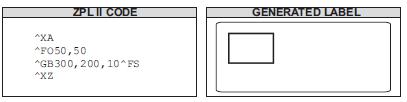
Width: 0 inch; Height: 1 inch; Thickness: 20; Color: default; Rounding: default:
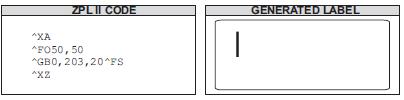
Width: 1 inch; Height: 0 inch; Thickness: 30; Color: default; Rounding: default:
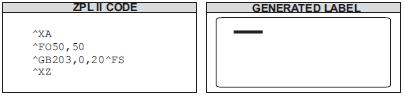
Width: 1.5 inch; Height: 1 inch; Thickness: 10; Color: default; Rounding: 5:
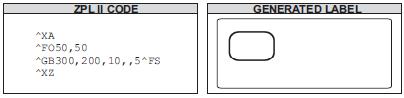
~HI~HS~HM ^XA^HW*:*.*^XZ ^XA ^HH ^XZ
Description Upon receipt, the printer responds with information on the model, softwareversion,dots-per-millimeter setting, memory size, and any detected objects.
^HW
Host Directory List
Description ^HW is used to transmit a directory listing of objects in a specific memoryarea(storage device) back to the host device. This command returns a formatted ASCII stringof object names to the host.
Each object is listed on a line and has a fixed length. The total length of a line is alsofixed. Each line listing an object begins with the asterisk (*) followed by a blank space. Thereareeight spaces for the object name, followed by a period and three spaces for the extension. Theextension is followed by two blank spaces, six spaces for the object size, two blank spaces, andthree spaces for option flags (reserved for future use). The format looks like this:
<STX><CR><LF>
DIR R: <CR><LF>
*Name.ext(2sp.)(6 obj. sz.)(2sp.)(3 option flags)
*Name.ext(2sp.)(6 obj. sz.)(2sp.)(3 option flags)
<CR><LF>
-xxxxxxx bytes free
<CR><LF>
<ETX>
<STX> = start of text
<CR><LR> = carriage return/line feed
<ETX> = end on text
printer returns the directory listing as soon as possible, based on other tasks it might beperforming when the command is received.
This command, like all ^ (caret) commands, is processed in the order that it is receivedbytheprinter.
Parameter |
Description |
Accepted Values: |
|---|---|---|
d |
location to retrieve object listing |
R:, E:, B:, A:, Z: |
Default Value: R: |
||
o |
object name |
1 to 8 alphanumeric characters |
Default Value: * |
||
x |
extension |
any valid extension (Zebra conventions) |
Default Value: * |
||
f |
format |
c = column format; d = default format |
Default Value: d |
Example Listed is an example of the ^HW command to retrieve from information R:
^XA
^HWR:.
^XZ
Example The printer returned this information as the Host Directory Listing:-DIR
~JC
Set Media Sensor Calibration
Description The ~JC command is used to force a label length measurement and adjust the media and ribbon sensor values.
Format ~JC
Comments In Continuous Mode, only the media and ribbon sensors are calibrated.
~JD
Enable Communications Diagnostics
Description The ~JD command initiates Diagnostic Mode, which produces an ASCII printout (using current label length and full width of printer) of all characters receivedbytheprinter. This printout includes the ASCII characters, the hexadecimal value, and any communication errors.
Format ~JD
~JE
Disable Diagnostics
Description The ~JE command cancels Diagnostic Mode and returns the printer tonormal label printing.
Format ~JE
~JL
Set Label Length
Description The ~JL command is used to set the label length. Depending on the size of the label, the printer feeds one or more blank labels.
Format ~JL
~JR
Power On Reset
Description The ~JR command resets all of the printer’s internal software, performs a power-on self-test (POST), clears the buffer and DRAM, and resets communication parameters and default values. Issuing a ~JR command performs the same function as a manual power-on reset.
Format ~JR
^LR
Label Reverse Print
Description The ^LR command reverses the printing of all fields in the label format. It allows a field to appear as white over black or black over white.
Using the ^LR is identical to placing an ^FR command in all current and subsequent fields.
Parameter |
Description |
Accepted Values: |
|---|---|---|
a |
reverse print all fields |
N = no |
Y = yes |
||
Initial Value at Power-up: N or last permanently saved value |
Example This is an example that shows printing white over black and black over white. The ^GB command is used to create the black background.
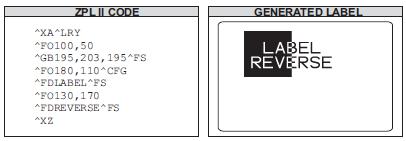
Comments The ^LR setting remains active unless turned off by ^LRN or the printer is turned off.
Note: ^GB needs to be used together with ^LR.
Only fields following this command are affected.
^MM
Print Mode
Description The ^MM command determines the action the printer takes after a label or group of labels has printed.
Parameter |
Description |
Accepted Values: |
|---|---|---|
a |
desired mode |
T = Tear-off |
P = Peel-off (not available on S-300) |
||
R = Rewind (depends on printer model) |
||
A = Applicator (depends on printer model) |
||
C = Cutter (depends on printer model) |
||
D = Delayed cutter |
||
F = RFID |
||
L = Reserved |
||
U = Reserved |
||
K = Kiosk |
||
b |
prepeel select |
N = no |
Y = yes |
This list identifies the different modes of operation:
Tear-off — after printing, the label advances so the web is over the tear bar. Thelabel, withliner attached, can be torn off manually.
Peel-off — after printing, the label moves forward and activates a Label AvailableSensor.
Printing stops until the label is manually removed from the printer.Power Peel – liner automatically rewinds using an optional internal rewind spindle. Value Peel – liner feeds down the front of the printer and is manually removed. Prepeel – after each label is manually removed, the printer feeds the next label forwardtoprepeel a small portion of the label away from the liner material. The printer thenbackfeedsand prints the label. The prepeel feature assists in the proper peel operation of somemediatypes.
Rewind — the label and liner are rewound on an (optional) external rewind device. Thenext label is positioned under the printhead (no backfeed motion).
Applicator — when used with an application device, the label move far enoughforwardtobe removed by the applicator and applied to an item. This applies only to printers thathaveapplicator ports and that are being used in a print-and-apply system.
Cutter — after printing, the media feeds forward and is automatically cut intopredetermined lengths.
Delayed cutter — When the printer is in the Delayed Cut PRINT MODE, it will cut thelabelwhen it receives the ~JK (Delayed Cut) command. To activate the ~JK command, theprinter’s PRINT MODE must be set to Delayed Cut and there must be a label waitingtobecut.When the printer is not in the Delayed Cut PRINT MODE, the printer will not cut thelabel when it receives the ~JK command. The Delayed Cut feature can be activated:
through PRINT MODE on the printer’s control panel
with a ^MMD command
RFID — increases throughput time when printing batches of RFID labels by eliminatingbackfeed between labels.
Kiosk — after printing, the media is moved in a presentation position, most applicationsmaintain a loop of media in the printer.
Comments Be sure to select the appropriate value for the print mode being usedtoavoidunexpected results.
^MN
Media Tracking
Description The ^MN command relays to the printer what type of media is being used(continuous or non-continuous) for purposes of tracking.
This bulleted list shows the types of media associated with this command:
Continuous Media – this media has no physical characteristic (such as a web, notch, perforation, black mark) to separate labels. Label length is determined by the ^LLcommand.
Continuous Media, variable length – same as Continuous Media, but if portions of theprinted label fall outside of the defined label length, the label size will automaticallybeextended to contain them. This label length extension applies only to the current label. Note that ^MNV still requires the use of the ^LL command to define the initial desiredlabel length.
Non-continuous Media – this media has some type of physical characteristic (suchasweb,notch, perforation, black mark) to separate the labels.
Parameter |
Description |
Accepted Values: |
|---|---|---|
a |
media being used |
N = continuous media |
Y = non-continuous media web sensing |
||
W = non-continuous media web sensing |
||
M = non-continuous media mark sensing |
||
A = auto-detects the type of media during calibration |
||
V = continuous media, variable length |
||
Default Value: a value must be entered or the command is ignored |
||
b |
black mark offset (dots) |
-80 to 283 for direct-thermal only printers |
-240 to 566 for 600 dpi printers |
||
-120 to 283 for all other printers |
||
Default Value: 0 |
^MT
Media Type
Description The ^MT command selects the type of media being used in the printer.
These are the choices for this command:
Thermal Transfer Media – this media uses a high-carbon black or colored ribbon. Theink on the ribbon is bonded to the media.
Direct Thermal Media – this media is heat sensitive and requires no ribbon.
Parameter |
Description |
Accepted Values: |
|---|---|---|
a |
media type used |
T = thermal transfer media |
D = direct thermal media |
||
Default Value: a value must be entered or the commandis ignored |
^PH
Feed Blank Label
Description The ^PH or ~PH command causes the printer to feed one blank label.
The ~PH command feeds one label after the format currently being printed is done or when the printer is placed in pause.
The ^PH command feeds one blank label after the current format prints.
Format ^PH or ~PH
^PM
Printing Mirror Image of Label
Description The ^PM command prints the entire printable area of the label as a mirror image. This command flips the image from left to right.
Parameter |
Description |
Accepted Values: |
|---|---|---|
a |
print mirror image of entire label |
N = no |
Y = yes |
||
Default Value: N |
Example This is an example of printing a mirror image on a label.
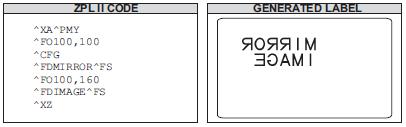
Comments If the parameter is missing or invalid, the command is ignored. Once entered, the ^PM command remains active until ^PMN is received or the printer is turned off.
~SD
Set Darkness
Description The ~SD command allows you to set the darkness of printing. ~SD is the equivalent of the darkness setting parameter on the control panel display.
Parameter |
Description |
Accepted Values: |
|---|---|---|
## |
desired darkness setting (two-digit number) |
00 to 30 |
Default Value: last permanently saved value |
Important The darkness setting range for the XiIIIPlus, Xi4, and RXi4 is 0 to 30 in increments of 0.1. The firmware is set up so that the ^MD and ~SD commands (ZPL darkness commands) accept that range of settings.
Comments The ^MD command value, if applicable, is added to the ~SD command.
~WC
Print Configuration Label
Description The ~WC command is used to generate a printer configuration label. The configuration label contains information about the printer setup, such as sensor type, network ID, ZPL mode, firmware version, and descriptive data on the R:, E:, B:, and A: devices.
Format ~WC
This command works only when the printer is idle.
^WD
List Stored Fonts, Objects, and Bar Codes
Description The ^WD command is used to print a label listing bar codes, objects stored in DRAM, or fonts. For bar codes, the list shows the name of the bar code. For fonts, the list shows the name of the font, the number to use with ^A command, and size. For objects stored in DRAM, the list shows the name of the object, extension, size, and option flags. All lists are enclosed in a double-line box.
Parameter |
Description |
Accepted Values: |
|---|---|---|
d |
source device (optional) |
R:, E:, B:, A: and Z: |
Default Value: R: |
||
o |
object name (optional) |
`1 to 8 alphanumeric characters |
Default Value: * The use of a ? (question mark) is also allowed. |
||
x |
extension (optional) |
any extension conforming to Zebra conventions |
.FNT = font |
||
.BAR = bar code |
||
.ZPL = stored ZPL format |
||
.GRF = GRF graphic |
||
.CO = memory cache |
||
.DAT = font encoding |
||
.BAS = ZBI encrypted program |
||
.BAE = ZBI encrypted program |
||
.STO = data storage |
||
.PNG = PNG graphic |
||
*= all objects |
||
.TTF = TrueType Font |
||
.TTE = True Type Extension |
||
Default Value: * |
||
The use of a ? (question mark) is also allowed. |
Example To print a label listing all objects in DRAM:
^XA
^WDR:.
^XZ
To print all resident bar codes:
^XA
^WDZ:*.BAR
^XZ
To print all resident fonts:
^XA
^WDZ:*.FNT
^XZ
Download Command
^DF
Download Format
Description The ^DF command saves ZPL II format commands as text strings to be later merged using ^XF with variable data. The format to be stored might contain field number (^FN) commands to be referenced when recalled.
While use of stored formats reduces transmission time, no formatting time is saved — this command saves ZPL II as text strings formatted at print time.
Enter the ^DF stored format command immediately after the ^XA command, then enter the format commands to be saved.
Parameter |
Description |
Accepted Values: |
|---|---|---|
d |
device to store image |
R:, E:, B:, A: |
Default Value: R: |
||
o |
image name |
1 to 8 alphanumeric characters |
Default Value: if a name is not specified, UNKNOWN is used |
||
x |
extension |
.ZPL |
~DG
Download Graphics
Description The ~DG command downloads an ASCII Hex representation of a graphic image. If .GRF is not the specified file extension, .GRF is automatically appended.
Parameter |
Description |
Accepted Values: |
|---|---|---|
d |
device to store image |
R:, E:, B:, A: |
Default Value: R: |
||
o |
image name |
1 to 8 alphanumeric characters |
Default Value: if a name is not specified, UNKNOWN is used |
||
x |
extension |
.GRF |
t |
total number of bytes in graphic |
see example formula |
w |
number of bytes per row |
see example formula |
data |
ASCII hexadecimal string defining image |
The data string defines the image and is an ASCII hexadecimal representation of the image. |
Each character represents a horizontal nibble of four dots. |
This is the key for the examples that follow:
x = width of the graphic in millimeters
y = height of the graphic in millimeters
z = dots/mm = print density of the printer being programmed
8 = bits/byte
Example This is an example of using the ~DG command to load a checkerboard pattern into DRAM. The name used to store the graphic is SAMPLE.GRF:
~DGR:SAMPLE.GRF,80,10,FFFFFFFFFFFFFFFFFFFF 8000FFFF0000FFFF0001 8000FFFF0000FFFF0001 8000FFFF0000FFFF0001 FFFF0000FFFF0000FFFF FFFF0000FFFF0000FFFF FFFF0000FFFF0000FFFF FFFFFFFFFFFFFFFFFFFF
^XA
^PW800
^LL400
^FO10,10^XGR:SAMPLE.GRF,1,1^FS
^FO400,10^XGR:SAMPLE.GRF,2,2^FS
^FO10,100^XGR:SAMPLE.GRF,3,3^FS
^FO400,100^XGR:SAMPLE.GRF,4,4^FS
^FO10,200^XGR:SAMPLE.GRF,5,6^FS
^XZ
This is an example of lading two same graph to printer, and the second be placed by the first one:
~DGR:SAMPLE.GRF,80,10, FFFFFFFFFFFFFFFFFFFF 8000FFFF0000FFFF0001 8000FFFF0000FFFF0001 8000FFFF0000FFFF0001 FFFF0000FFFF0000FFFF FFFF0000FFFF0000FFFF FFFF0000FFFF0000FFFF FFFFFFFFFFFFFFFFFFFF
~DGR:SAMPLE.GRF,1691,19,
:Z64:eJzd1DFuwzAMBdAvuIBHXqCoLhJE1+oQxPbU0UfoVQ J0yDVUoEBXd4oGwyzlJrFFBmiz loMCvxgUJUsEJBxzmn8izuG/mBmBX+Y/FmpZaNTUr0hSUCfU7 rCKuosgbO6lQXJZcoqSpWd4T Ts8adpgq2mLjaVdSX7wSLJnBZGz1A2a6rdYElAdo56x+jxoc txqwg3a4y/ Ehm6kr9kU4Y9DJhoXCl3SxG50Q0HVhL0su6flMJ0SAjLFhSL 8oeF+Nd+pRT2Egj4knWQmFOE mQ2haQyEakjIJDwVV3BIey9c4EcaSAlOliOQ+KJJF8qDIy61 RhCZp+R8hH6 Z5zXtAl2G8UJqfCpqfpoImS0yX4XfqrxTlk+XjJueiOdeVq c/DHZST3qKDvLqkn2ku4j33yJ Jibq5rmig2lgJPBY2ZRlzrmrcw+tyiVxQpUm7kq+pBsc7H siS5lZocG0I+q oqag6FgZpRuZ4iSpdFQ/bPsbydKr9k=:2C7F
^XA
^LL200
^PW800
^FO20,20
^XGR:SAMPLE.GRF,1,1^FS
^PQ1,0,1,Y
^XZ
This is an example of keeping the graph in Flash when printer power off:
~DGE:02.GRF,80,10, FFFFFFFFFFFFFFFFFFFF 8000FFFF0000FFFF0001 8000FFFF0000FFFF0001 8000FFFF0000FFFF0001 FFFF0000FFFF0000FFFF FFFF0000FFFF0000FFFF FFFF0000FFFF0000FFFF FFFFFFFFFFFFFFFFFFFF
~DGE:SAMPLE.GRF,1691,19,
:Z64:eJzd1DFuwzAMBdAvuIBHXqCoLhJE1+oQxPbU0UfoVQ J0yDVUoEBXd4oGwyzlJrFFBmizloMCvxgUJUsEJBxzmn8iz uG/mBmBX+Y/FmpZaNTUr0hSUCfU7rCKuosgbO6lQXJZcoqSp Wd4TTs8adpgq2mLjaVdSX7wSLJnBZGz1A2a6rdYElAdo56x+ jxoctxqwg3a4y/Ehm6kr9kU4Y9DJhoXCl3SxG50Q0HVhL0su 6flMJ0SAjLFhSL8oeF+Nd+pRT2Egj4knWQmFOEmQ2haQyEak jIJDwVV3BIey9c4EcaSAlOliOQ+KJJF8qDIy61RhCZp+R8hH 6Z5zXtAl2G8UJqfCpqfpoImS0yX4XfqrxTlk+XjJueiOdeVq c/DHZST3qKDvLqkn2ku4j33yJJibq5rmig2lgJPBY2ZRlzrm rcw+tyiVxQpUm7kq+pBsc7HsiS5lZocG0I+qoqag6FgZpRuZ 4iSpdFQ/bPsbydKr9k=:2C7F
^XA
^LL200
^PW800
^FO20,20^XGE:SAMPLE.GRF,1,1^FS
^FO400,20^XGE:02.GRF,1,1^FS
^PQ1,0,1,Y
^XZ
====Recall====
^XA
^LL200
^PW800
^FO20,20^XGE:SAMPLE.GRF,1,1^FS
^FO400,20^XGE:02.GRF,1,1^FS
^PQ1,0,1,Y
^XZ
Example This example is generated using the ^XF command to recall this format:
^XA
^DFE:SAMPLE.ZPL^FS
^PW800^LL280
^LH0,0
^FO20,20^GB760,200,2,B,0^FS
^FO20,100^GB760,0,2,B,0^FS
^FO30,50,0^ADN,36,20^FDSN:^FS
^FO110,58,0^ADN,18,10^FN1^FS
^FO450,50,0^ADN,36,20^FDDate:^FS
^FO580,58,0^ADN,18,10^FN2^FS
^XZ
^XA
^DFE:0002.ZPL^FS
^PW800^LL240
^LH0,0
^FO180,118^BY4^BUN,60,Y,N,Y^FN1^FS
^XZ
==========Recalled==============
^XA
^XFE:SAMPLE.ZPL
^FN1^FDNO.AX2017041100001^FS
^FN2^FD2017.04.11 PM ^FS
^XFE:0002.ZPL
^FN1^FD01234567890^FS
^XZ
^FN
Field Number
Description The ^FN command numbers the data fields. This command is used in both ^DF (Store Format) and ^XF (Recall Format) commands.
In a stored format, use the ^FN command where you would normally use the ^FD (Field Data) command. In recalling the stored format, use ^FN in conjunction with the ^FD command.
The optional «a» parameter can be used with the KDU Plus to cause prompts to be displayed on the KDU unit. Also, when the Print on Label link is selected on the Directory page of ZebraLink‑enabled printers, the field prompt displays.
The number of fields and data that can be stored is dependent on the available printer memory.
Note: The maximum number of ^FN commands that can be used depends on the amount of data that is placed in the fields on the label. It is recommended to use 400 or fewer fields.
Parameter |
Description |
Accepted Values: |
|---|---|---|
# |
field number |
1–9999 |
Default Value: 0 |
||
a |
optional prompt string |
surrounded by double quotes |
Default Value: optional parameter |
Comments
The same ^FN value can be stored with several different fields.
If a label format contains a field with ^FN and ^FD, the data in that field prints for any other field containing the same ^FN value.
For the “a” parameter to function as a prompt, the characters used must be surrounded by double quotes (see example).
^GF
Graphic Field
Description The ^GF command allows you to download graphic field data directly into the printer’s bitmap storage area. This command follows the conventions for any other field, meaning a field orientation is included. The graphic field data can be placed at any location within the bitmap space.
Parameter |
Description |
Accepted Values: |
|---|---|---|
a |
compression type |
A = ASCII hexadecimal (follows the format for other downloadcommands) |
B = binary (data sent after the c parameter is strictly binary) |
||
C = compressed binary (data sent after the c parameter is incompressed binary format. |
||
(data sent after the c parameter is incompressed binary format. |
||
The data is compressed on the host sideusing Zebra’s compression algorithm. |
||
The data is then decompressedand placed directly into the bitmap.) |
||
Default Value: A |
||
b |
binary byte count |
1 to 99999 |
Тhis is the total number of bytes to be transmitted for the total imageor the total number of bytes that follow parameter d. |
||
For ASCII download, the parameter should match parameter c. |
||
Out-of-rangevalues are set to the nearest limit. |
||
Default Value: command ignored if not specified |
||
c |
graphic field count |
1 to 99999 |
This is the total number of bytes comprising the graphic format(width x height), |
||
which is sent as parameter d. Count dividedbybytes per row gives the number of lines in the image. |
||
This number represents the size of the image, not necessarily the size of the datastream (see d). |
||
Default Value: command ignored if not specified |
||
d |
bytes per row |
1 to 99999 |
This is the number of bytes in the downloaded data that compriseonerowof the image. |
||
Default Value: command ignored if not specified |
||
data |
graphic field data |
ASCII hexadecimal data: 00 to FF |
A string of ASCII hexadecimal numbers, two digits per image byte. |
||
CR and LF can be inserted as needed for readability |
||
The number of two-digit number pairs must match the above count. |
||
Any numberssent after count is satisfied are ignored. |
||
A comma in the data padsthecurrent line with 00 (white space), minimizing the data sent. |
||
~DN or any caret or tilde character prematurely aborts the download. |
||
Binary data: Strictly binary data is sent from the host. |
||
All control prefixes are ignored until the total number of bytes needed for thegraphic format is sent. |
Example (ASCII mode) This example downloads 8,000 total bytes of data and places the graphic data at location100,100 of the bitmap. The data sent to the printer is in ASCII form.
^FO100,100^GFA,8000,8000,80,ASCII data
Example (Binary mode) This example downloads 8,000 total bytes of data and places the graphic data at location100,100 of the bitmap. The data sent to the printer is in binary form.
^FO100,100^GFB,8000,8000,80,Binary data
^ID
Object Delete
Description The ^ID command deletes objects, graphics, fonts, and stored formats fromstorage areas. Objects can be deleted selectively or in groups. This command canbeusedwithin a printing format to delete objects before saving new ones, or in a stand-aloneformattodelete objects.
The image name and extension support the use of the asterisk (*) as a wild card. This allowsyou to easily delete a selected groups of objects.
Parameter |
Description |
Accepted Values: |
|---|---|---|
d |
location of stored object |
R:, E:, B:, A: |
Default Value: R: |
||
o |
object name |
1 to 8 alphanumeric characters |
Default Value: UNKNOWN if not specified |
||
x |
extension |
any valid Zebra extension |
Default Value: .GRF |
Example Download two images, save their label format, and print:
~DGR:SAMPLE1.GRF,80,10, FFFFFFFFFFFFFFFFFFFF 8000FFFF0000FFFF0001 8000FFFF0000FFFF0001 8000FFFF0000FFFF0001 FFFF0000FFFF0000FFFF FFFF0000FFFF0000FFFF FFFF0000FFFF0000FFFF FFFFFFFFFFFFFFFFFFFF
~DGE:SAMPLE2.GRF,1691,19,
:Z64:eJzd1DFuwzAMBdAvuIBHXqCoLhJE1+oQxPbU0UfoVQJ0y DVUoEBXd4oGwyzlJrFFBmizloMCvxgUJUsEJBxzmn8izuG/mBm BX+Y/FmpZaNTUr0hSUCfU7rCKuosgbO6lQXJZcoqSpWd4TTs8a dpgq2mLjaVdSX7wSLJnBZGz1A2a6rdYElAdo56x+jxoctxqwg3 a4y/Ehm6kr9kU4Y9DJhoXCl3SxG50Q0HVhL0su6flMJ0SAjLFh SL8oeF+Nd+pRT2Egj4knWQmFOEmQ2haQyEakjIJDwVV3BIey9c 4EcaSAlOliOQ+KJJF8qDIy61RhCZp+R8hH6Z5zXtAl2G8UJqfC pqfpoImS0yX4XfqrxTlk+XjJueiOdeVqc/DHZST3qKDvLqkn2k u4j33yJJibq5rmig2lgJPBY2ZRlzrmrcw+tyiVxQpUm7kq+pBs c7HsiS5lZocG0I+qoqag6FgZpRuZ4iSpdFQ/bPsbydKr9k=:2C 7F
^XA
^PW500^LL320
^LH0,0
^FO20,10^GB460,300,2,B,0^FS
^FO20,100^GB460,0,2,B,0^FS
^FO100,50,0^ADN,36,20^FDBarcode Test^FS
^ISE:SAMPLE4.GRF,N
^XZ
^XA
^PW500^LL320
^ILE:SAMPLE4.GRF^FS
^FO40,220^XGR:SAMPLE1.GRF,1,1^FS
^FO180,160^XGE:SAMPLE2.GRF,1,1^FS
^XZ
^IL
Image Load
Description The ^IL command is used at the beginning of a label format to load a stored image of a format and merge it with additional data. The image is always positioned at ^FO0,0.
Using this technique to overlay the image of constant information with variable data greatly increases the throughput of the label format.
Parameter |
Description |
Accepted Values: |
|---|---|---|
d |
location of stored object |
R:, E:, B:, and A: |
Default Value: R: |
||
o |
object name |
1 to 8 alphanumeric characters |
Default Value: if a name is not specified, UNKNOWN is used |
||
x |
extension |
Fixed Value: .GRF, .PNG |
Example This example recalls the stored image SAMPLE2.GRF from DRAM and overlays it with the additional data. The graphic was stored using the ^IS command.
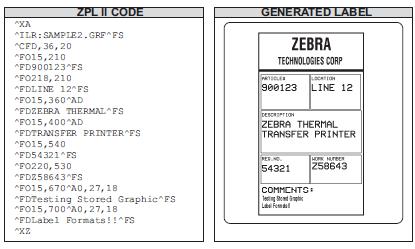
Example This example of save label as image SAMPLE2.GRF, save it in RAMand print.
^XA
^PW800
^LL800
^CFD,36
^LH10,15
^FO2,2^GB430,750,4^FS
^FO10,170^GB200,144,2^FS
^FO10,318^GB410,174,2^FS
^FO212,170^GB206,144,2^FS
^FO10,498^GB200,120,2^FSR
^FO212,498^GB209,120,2^FS
^FO4,150^GB422,10,10^FS
^FO135,20^A0,70,60^FDZEBRA^FS
^FO80,100^A0,40,30^FDTECHNOLOGIES CORP^FS
^FO15,180^FDARTICLE#^FS
^FO218,180^FDLOCATION^FS
^FO15,328^FDDESCRIPTION^FS
^FO15,508^FDREQ.NO.^FS
^FO220,508^FDWORK NO.^FS
^FO15,630^AD,36,20^FDCOMMENTS:^FS
^ISR:SAMPLE2.GRF,N
^XZ
^XA
^ILR:SAMPLE2.GRF^FS
^CFD,18,10
^FO55,260^FD900123^FS
^FO288,260^FDLINE 12^FS
^FO55,400^AD^FDZEBRA THERMAL^FS
^FO55,440^AD^FDTRANSFER PRINTER^FS
^FO55,580^FD54321^FS
^FO280,570^FDZ58643^FS
^FO55,690^A0,27,18^FDTesting Stored Graphic^FS
^FO55,720^A0,27,18^FDLabel Formats!!^FS
^XZ
===Recall===
^XA
^ILR:SAMPLE2.GRF^FS
^CFD,18,10
^FO55,260^FD900123^FS
^FO288,260^FDLINE 12^FS
^FO55,400^AD^FDZEBRA THERMAL^FS
^FO55,440^AD^FDTRANSFER PRINTER^FS
^FO55,580^FD54321^FS
^FO280,570^FDZ58643^FS
^FO55,690^A0,27,18^FDTesting Stored Graphic^FS
^FO55,720^A0,27,18^FDLabel Formats!!^FS
^XZ
Example This example saves the label as an image SAMPLE2.GRF, stores it in Flash, and prints it.
^XA
^PW800
^LL800
^CFD,36
^LH10,15
^FO2,2^GB430,750,4^FS
^FO10,170^GB200,144,2^FS
^FO10,318^GB410,174,2^FS
^FO212,170^GB206,144,2^FS
^FO10,498^GB200,120,2^FSR
^FO212,498^GB209,120,2^FS
^FO4,150^GB422,10,10^FS
^FO135,20^A0,70,60^FDZEBRA^FS
^FO80,100^A0,40,30^FDTECHNOLOGIES CORP^FS
^FO15,180^FDARTICLE#^FS
^FO218,180^FDLOCATION^FS
^FO15,328^FDDESCRIPTION^FS
^FO15,508^FDREQ.NO.^FS
^FO220,508^FDWORK NO.^FS
^FO15,630^AD,36,20^FDCOMMENTS:^FS
^ISE:SAMPLE2.GRF,N
^XZ
^XA
^ILE:SAMPLE2.GRF^FS
^CFD,18,10
^FO55,260^FD900123^FS
^FO288,260^FDLINE 12^FS
^FO55,400^AD^FDZEBRA THERMAL^FS
^FO55,440^AD^FDTRANSFER PRINTER^FS
^FO55,580^FD54321^FS
^FO280,570^FDZ58643^FS
^FO55,690^A0,27,18^FDTesting Stored Graphic^FS
^FO55,720^A0,27,18^FDLabel Formats!!^FS
^XZ
=Recall==
^XA
^LL800
^ILE:SAMPLE2.GRF^FS
^CFD,18,10
^FO55,260^FD900123^FS
^FO288,260^FDLINE 12^FS
^FO55,400^AD^FDZEBRA THERMAL^FS
^FO55,440^AD^FDTRANSFER PRINTER^FS
^XZ
^IS
Image Save
Description The ^IS command is used within a label format to save that format as a graphic image, rather than as a ZPL II script. It is typically used toward the end of a script. The saved image can later be recalled with virtually no formatting time and overlaid with variable data to form a complete label.
Using this technique to overlay the image of constant information with the variable data greatly increases the throughput of the label format.
Parameter |
Description |
Accepted Values: |
|---|---|---|
d |
location of stored object |
R:, E:, B:, and A: |
Default Value: R: |
||
o |
object name |
1 to 8 alphanumeric characters |
Default Value: if a name is not specified, UNKNOWN is used |
||
x |
extension |
.GRF or .PNG |
Default Value: .GRF |
||
p |
print image after storing |
N = no, Y = yes |
Default Value: Y |
Example This is an example of using the ^IS command to save a label format to DRAM. The name used to store the graphic is SAMPLE2.GRF.
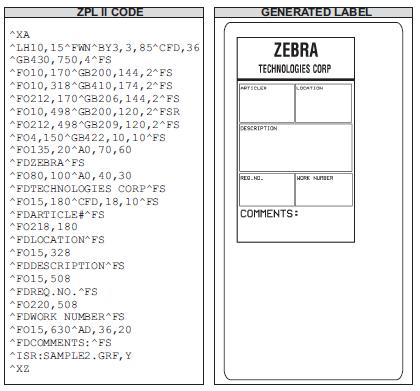
^XF
Recall Format
Description The ^XF command recalls a stored format to be merged with variable data. There can be multiple ^XF commands in one format, and they can be located anywhere within the code.
When recalling a stored format and merging data using the ^FN (Field Number) function, the calling format must contain the ^FN command to merge the data properly.
While using stored formats reduces transmission time, no formatting time is saved — the ZPL II format being recalled is saved as text strings that need to be formatted at print time.
Parameter |
Description |
Accepted Values: |
|---|---|---|
d |
source device of stored image |
R:, E:, B:, and A: |
Default Value: search priority (R:, E:, B:, and A:) |
||
o |
name of stored image |
1 to 8 alphanumeric characters |
Default Value: if a name is not specified, UNKNOWN is used |
||
x |
extension |
Fixed Value:.ZPL |
^XG
Recall Graphic
Description The ^XG command is used to recall one or more graphic images for printing. This command is used in a label format to merge graphics, such as company logos and piece parts, with text data to form a complete label.
An image can be recalled and resized as many times as needed in each format. Other images and data might be added to the format.
Parameter |
Description |
Accepted Values: |
|---|---|---|
d |
source device of stored image |
R:, E:, B:, and A: |
Default Value: search priority (R:, E:, B:, and A:) |
||
o |
name of stored image |
1 to 8 alphanumeric characters |
Default Value: if a name is not specified, UNKNOWN is used |
||
x |
extension |
.GRF |
mx |
magnification factor on the x-axis |
1 to 10 |
Default Value: 1 |
||
my |
magnification factor on the y-axis |
1 to 10 |
Default Value: 1 |
Example This is an example of using the ^XG command to recall the image SAMPLE.GRF from DRAM and print it in five different sizes in five different locations on the same label:
^XA
^FO100,100^XGR:SAMPLE.GRF,1,1^FS
^FO100,200^XGR:SAMPLE.GRF,2,2^FS
^FO100,300^XGR:SAMPLE.GRF,3,3^FS
^FO100,400^XGR:SAMPLE.GRF,4,4^FS
^FO100,500^XGR:SAMPLE.GRF,5,5^FS
^XZ
Graphic Command
^GB
Graphic Box
Description The ^GB command is used to draw boxes and lines as part of a label format. Boxes and lines are used to highlight important information, divide labels into distinct areas, or to improve the appearance of a label. The same format command is used for drawing either boxes or lines.
Parameter |
Description |
Accepted Values: |
|---|---|---|
w |
box width (in dots) |
value of t to 32000 |
Default Value: value used for thickness (t) or 1 |
||
h |
box height (in dots) |
value of t to 32000 |
Default Value: value used for thickness (t) or 1 |
||
t |
border thickness (in dots) |
1 to 32000 |
Default Value: 1 |
||
c |
line color |
B = black, W = white |
Default Value: B |
||
r |
degree of corner rounding |
0 (no rounding) to 8 (heaviest rounding) |
Default Value: 0 |
the w and h parameters, keep in mind that printers have a default of 6, 8, 12, or 24 dots/millimeter. Thiscomesout to 153, 203, 300, or 600 dots per inch. To determine the values for w and h, calculate the dimensionsinmillimeters and multiply by 6, 8, 12, or 24.
If the width and height are not specified, you get a solid box with its width and height as specifiedbyvalue t.
- The roundness-index is used to determine a rounding-radius for each box. Formula:
rounding-radius = (rounding-index / 8) * (shorter side / 2)
where the shorter side is the lesser of the width and height (after adjusting for minimumand default values).
Examples Here are a few examples of graphic boxes.
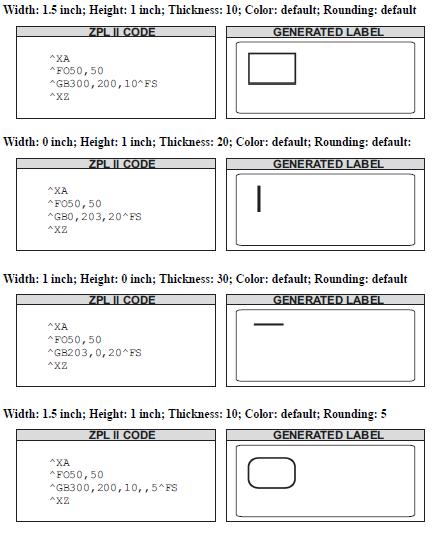
^GD
Graphic Diagonal Line
Description The ^GD command produces a straight diagonal line on a label. This can be used in conjunction with other graphic commands to create a more complex figure.
Parameter |
Description |
Accepted Values: |
|---|---|---|
w |
box width (in dots) |
3 to 32000 |
Default Value: value of t (thickness) or 3 |
||
h |
box height (in dots) |
3 to 32000 |
Default Value: value of t (thickness) or 3 |
||
t |
border thickness (in dots) |
1 to 32000 |
Default Value: 1 |
||
c |
line color |
B = black, W = white |
Default Value: B |
||
o |
orientation (direction of the diagonal) |
R (or /) = right-leaning diagonal, L (or \) = left-leaning diagonal |
Default Value: R |
Example This is an example of how to create a diagonal line connecting one corner with the opposite corner of a box on a printed label.
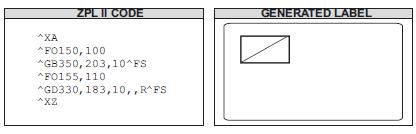
^GE
Graphic Ellipse
Description The ^GE command produces an ellipse in the label format.
Parameter |
Description |
Accepted Values: |
|---|---|---|
w |
ellipse width (in dots) |
3 to 4095 (larger values are replaced with 4095) |
Default Value: value used for thickness (t) or 1 |
||
h |
ellipse height (in dots) |
3 to 4095 |
Default Value: value used for thickness (t) or 1 |
||
t |
border thickness (in dots) |
2 to 4095 |
Default Value: 1 |
||
c |
line color |
B = black, W = white |
Default Value: B |
Example This is an example of how to create an ellipse on a printed label.
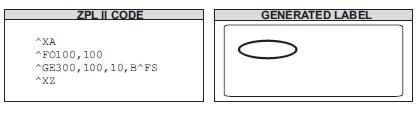
^GS
Graphic Symbol
Description The ^GS command enables you to generate the registered trademark, copyright symbol, and other symbols.
Parameter |
Description |
Accepted Values: |
|---|---|---|
o |
field orientation |
N = normal, R = rotate 90 degrees clockwise, I = inverted 180 degrees, B = bottom-up (270 degrees) |
Default Value: N or last ^FW value |
||
h |
character height proportional to width (in dots) |
0 to 32000 |
Default Value: last ^CF value |
||
w |
character width proportional to height (in dots) |
0 to 32000 |
Default Value: last ^CF value |
Example Use the ^GS command followed by ^FD and the appropriate character (A through E) within the field data to generate the desired character:
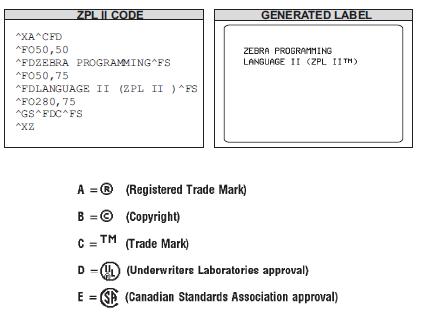
QR Code Command
^B0
Aztec Bar Code Parameters
Description The ^B0 command creates a two-dimensional matrix symbology made up of square modules arranged around a bulls-eye pattern at the center.
Parameter |
Description |
Accepted Values: |
|---|---|---|
a |
orientation |
N = normal |
R = rotated |
||
I = inverted 180 degrees |
||
B = read from bottom up, 270 degrees |
||
Default Value: current ^FW value |
||
b |
magnification factor |
1 to 10 |
Default Value: |
||
1 on 150 dpi printers |
||
2 on 200 dpi printers |
||
3 on 300 dpi printers |
||
6 on 600 dpi printers |
||
c |
extended channel interpretation code indicator |
Y = if data contains ECICs |
N = if data does not contain ECICs |
||
Default Value: N |
||
d |
error control and symbol size/type indicator |
0 = default error correction level |
01 to 99 = error correction percentage (minimum) |
||
101 to 104 = 1 to 4-layer compact symbol |
||
201 to 232 = 1 to 32-layer full-range symbol |
||
300 = a simple Aztec “Rune” |
||
Default Value: 0 |
||
e |
menu symbol indicator |
Y = if this symbol is to be a menu (bar code reader initialization) symbol |
N = if it is not a menu symbol |
||
Default Value: N |
||
f |
number of symbols for structured append |
1 through 26 |
Default Value: 1 |
||
g |
optional ID field for structured append |
The ID field is a text string with 24-character maximum |
Default Value: no ID |
Example This is an example of the ^B0 command (Aztec Bar Code Basic Test):
^XA
^PW800
^LL640
^FO40,10^A0,32,25^FDAztec Test:^FS
^FO40,80^B0N,7,N,0,N,1,0^FD7. This is testing label 7^FS
^FO440,80^B0N,7,N,0,N,1,0^FD0123456789-abcdefgz/ABSDKFJJWIOWEUT=@#$%^&*(():WWW.COM^FS
^XZ
Example This is an example of the ^B0 command (Aztec Bar Code Rotating Test):
^XA
^PW800
^LL640
^FO100,30^A0,32,25^FDAztec Barcode Orientation Test:^FS
^FO100,100^B0N,10,Y,0,N,1,0^FD7. This is testing label 7^FS
^FO500,100^B0R,10,N,0,N,1,0^FD7. This is testing label 7^FS
^FO500,400^B0I,10,Y,0,N,1,0^FD7. This is testing label 7^FS
^FO100,400^B0B,10,N,0,N,1,0^FD7. This is testing label 7^FS
^XZ
Example This is an example of the ^B0 command (Aztec Bar Code Magnification Coefficient Test):
^XA
^PW800
^LL640
^FO40,10^A0,32,25^FDAztec magnification factor Test:^FS
^FO40,80^B0N,1,N,0,N,1,0^FD7. This is testing label 7^FS
^FO340,80^B0N,3,N,0,N,1,0^FD7. This is testing label 7^FS
^FO540,80^B0N,5,N,0,N,1,0^FD7. This is testing label 7^FS
^FO40,340^B0N,11,N,0,N,1,0^FD7. This is testing label 7^FS
^FO340,340^B0N,7,N,0,N,1,0^FD7. This is testing label 7^FS
^FO540,340^B0N,10,N,0,N,1,0^FD7. This is testing label 7^FS
^XZ
^B4
Code 49 Bar Code
Description The ^B4 command creates a multi-row, continuous, variable-lengthsymbologycapable of encoding the full 128-character ASCII set. It is ideally suited for applicationsrequiringlarge amounts of data in a small space.
The code consists of two to eight rows. A row consists of a leading quiet zone, four symbol characters encoding eight code characters, a stop pattern, and a trailing quiet zone. Aseparatorbar with a height of one module separates each row. Each symbol character encodestwocharacters from a set of Code 49 characters.
^B4 has a fixed print ratio.
Rows can be scanned in any order.
Parameter |
Description |
Accepted Values: |
|---|---|---|
o |
orientation |
N = normal |
R = rotated 90 degrees (clockwise) |
||
I = inverted 180 degrees |
||
B = read from bottom up, 270 degrees |
||
Default Value: current ^FW value |
||
h |
height multiplier of individual rows |
1 to height of label |
Default Value: value set by ^BY |
||
This number multiplied by the module equals the height of the individual rows in dots. |
||
1 is not a recommended value. |
||
f |
print interpretation line |
N = no line printed |
A = print interpretation line above code |
||
B = print interpretation line below code |
||
Default Value: N |
||
When the field data exceeds two rows, expect the interpretation line to extend beyond the right edge of the bar code symbol. |
||
m |
starting mode |
0 = Regular Alphanumeric Mode |
1 = Multiple Read Alphanumeric |
||
2 = Regular Numeric Mode |
||
3 = Group Alphanumeric Mode |
||
4 = Regular Alphanumeric Shift 1 |
||
5 = Regular Alphanumeric Shift 2 |
||
A = Automatic Mode — the printer determines the starting mode by analyzing the field data. |
||
Default Value: A |
Example This is an example of a Code 49 bar code (Code 49 - Basic Test):
^XA
^PW800
^LL640
^FO40,10^A0,32,25^FDCode 49 Test^FS
^FO40,80^BY2^B4N,20,A,A^FD12345ABCDE^FS
^FO440,80^BY2^B4N,20,A,A^FDAZK 09-$8/R++%77^FS
^FO40,320^BY2^B4N,20,A,A^FD12345aBCDE^FS
^XZ
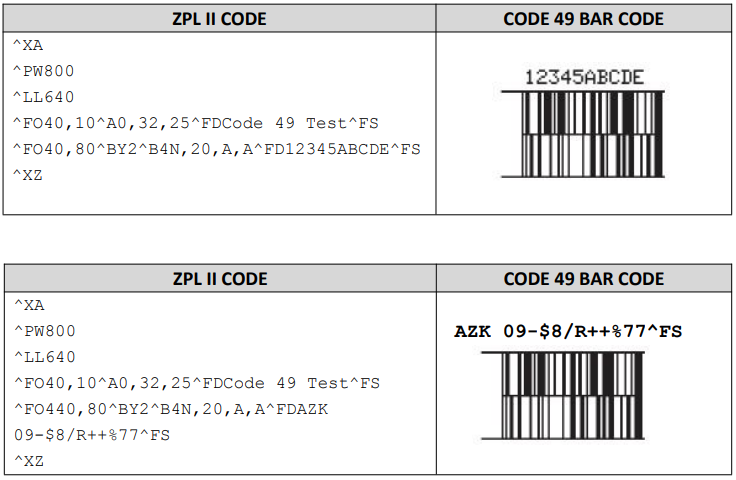
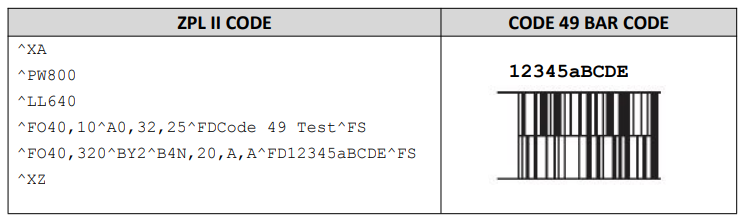
Example This is an example of a Code 49 bar code (Code 49 - Rotating Test):
^XA
^PW800
^LL640
^FO40,10^A0,32,25^FDCode 49 Orientation Test:^FS
^FO40,100^BY2^B4N,20,A,A^FD12345ABCDE^FS
^FO600,100^BY2^B4R,20,A,A^FD12345ABCDE^FS
^FO500,400^BY2^B4I,20,A,A^FD12345ABCDE^FS
^FO40,300^BY2^B4B,20,A,A^FD12345ABCDE^FS
^XZ
Example This is an example of a Code 49 bar code (Code 49 - Comment Line Test):
^XA
^PW800
^LL640
^FO40,10^A0,32,25^FDCode 49 Interpretation Line Test:^FS
^FO40,100^BY2^B4N,20,N,A^FD12345ABCDE^FS
^FO440,100^BY2^B4N,20,A,A^FD12345ABCDE^FS
^FO40,300^BY2^B4N,20,B,A^FD12345ABCDE^FS
^XZ
Example This is an example of a Code 49 bar code (Code 49 - Product Height Test):
^XA
^PW800
^LL640
^FO40,10^A0,32,25^FDCode 49 Size Test:^FS
^FO40,100^BY1^B4N,20,A,A^FD12345ABCDE^FS
^FO440,100^BY2,2^B4N,20,A,A^FD12345ABCDE^FS
^FO40,300^BY2,3,30^B4N,20,A,A^FD12345ABCDE^FS
^FO440,300^BY3,,40^B4N,,B,A^FD12345ABCDE^FS
^XZ
^B7
PDF417 Bar Code
Description The ^B7 command produces the PDF417 bar code — a two-dimensional, multi-row, continuous, stacked symbology. PDF417 is capable of encoding over 1,000 characters per barcode. It is ideally suited for applications requiring large amounts of information.
The bar code consists of three to 90 stacked rows. Each row consists of start and stop patterns and symbol characters called code-words. A code-word consists of four bars and four spaces. A three code-word minimum is required per row.
The PDF417 bar code is also capable of using the structured append option (^FM), which allows you to extend the field data limitations by printing multiple bar codes.
PDF417 has a fixed print ratio.
Field data (^FD) is limited to 3K of character data.
Parameter |
Description |
Accepted Values: |
|---|---|---|
o |
orientation |
N = normal |
R = rotated 90 degrees (clockwise) |
||
I = inverted 180 degrees |
||
B = read from bottom up, 270 degrees |
||
Default Value: current ^FW value |
||
h |
bar code height for individual rows (in dots) |
1 to height of label |
Default Value: value set by ^BY |
||
This number multiplied by the module equals the height of the individual rows in dots. |
||
If not specified, the overall bar code height divided by the number of rows equals the height of individual rows in dots. |
||
1 is not a recommended value. |
||
s |
security level |
1 to 8 (error detection and correction) |
Default Value: 0 (error detection only) |
||
This determines the number of error detection and correction code-words to be generated for the symbol. |
||
c |
number of data columns to encode |
1 to 30 |
Default Value: 1:2 (row-to-column aspect ratio) |
||
You can specify the number of code-word columns giving control over the width of the symbol. |
||
r |
number of rows to encode |
3 to 90 |
Default Value: 1:2 (row-to-column aspect ratio) |
||
You can specify the number of symbol rows giving control over the height of the symbol. |
||
t |
truncate right row indicators and stop pattern |
N = no truncation |
Y = perform truncation |
||
Default Value: N |
Example This is an example of a PDF417 bar code:
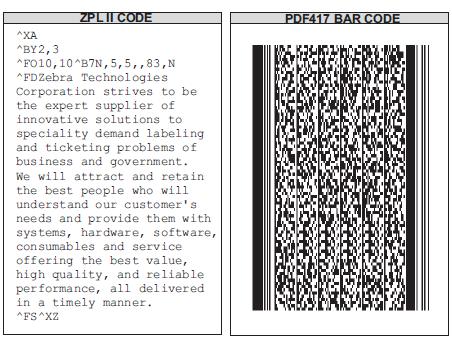
Example This is an example of a PDF417 without and with truncation selected:
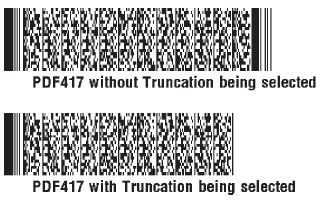
Example This example shows the ^B7 command used with field hex (^FH) characters:
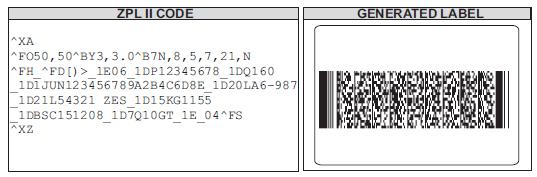
Comments
If both columns and rows are specified, their product must be less than 928.
No symbol is printed if the product of columns and rows is greater than 928.
No symbol is printed if total code-words are greater than the product of columns and rows.
Serialization is not allowed with this bar code.
The truncation feature can be used in situations where label damage is not likely. Therightrowindicators and stop pattern is reduced to a single module bar width. The differencebetweenanon truncated and a truncated bar code is shown in the previous examples.
Parameter |
Description |
Accepted Values: |
|---|---|---|
w |
module width (in dots) |
2 to 10 |
Default Value: 2 |
||
r |
ratio |
Fixed Value: 3 (ratio has no effect on PDF417) |
h |
height of bars (in dots) |
1 to 32000 |
Default Value: 10 |
||
PDF417 uses this only when row height is not specified in the ^B7 h parameter. |
^FD
The character set sent to the printer with the ^FD command includes the full ASCII set, except for those characters with special meaning to the printer.
CR and LF are also valid characters for all ^FD statements. This scheme is used:
«backslash»& = carriage return/line feed
«backslash»»backslash»= «backslash»
^CI13 must be selected to print a «backslash».
Example 1
^XZ
^PW800
^LL640
^XA
^FO40,30^A0,32,25^FDPDF417 Barcode Test:^FS
^FO40,80^BY2,3^B7N,5,5,6,,N^FDTechnologies Corporation strives to be the expert supplier of innovative solutions to specialty demand labeling and ticketing problems of business and government.^FS
^FO40,280^BY3,3.0^B7N,8,5,7,21,N^FH_^FD[)>_1E06_1DP12345678_1DQ160 _1D1JUN123456789A2B4C6D8E_1 D20LA6-987_1D21L54321 ZES_1D15KG1155_1DBSC151208_1D7Q10GT_1E_04^FS
^XZ
Example 2
^XA
^PW800
^FO40,30^A0,32,25^FDPDF417 Barcode Orientation Test:^FS
^FO40,80^BY2^B7N,4,3,4,,N^FDТechnologies Corporation strives to be the expert supplier of innovative solutions to specialty demand labeling and ticketing problems of business and government.^FS
^FO640,80^BY2^B7R,4,3,4,,N^FDTechnologies Corporation strives to be the expert supplier of innovative solutions to specialty demand labeling and ticketing problems of business and government.^FS
^FO440,400^BY2^B7I,4,3,4,,N^FDTechnologies Corporation strives to be the expert supplier of innovative solutions to specialty demand labeling and ticketing problems of business and government.^FS
^FO40,280^BY2^B7B,4,3,4,,N^FDTechnologies Corporation strives to be the expert supplier of innovative solutions to specialty demand labeling and ticketing problems of business and government.^FS
^XZ
Example 3
^XA
^PW800
^LL640
^FO40,30^A0,32,25^FDPDF417 Barcode height for individual rows Test:^FS
^FO40,80^BY2,,40^B7N,1,3,4,,N^FDTechnologies Corporation strives to be the expert supplier of innovative solutions to specialty demand labeling and ticketing problems of business and government-123.^FS
^FO40,130^BY2,,80^B7N,1,3,4,,N^FDTechnologies Corporation strives to be the expert supplier of innovative solutions to specialty demand labeling and ticketing problems of business and government-123.^FS
^FO40,180^BY2^B7N,4,3,4,,N^FDiTechnologies Corporation strives to be the expert supplier of innovative solutions to specialty demand labeling and ticketing problems of business and government-123.^FS
^FO40,320^BY2^B7N,7,3,4,,N^FDTechnologies Corporation strives to be the expert supplier of innovative solutions to specialty demand labeling and ticketing problems of business and government-123.^FS
^FO440,100^BY2^B7N,10,3,4,,N^FDTechnologies Corporation strives to be the expert supplier of innovative solutions to specialty demand labeling and ticketing problems of business and government-123.^FS
^XZ
Example 4
^XA
^PW800
^LL640
^FO40,30^A0,32,25^FDPDF417 Barcode security level Test:^FS
^FO40,80^BY2^B7N,4,1,4,,N^FDTechnologies Corporation strivestobetheexpert supplier of innovative solutions to speciality demand labelingandticketing problems of business and government-123.^FS
^FO40,260^BY2^B7N,4,3,4,,N^FDTechnologies Corporation strivestobetheexpert supplier of innovative solutions to speciality demand labelingandticketing problems of business and government-123.^FS
^FO40,440^BY2^B7N,4,5,4,,N^FDTechnologies Corporation strivestobetheexpert supplier of innovative solutions to speciality demand labelingandticketing problems of business and government-123.^FS
^FO440,50^BY2^B7N,4,8,4,,N^FDTechnologies Corporation strivestobetheexpert supplier of innovative solutions to speciality demand labelingandticketing problems of business and government-123.^FS
^FO440,250^BY2^B7N,4,9,4,,N^FDTechnologies Corporation strivestobethe expert supplier of innovative solutions to speciality demand labelingandticketing problems of business and government-123.^FS
^FO440,500^BY2^B7N,4,0,4,,N^FDTechnologies Corporation strivestobethe expert supplier of innovative solutions to speciality demand labelingandticketing problems of business and government-123.^FS
^XZ
Example 5
^XA
^PW800
^LL640
^FO40,30^A0,32,25^FDPDF417 Barcode number of data columns to encodeTest:^FS^FO40,80^BY2^B7N,4,3,1,,N^FDiDPRT Technologies Corporation strivestobetheexpert supplier of innovative solutions to speciality demand labelingandticketing problems of business and government-123.^FS
^FO40,220^BY2^B7N,4,3,3,,N^FDTechnologies Corporation strivestobetheexpert supplier of innovative solutions to speciality demand labelingandticketing problems of business and government-123.^FS
^FO40,380^BY2^B7N,4,3,6,,N^FDTechnologies Corporation strivestobetheexpert supplier of innovative solutions to speciality demand labelingandticketing problems of business and government-123.^FS
^FO40,550^BY2^B7N,4,3,10,,N^FDTechnologies Corporation strivestobethe expert supplier of innovative solutions to speciality demand labelingandticketing problems of business and government-123.^FS
^XZ
Example 6
^XA
^PW800
^LL640
^FO40,30^A0,32,25^FDPDF417 Barcode number of rows to encode to encodeTest:^FS
^FO40,80^BY2^B7N,4,3,5,1,N^FDTechnologies Corporation strivestobetheexpert supplier of innovative solutions to speciality demand labelingandticketing problems of business and government-123.^FS
^FO40,220^BY2^B7N,4,3,5,3,N^FDTechnologies Corporation strivestobethe expert supplier of innovative solutions to speciality demand labelingandticketing problems of business and government-123.^FS
^FO40,380^BY2^B7N,4,3,5,8,N^FDTechnologies Corporation strivestobethe expert supplier of innovative solutions to speciality demand labelingandticketing problems of business and government-123.^FS
^FO40,550^BY2^B7N,4,3,5,12,N^FDTechnologies Corporation strivestobethe expert supplier of innovative solutions to speciality demand labelingandticketing problems of business and government-123.^FS
^XZ
Example 7
^XA
^PW800
^LL640
^XA
^FO40,30^A0,32,25^FDPDF417 Barcode Test:^FS
^FO40,80^BY2,3^B7N,5,5,10,,N^FDFather’s Love.My father was a self-taught mandolin player. one of the best string instrument players in our town. He could not read music, but if heheardatune a few times, he could play it. When he was younger, he was a member of a small countrymusic band. They would play at local dances and on a few occasions would play for thelocalradio station. He often told us how he had auditioned and earned a position inabandTheywould play at local -12345689occasions would play for the local radio station. Heoftentoldushow he had auditioned and earned a position in a band that featured Patsy Clineas theirleadsinger. He told the family that after he was hired he never went back. Dad was a veryreligiousman. He stated that there was a lot of drinking and cursing the day of his auditionandhedidnot want to Hetunedptheoldmandolinandplayed a few notes. When I lookedaround,there !@#$^&was not a dry eye in the family. We saw before usa uiethumble mawithanplaythat MandolinQ!^FS
^XZ
^BF
MicroPDF417 Bar Code
Description The ^BF command creates a two-dimensional, multi-row, continuous, stacked symbology identical to PDF417, except it replaces the 17‑module‑wide start and stop patterns and left/right row indicators with a unique set of 10‑module‑wide row address patterns. These reduce overall symbol width and allow linear scanning at row heights as low as 2X.
MicroPDF417 is designed for applications with a need for improved area efficiency but without the requirement for PDF417’s maximum data capacity. It can be printed only in specific combinations of rows and columns up to a maximum of four data columns by 44 rows.
Field data limits (for ^FD / ^FH):
250 7-bit characters
150 8-bit characters
366 4-bit numeric characters
Parameter |
Description |
Accepted Values: |
|---|---|---|
o |
orientation |
N = normal |
R = rotated 90 degrees (clockwise) |
||
I = inverted 180 degrees |
||
B = read from bottom up, 270 degrees |
||
Default Value: current ^FW value |
||
h |
bar code height (in dots) |
1 to 9999 |
Default Value: value set by ^BY or 10 (if no ^BY value exists). |
||
m |
mode |
0 to 33 |
Example This is an example of a MicroPDF417 bar code(Rotating Test):
^XA
^PW800
^LL740
^FO100,10^A0,32,25^FDMicroPDF417 Orientation Test:^FS
^BY3
^FO100,100^BY5^BFN,8,10^FDiD1234567890ABCDEFGHIJKLMNOPQRSTUV^FS
^FO590,100^BY5^BFR,8,10^FDiD1234567890ABCDEFGHIJKLMNOPQRSTUV^FS
^FO550,500^BY5^BFI,8,10^FDiD1234567890ABCDEFGHIJKLMNOPQRSTUV^FS
^FO100,400^BY5^BFR,8,10^FDiD1234567890ABCDEFGHIJKLMNOPQRSTUV^FS
^XZ
Example This is an example of a MicroPDF417 bar code(Height Test): - ^XA - ^PW800 - ^LL740 - ^FO40,20^A0,32,25^FDMicroPDF417 height Test:^FS - ^BY2,,5 - ^FO40,80^BY5^BFN,1,10^FDiD1234567890ABCDEFGHIJKLMNOPQRSTUV^FS - ^BY2,,5 - ^FO40,150^BY5^BFN,5,10^FDiD1234567890ABCDEFGHIJKLMNOPQRSTUV^FS - ^BY2 - ^FO40,300^BFN,10,10^FDiD1234567890ABCDEFGHIJKLMNOPQRSTUV^FS - ^BY2 - ^FO440,100^BFN,15,10^FDiD1234567890ABCDEFGHIJKLMNOPQRSTUV^FS - ^XZ
Example This is an example of a MicroPDF417 bar code(Model Test):
^XA
^PW800
^LL640
^BY2
^FO40,20^A0,32,25^FDMicroPDF417 mode Test:^FS
^FO40,80^BFN,5,1^FDiD1234567890ABCDEFGHIJKLMNOPQRSTUV^FS
^FO40,260^BFN,5,16^FDiD1234567890ABCDEFGHIJKLMNOPQRSTUV^FS
^FO40,440^BFN,5,18^FDiD1234567890ABCDEFGHIJKLMNOPQRSTUV^FS
^FO440,100^BFN,5,30^FDiD1234567890ABCDEFGHIJKLMNOPQRSTUV^FS
^XZ
^BQ
QR Code Bar Code
Description The ^BQ command produces a matrix symbology consisting of an array of nominally square modules arranged in an overall square pattern. A unique patternat threeofthe symbol’s four corners assists in determining bar code size, position, and inclination.
A wide range of symbol sizes is possible, along with four levels of error correction. Userspecifiedmodule dimensions provide a wide variety of symbol production techniques.
QR Code Model 1 is the original specification, while QR Code Model 2 is an enhancedformof the symbology. Model 2 provides additional features and can be automatically differentiatedfrom Model 1.
Model 2 is the recommended model and should normally be used.
This bar code is printed using field data specified in a subsequent ^FD string.
Encodable character sets include numeric data, alphanumeric data, 8-bit byte data, and Kanji characters.
Parameter |
Description |
Accepted Values: |
|---|---|---|
a |
field orientation |
Fixed Value: normal (^FW has no effect on rotation) |
b |
model |
1 (original), 2 (enhanced — recommended) |
Default Value: 2 |
||
c |
magnification factor |
1 to 10 |
Default Value: 1 on 150 dpi printers |
||
2 on 200 dpi printers |
||
3 on 300 dpi printers |
||
6 on 600 dpi printers |
||
d |
H,Q,M,L |
H = ultra-high reliability level |
Q = high reliability level |
||
M = standard level |
||
L = high density level |
||
Default Value: Q if empty; M for invalid values |
||
e |
N,A,B.K |
N, A, B, K |
Accepted Values: 1 - 7 |
||
Default Value: 7 |
Example This is an example of a QR Code bar code(Basic Test):
^XA
^LL800
^FO100,10^A0,32,25^FDQR Code Test:^FS
^FO100,100^BQN,2,10^FDMM,AAC-42^FS
^FO100,350^FB300,2,,L,1^A0,24,18^FDMM,AAC-42^FS
^FO500,100^BQ,2,8^FDQA,0123456789ABCD 2D code^FS
^FO500,350^FB300,3,,L,1^A0,24,18^FDQA,0123456789ABCD 2D code^FS
^FO500,400^BQ,2,10^FDHM,N123456789012345^FS
^FO500,640^FB300,3,,L,1^A0,24,18^FDHM,N123456789012345^FS
^FO100,450^BQN,2,6^FDhttp://www.mertech.ru^FS
^FO100,650^FB300,3,,L,1^A0,24,18^FDhttp://www.mertech.ru^FS
^XZ
Example This is an example of a QR Code bar code(Amplification Test):
^XA
^LL740
^FO40,30^A0,32,25^FDQR Code magnification factor Test:^FS
^FO40,80^BQN,1,1^FDhttp://www.mertech.ru-,0123456789ABCD^FS
^FO240,80^BQN,2,3^FDhttp://www.mertech.ru-,0123456789ABCD^FS
^FO500,80^BQN,1,6^FDhttp://www.mertech.ru-,0123456789ABCD^FS
^FO40,320^BQN,2,11^FDhttp://www.mertech.ru-,0123456789ABCD^FS
^FO440,320^BQN,2,10^FDhttp://www.mertech.ru-,0123456789ABCD^FS
^XZ
^BX
Data Matrix Bar Code
Description The ^BX command creates a two-dimensional matrix symbology made up of square modules arranged within a perimeter finder pattern.
Parameter |
Description |
Accepted Values: |
|---|---|---|
o |
orientation |
N = normal |
R = rotated 90 degrees (clockwise) |
||
I = inverted 180 degrees |
||
B = read from bottom up, 270 degrees |
||
Default Value: current ^FW value |
||
h |
dimensional height of individual symbol elements |
1 to the width of the label |
The individual elements are square — this parameter specifies both module and row height. |
||
If this parameter is zero (or not given), the h parameter (bar height) in ^BY is used as the approximate symbol height. |
||
s |
quality level |
0, 50, 80, 100, 140, 200 |
Default Value: 0 |
||
Quality refers to the amount of data that is added to the symbol for error correction. |
||
The AIM specification refers to it as the ECC value. ECC50, ECC 80, ECC 100, and ECC 140 use convolution encoding; ECC200 uses Reed‑Solomon encoding. |
||
For new applications, ECC200 is recommended. ECC 000‑140 should be used only in closed applications where a single party controls both production and reading. |
||
c |
columns to encode |
9 to 49 |
Odd values only for quality 0 to 140; even values only for quality 200. |
||
The number of rows and columns is automatically determined. |
||
Forcing too small of a symbol results in no print. |
||
If value > 49 → set to 0 and determined normally. |
||
If even value → INVALID‑P. If <9 → INVALID‑L if ^CV active. |
||
r |
rows to encode |
9 to 49 |
f |
format ID (0–6) — not used with quality 200 |
1 = numeric + space (0..9,”) – No &’’ |
2 = uppercase alphanumeric + space (A..Z,’’) – No &’’ |
||
3 = uppercase alphanumeric + space, period, comma, dash, and slash (0..9,A..Z,“.-/”) |
||
4 = uppercase alphanumeric + space (0..9,A..Z,’’) – No &’’ |
||
5 = full 128 ASCII 7‑bit set |
||
6 = full 256 ISO 8‑bit set |
||
Default Value: 6 |
||
g |
escape sequence control character |
Any character |
Default Value: ~ (tilde) |
||
Used only with quality 200. Escape character for embedding special control sequences within field data. |
||
Older firmware keeps underscore (_) as default (V60.13.0.12 and later). |
||
a |
aspect ratio |
1 = square |
2 = rectangular |
||
Default Value: 1 |
Example This is an example of a square Data Matrix bar code(Rotating Test):
^XA
^FO50,30^A0,32,25^FDData Matrix Barcode Orientation Test ^FS
^FO50,80^BXN,6,200^FDiT TECHNOLOGIES CORPORATION ^FS
^FO400,80^BY2,2^BXR,6,80,,,,,2^FDiT TECHNOLOGIES CORPORATION^FS
^FO450,350^BXI,6,80^FDiT TECHNOLOGIES CORPORATION^FS
^FO50,350^BY2,2^BXB,6,80,,,,,2^FDiT TECHNOLOGIES CORPORATION^FS
^XZ
Query Command
~HI
Host Identification
Description The ~HI command is designed to check printer information on themodel, software version, dots-per-millimeter setting, memory size, and any detected objects. Format ~HI
When the printer receives this command, it returns:
XXXXXX,V1.0.0,dpm,000KB,X (version of software)
dots/mm =25.4dpi (8 dots/mm = 203dpiprintheads)
000KB = memory (16384KB=16MB)
x = recognizable objects only options specific to printer are shown (cutter, options, et cetera.)
~HM
Host Ram Status
Description Sending ~HM to the printer immediately returns a memory status messagetothe host. Use this command whenever you need to know the printer’s RAMstatus.
When ~HM is sent to the Zebra printer, a line of data containing information on the total amount, maximum amount, and available amount of memory is sent back to the host. Format ~HM
Example • This example shows when the ~HM is sent to the printer, a line of data containingthree numbers are sent back to the host. Each set of numbers is identified and explainedinthetable that follows:
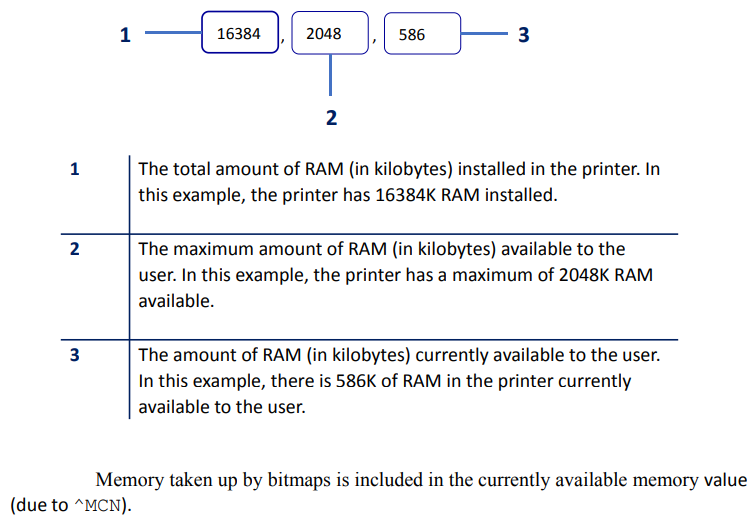
Downloading a graphic image, fonts, or saving a bitmap affects only the amount of RAM. Thetotal amount of RAM and maximum amount of RAM does not change after the printer isturnedon.
~HS
Host Status Return
Description When the host sends ~HS to the printer, the printer sends three data stringsback. Each string starts with an <STX> control code and is terminated by an<ETX><CR><LF> control code sequence. To avoid confusion, the host prints each string on a separateline.
Note When a ~HS command is sent, the printer will not send a response to the host if theprinter is in one of these conditions:
MEDIA OUT
RIBBON OUT
HEAD OPEN
REWINDER FULL
HEAD OVER-TEMPERATURE
String 1 <STX>aaa,b,c,dddd,eee,f,g,h,iii,j,k,l<ETX><CR><LF>Eg.<STX>412,0,0,0200,000,0,1,1,000,0,0,0<ETX><CR><LF>
aaa = communication (interface) settings
b = paper out flag (1 = paper out)
c = pause flag (1 = pause active)
dddd = label length (value in number of dots)
eee = number of formats in receive buffer
f = buf er full flag (1 = receive buffer full)
g = communications diagnostic mode flag (1 = diagnostic mode active)
h = partial format flag (1 = partial format in progress)
iii = unused (always 000)
j = corrupt RAM flag (1 = configuration data lost)
k = temperature range (1 = under temperature)
l = temperature range (1 = over temperature)
This string specifies the printer’s baud rate, number of data bits, number of stopbits, paritysetting, and type of handshaking. This value is a three-digit decimal representationof aneight-bit binary number. To evaluate this parameter, first convert the decimal number toabinary number.
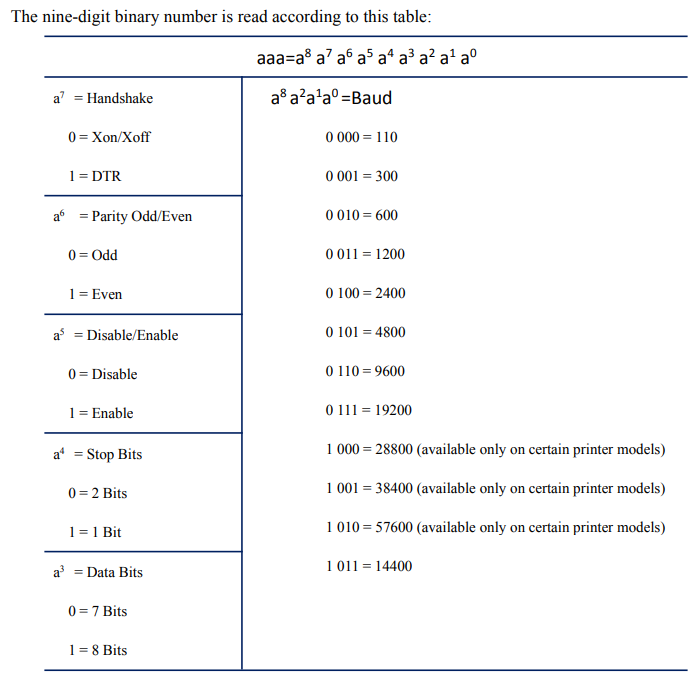
String 2 <STX>mmm,n,o,p,q,r,s,t,uuuuuuuu,v,www<ETX><CR><LF>Eg.<STX>160,0,0,0,0,2,1,1,00000000,0,000<ETX><CR><LF>mmm = function settings d
n = unused
o = head up flag (1 = head in up position)
p = ribbon out flag (1 = ribbon out)
q = thermal transfer mode flag (1 = Thermal Transfer Mode selected)
r = Print Mode
0 = Rewind
1 = Peel-Off
2 = Tear-Off
3 = Cutter
4 = Applicator
5 = Delayed cut
6 = Reserved e
7 = Reserved e
8 = Reserved e
9 = RFID
s = print width mode
t = label waiting flag (1 = label waiting in Peel-off Mode)
Uuuuuuuu = labels remaining in batch
v = format while printing flag (always 1)
www = number of graphic images stored in memory
This string specifies the printer’s media type, sensor profile status, and communicationdiagnostics status. As in String 1, this is a three-digit decimal representation of aneight-bitbinary number. First, convert the decimal number to a binary number.
These values are not supported by all printer models.
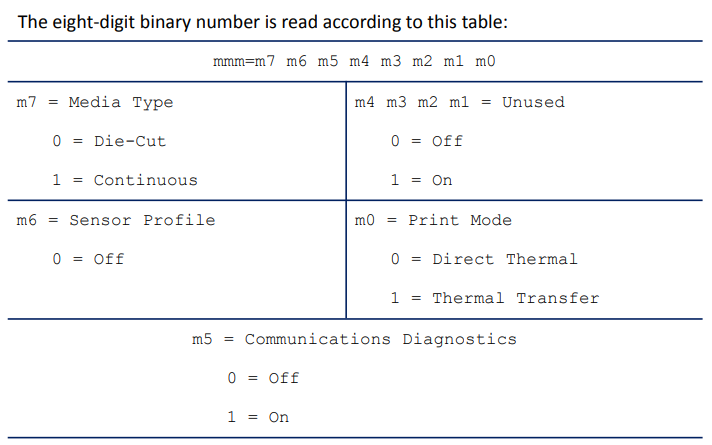
<STX>xxxx,y<ETX><CR><LF> Eg.<STX>0000,1
xxxx = password
y = 0 (static RAM not installed)1 (static RAM installed)
Setting Commands
^CF
Change Alphanumeric Default Font
Description The ^CF ommand sets the default font used in your printer. You canusethe^CF command to simplify your programs.
Parameter |
Description |
Accepted Values: |
|---|---|---|
f |
specified default font |
A through Z and 0 to 9 |
Initial Value at power-up: A |
||
h |
individual character height (in dots) |
0 to 32000 |
Initial Value at power-up: 9 |
||
w |
individual character width (in dots) |
0 to 32000 |
Initial Value at power-up: 5 or last permanent saved value |
Parameter f specifies the default font for every alphanumeric field. Parameter h is thedefaultheight for every alphanumeric field, and parameter w is the default width value for everyalphanumeric field.
The default alphanumeric font is A. If you do not change the alphanumeric default font anddonot use any alphanumeric field command (^AF) or enter an invalid font value, any datayouspecify prints in font A.
Defining only the height or width forces the magnification to be proportional to theparameterdefined. If neither value is defined, the last ^CF values given or the default ^CFvaluesforheight and width are used.
Example This is an example of ^CF code and the result of the code:
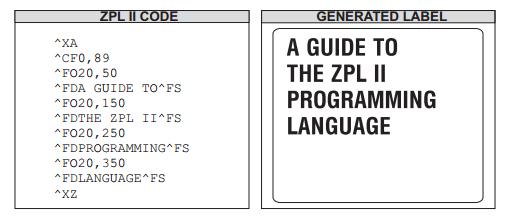
Example This is an example of test after restarting print: the default revert to he original default FrontA.
^XA
^LL100
^FO10,30 ^FDChange Alphanumeric Default Font NO6^FS
^FO10,60 ^FDChange Alphanumeric Default Font NO7^FS
^XZ
Example This is an example of «h» and «w» test.
^XA
^MNN
^LL240
^CFE,32,32
^FO10,60 ^FDChange Alphanumeric Default Font NO2^FS
^CFE,28,18
^FO10,100 ^FDChange Alphanumeric Default Font NO3^FS
^CFD,30,15
^FO10,150 ^FDChange Alphanumeric Default Font NO4^FS
^CFD,18,10
^FO10,200 ^FDChange Alphanumeric Default Font NO5^FS
^XZ
Example This is an exception test of when the f is illegal, press Font A to print, and press thehandwparameter to set printing size.
^XA
^MTD
^LL180
^CFE,12,25
^FO10,20 ^FDChange Alphanumeric Default Font NO1^FS
^CFD,30,15
^FO10,60 ^FDChange Alphanumeric Default Font NO2^FS
^CFK,22,22
^FO10,100 ^FDChange Alphanumeric Default Font NO3^FS
^CFA,22,22
^FO10,140 ^FDChange Alphanumeric Default Font NO3^FS
^XZ
Comments Any font in the printer, including downloaded fonts, EPROM stored fonts, and fonts A through Z and 0 to 9, can also be selected with ^CW.
^FD
Field Data
Description The ^FD command defines the data string for the field. The field data can be any printable character except those used as command prefixes (^ and ~).
Parameter |
Description |
Accepted Values: |
|---|---|---|
a |
data to be printed |
any data string up to 3072 bytes |
Default Value: none — a string of characters must be entered |
Example
^XA
^PW800
^LL400
^FO50,50^AEN^FD123456780ABCDEFGHIJK^FS
^FO50,100^AEN^FDLMNOPQRSTUVWXYZabcdefg^FS
^FO50,150^AEN^FDhijklmnopqrstuvwxyz^FS
^FO50,200^AEN^FD!@#$%&*()_-=+[]{}|;:“»<>,.?/^FS
^FO50,250^AEN^FD12345^6780ABCDEFGHIJK^FS
^CC++FO50,300+AEN+FD12345+6780ABCDEFGHIJK+FS+CC^
^FO50,350^AEN^FD!@#$%&*()_+1234567890-=QWEASDZXCRTYUFGHVBNMJKUIOPLqwertyuioplkjhgfdsazxcvbnm^FS
^XZ
Comments The ^ and ~ characters can be printed by changing the prefix characters. The new prefix characters cannot be printed.
Characters with codes above 127, or the ^ and ~ characters, can be printed using the ^FH and ^FD commands.
^CI13 must be selected to print a «backslash».
^FH
Field Hexadecimal Indicator
Description The ^FH command allows you to enter the hexadecimal value for any characterdirectly into the ^FD statement. The ^FH command must precede each ^FD commandthatuseshexadecimals in its field.
Within the ^FD statement, the hexadecimal indicator must precede each hexadecimal value. The default hexadecimal indicator is _ (underscore). There must be a minimumof twocharacters designated to follow the underscore. The a parameter can be added whenadifferenthexadecimal indicator is needed.
This command can be used with any of the commands that have field data (that is ^FD, ^FV(Field Variable), and ^SN (Serialized Data)).
Valid hexadecimal characters are:
0 1 2 3 4 5 6 7 8 9 A B C D E F a b c d e f
Parameter |
Description |
Accepted Values: |
|---|---|---|
a |
hexadecimal indicator |
any character except current format and control prefix (^ and ~ by default) |
Default Value: _ (underscore) |
Example · This command is only valid for the first ^FD command after the ^FH command.
^XA
^LL100
^FO20,20^AEN
^FH^FD{)>7E065EP1278*4060*7E@15*1D11551D7Q4^FS
^FO20,60^AEN
^FD{)>7E065EP1278*4060*7E@15*1D11551D7Q4^FS
^XZ
^FO
Field Origin
Description The ^FO command sets a field origin, relative to the label home (^LH) position. ^FO sets the upper-left corner of the field area by defining points along the x-axis and y-axis independent of the rotation.
Parameter |
Description |
Accepted Values: |
|---|---|---|
x |
x-axis location (in dots) |
0 to 32000 |
Default Value: 0 |
||
y |
y-axis location (in dots) |
0 to 32000 |
Default Value: 0 |
||
z |
justification |
0 = left justification |
1 = right justification |
||
2 = auto justification (script dependent) |
||
Default Value: last accepted ^FW value or ^FW default |
Example · the test for x or y parameter set.
^XA
^PW800
^LL320
^FO0,0,0^AEN^FDABC0DEFG123456789^FS
^FO80,40,0^AEN^FDABC1DEFG123456789^FS
^FO160,80,0^AEN^FDABC2DEFG123456789^FS
^FO240,120,0^AEN^FDABC3DEFG123456789^FS
^FO320,160,0^AEN^FDABC4DEFG123456789^FS
^FO400,200,0^AEN^FDABC5DEFG123456789^FS
^FO480,240,0^AEN^FDABC6DEFG123456789^FS
^FO560,280,0^AEN^FDABC7DEFG123456789^FS
^XZ
Comments If the value entered for the x or y parameter is too high, it could position the field origin completely off the label.
The auto justification option might cause unexpected results if variable fields or bidirectional text are used with ^FO. For the best results with bidirectional text and/or variable fields, use either the left or right justification option.
^FR
Field Reverse Print
Description The ^FR command allows a field to appear as white over black or black over white. When printing a field and the ^FR command has been used, the color of the output is the reverse of its background.
Example • In this example, the ^GB command creates areas of black allowing the printing to appear white:
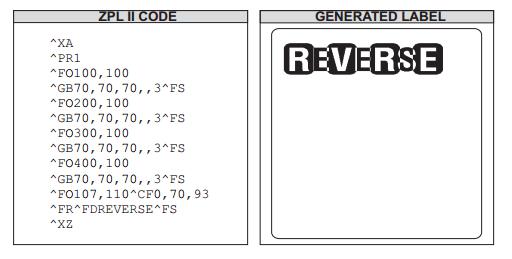
Comments The ^FR command applies to only one field and has to be specified each time. When multiple ^FR commands are going to be used, it might be more convenient to use the ^LR command.
^FS
Field Separator
Description The ^FS command denotes the end of the field definition. Alternatively, ^FS can also be issued as a single ASCII control code SI (Control‑O, hexadecimal 0F).
Exception Test: the content of a can not print without ^FD, and it would not affect the next content of ^FD…^FS.
^XA ^LL120
^FO20,20,0^AENABC0DEFG1231^FS
^FO20,50,0^AEN^FDABC1DEFG1232^FS
^FO20,80,0^AEN^FDABCDEFG1233^XZ
^XZ
Exception Test: it can print normally without ^FS.
^XA
^LL120
^FO20,20,0^AEN^FDABCDEFG1234
^FO20,50,0^AEN^FDABCDEFG1235
^FO20,80,0^AEN^FDABCDEFG1236
^XZ
Exception Test: a command containing many ^FD, only valid for the ^FD closest to ^FS. A command containing many ^FS, only valid for the ^FS closest to ^FD.
^XA
^LL100
^FO20,20^ADN^FD123456780A^FDBCDEFGHIJK^FS
^XZ
^XA
^LL100
^FO20,60^AEN^FD1234^FS56780AB^FSCDEFGHIJK^FS
^XZ
^FT
Field Typeset
Description The ^FT command sets the field position, relative to the home position of the label designated by the ^LH command. The typesetting origin of the field is fixed with respect to the contents of the field and does not change with rotation.
Parameter |
Description |
Accepted Values: |
|---|---|---|
x |
x-axis location (in dots) |
0 to 32000 |
Default Value: position after last formatted text field |
||
y |
y-axis location (in dots) |
0 to 32000 |
Default Value: position after last formatted text field |
||
z |
justification |
0 = left justification |
1 = right justification |
||
2 = auto justification (script dependent) |
||
Default Value: last accepted ^FW value or ^FW default |
The auto justification option may cause unexpected results if variable fields or bidirectional text are used with ^FT. For best results with bidirectional text and/or variable fields, use either the left or right justification options.
Example · This will assume that after the last field that was set, the other fields will automatically follow when missing X and Y.
^XA
^LL280
^FT20,120^A0N,30,20,^FDACME^FS
^FT^GS^FDC^FS
^FT^A0N,30,20,^FD Summer^FS
^FT^A0N,60,50,^FD Clearance^FS
^FT^A0N,120,100,^FD Sale^FS
^XZ
^FW
Field Orientation
Description The ^FW command sets the default orientation for all command fields that have an orientation (rotation) parameter (and in x.14 sets the default justification for all commands with a justification parameter). Fields can be rotated 0, 90, 180, or 270 degrees clockwise by using this command.
The ^FW command affects only fields that follow it. Once you have issued a ^FW command, the setting is retained until you turn off the printer or send a new ^FW command to the printer.
Parameter |
Description |
Accepted Values / Details |
|---|---|---|
r |
Rotate field |
N = normal |
R = rotated 90 degrees |
||
I = inverted 180 degrees |
||
B = bottom-up 270 degrees, read from bottom up |
||
Initial Value at Power-up: N |
||
z |
Justification |
0 = left justification |
1 = right justification |
||
2 = auto justification (script dependent) |
||
Default Value: auto for ^TB and left for all other commands |
Example • Test for r parameter set:
^FW and ^A set the printing direction at the same time, regard the ^A command set as the standard.
This command only is valid for its field and others label format, unless restart or reset.
^XA
^PW800
^LL360
^FWN,0^FO80,10^AE,18,10^FD01234E5678901^FS
^FWI,0^FO80,50^AE,18,10^FD01234B5678902^FS
^FWR,0^FO10,10^AE,18,10^FD01234C5678903^FS
^FWB,0^FO400,10^AE,18,10^FD01234D5678904^FS
^FWI,0^FO80,90^AEN,18,10^FD01234B5678905^FS
^FO80,130^AE,18,10^FD01234B5678906^FS
^XZ
^XA
^PW800
^LL100
^FO10,10^AE,18,10^FD01234E5678906^FS
^FO10,50^AE,18,10^FD01234B5678907^FS
^XZ
Example • Test for z parameter set:
^XA
^PW800
^LL400
^FWN,0^FO300,80^AE,18,10^FD01234B56789^FS
^FWN,1^FO300,130^AE,18,10^FD01234C56789^FS
^FWN,2^FO300,180^AE,18,10^FD01234D56789^FS
^FWI,0^FO300,230^AE,18,10^FD01234E56789^FS
^FWI,1^FO300,280^AE,18,10^FD01234F56789^FS
^FWI,2^FO300,330^AE,18,10^FD01234G56789^FS
^XZ
^XA
^PW800
^LL400
^FWR,0^FO50,10^AE,18,10^FD01234H56789^FS
^FWR,1^FO110,10^AE,18,10^FD01234I56789^FS
^FWR,2^FO170,10^AE,18,10^FD01234J56789^FS
^FWB,0^FO230,10^AE,18,10^FD01234K56789^FS
^FWB,1^FO290,10^AE,18,10^FD01234L56789^FS
^FWB,2^FO350,10^AE,18,10^FD01234M56789^FS
^XZ
Comments The ^FW command affects only the orientation in commands where the rotation parameter has not been specifically set. If a command has a specific rotation parameter, that value is used.
^FX
Comment
Description The ^FX command is useful when you want to add non‑printing informational comments or statements within a label format. Any data after the ^FX command up to the next caret (^) or tilde (~) command does not have any effect on the label format. Therefore, you should avoid using the caret (^) or tilde (~) commands within the ^FX statement.
Parameter |
Description |
Accepted Values: |
|---|---|---|
c |
non printing comment |
Creates a non‑printable comment. |
Example • This is an example of how to use the ^FX command effectively:
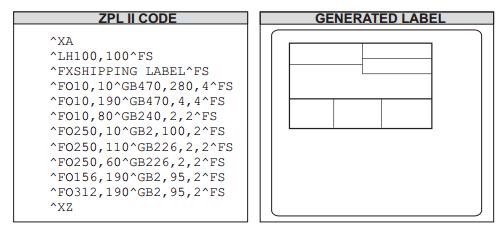
Comments Correct usage of the ^FX command includes following it with the ^FS command.
^LH
Label Home
Description The ^LH command sets the label home position. The default home position of a label is the upper‑left corner (position 0,0 along the x and y axis). This is the axis reference point for labels. Any area below and to the right of this point is available for printing. The ^LH command changes this reference point. For instance, when working with preprinted labels, use this command to move the reference point below the preprinted area.
This command affects only fields that come after it. It is recommended to use ^LH as one of the first commands in the label format.
Parameter |
Description |
Accepted Values: |
|---|---|---|
x |
x-axis position (in dots) |
0 to 32000 |
Initial Value at Power-up: 0 or last permanently saved value |
||
y |
y-axis position (in dots) |
0 to 32000 |
Initial Value at Power-up: 0 or last permanently saved value |
Depending on the print head used in your printer, use one of these when figuring thevaluesforxand y:
6 dots = 1 mm, 152 dots = 1 inch
8 dots = 1 mm, 203 dots = 1 inch
11.8 dots = 1 mm, 300 dots = 1 inch
24 dots = 1 mm, 608 dots = 1 inch
Example · This is an example of this command will affect the next label, and printing datum mark will revert to default when restart printer.
^XA
^PW800
^LL240
^LH0,0
^AE,18,10^FD0123456789^FS
^LH60,60
^AE,18,10^FD1123456789^FS
^LH120,120
^AE,18,10^FD2123456789^FS
^XZ
^XA
^AE,18,10^FD3123456789^FS
^AE,18,10^FD4123456789^FS
^XZ
Example · This is an example of when missing X and Y parameter, remove the last valid value.
^XA
^PW800
^LL400
^LH0,0
^AE,18,10^FD0123456789^FS
^LH40,40
^AE,18,10^FD1123456789^FS
^LH400
^AE,18,10^FD2123456789^FS
^LH,200
^AE,18,10^FD3123456789^FS
^LH
^AE,18,10^FD4123456789^FS
^XZ
Comments To be compatible with existing printers, this command must come before the first ^FS (Field Separator) command. Once you have issued an ^LH command, the setting is retained until you turn off the printer or send a new ^LH command to the printer.
^LL
Label Length
Description The ^LL command defines the length of the label. This command is necessary when using continuous media (media not divided into separate labels by gaps, spaces, notches, slots, or holes).
To affect the current label and be compatible with existing printers, ^LL must come before the first ^FS (Field Separator) command. Once you have issued ^LL, the setting is retained until you turn off the printer or send a new ^LL command.
Parameter |
Description |
Accepted Values: |
|---|---|---|
y |
y-axis position (in dots) |
1 to 32000, not to exceed the maximum label size |
While the printer accepts any value for this parameter, |
||
the amount of memory installed determines the maximum length of the label. |
||
Default Value: typically set through the LCD (if applicable), |
||
or to the maximum label length capability of the printer |
Comments These formulas can be used to determine the value of y:
For 6 dot/mm printheads… Label length in inches × 152.4 (dots/inch) = y
For 8 dot/mm printheads… Label length in inches × 203.2 (dots/inch) = y
For 12 dot/mm printheads… Label length in inches × 304.8 (dots/inch) = y
For 24 dot/mm printheads… Label length in inches × 609.6 (dots/inch) = y
Values for y depend on the memory size. If the entered value for y exceeds the acceptable limits, the bottom of the label is cut off. The label also shifts down from top to bottom.
If multiple ^LL commands are issued in the same label format, the last ^LL command affects the next label unless it is prior to the first ^FS.
^LR
Label Reverse Print
Description The ^LR command reverses the printing of all fields in the label format. It allows a field to appear as white over black or black over white.
Using the ^LR is identical to placing an ^FR command in all current and subsequent fields.
Parameter |
Description |
Accepted Values: |
|---|---|---|
a |
reverse print all fields |
N = no; Y = yes |
Initial Value at Power-up: N or last permanently saved value |
Example This example shows printing white over black and black over white.The ^GB command is used to create the black background.
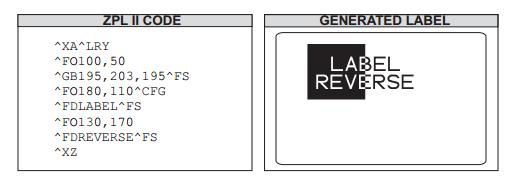
Comments The ^LR setting remains active unless turned off by ^LRN or the printer is turned off.
Note: ^GB needs to be used together with ^LR. Only fields following this command are affected.
^LT
Label Top
Description The ^LT command moves the entire label format a maximum of 120 dot rows up or down from its current position, in relation to the top edge of the label. A negative value moves the format towards the top of the label; a positive value moves the format away from the top of the label.
This command can be used to fine-tune the position of the finished label without changing any of the existing parameters.
Important: For some printer models, it is possible to request a negative value large enough to cause the media to back up into the printer and become unthreaded from the platen. This condition can result in a printer error or unpredictable results.
Parameter |
Description |
Accepted Values: |
|---|---|---|
x |
label top (in dot rows) |
-120 to 120 |
Default Value: a value must be specified or the command is ignored |
Example • This is an example of negative values move the format toward the top of the label, andpositive values move the format away from the top of the label.
^XA
^PW800 ^LL640 ^LH0,0
^LS0
^LT40
^FO0,52,0^GB744,2,2,B,0^FS
^FO0,246,0^GB592,2,2,B,0^FS
^FO0,396,0^GB744,2,2,B,0^FS
^FO128,246,0^GB2,150,2,B,0^FS
^FO602,68,0^GB2,312,2,B,0^FS
^FO0,472,0^GB744,2,2,B,0^FS
^FO8,76,0^BQN,2,6,L^FDwww.mertech.ru^FS
^FT48,44,0^CFC,36,20^FDShipment NO: A^FS ^FT^SN0405288,1,Y^FS
^FO618,76^BY3^BUB,100,Y,N,Y^FD01234567890^FS
^FO64,487^BY3,2.7^B3N,N,110,Y,N^FD360013990189^FS
^FO8,276,0^A0N,35,27^FDConsignee^FS
^FO8,326,0^A0N,35,25^FDInformation^FS
^FO168,72,0^ABN,33,14^FDShipper information^FS
^FO168,112,0^CFF,26,13^TBN,400,30^FDContact Person:Support^FS
^FO168,142,0^TBN,400,52^FDAddress:Bear Lakes Village^FS
^FO168,194,0^TBN,400,52^FDArea Code:XXX Tel:88005557783^FS
^FO136,256,0^FDContact Person:Support^FS
^FO136,286,0^FDAddress:Moskow^FS
^FO136,316,0^FDArea Code:XXX^FS
^FO136,346,0^FDTel:88005557783^FS
^FO168,406,0^AVN,80,71^FDMERTECH^FS
^PQ1
^XZ
Comments The accepted value range for x might be smaller depending on the printer platform. The ^LT command does not change the media rest position.
^PM
Printing Mirror Image of Label
Description The ^PM command prints the entire printable area of the label as a mirror image. This command flips the image from left to right.
Parameter |
Description |
Accepted Values: |
|---|---|---|
a |
print mirror image of entire label |
N = no; Y = yes |
Default Value: N |
Example This is an example of printing a mirror image on a label.
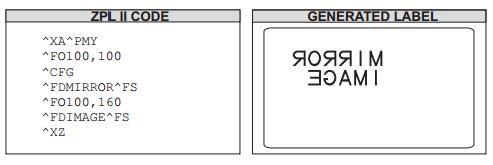
Comments If the parameter is missing or invalid, the command is ignored. Once entered, the ^PM command remains active until ^PMN is received or the printer is turned off.
^PO
Print Orientation
Description The ^PO command inverts the label format 180 degrees. The label appears to be printed upside down. If the original label contains commands such as ^LL, ^LS, ^LT, and ^PF, the inverted label output is affected differently.
Parameter |
Description |
Accepted Values: |
|---|---|---|
a |
invert label 180 degrees |
N = normal; I = invert |
Default Value: N |
Example This is an example of printing a label at 180 degrees:
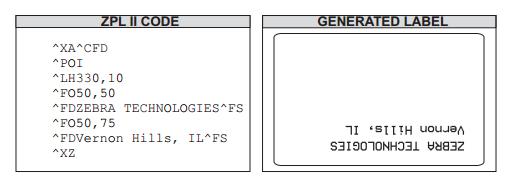
Example • This is an example of when receive this command many times, only is valid for last one. Andthis command also is valid for others label format unless restart or reset
^XA
^PW800
^LL100
^POI
^PON
^POI
^FO0,0^AEN,28,15^FDAaBBCDEFG123456789901^FS
^FO0,50^AEN,28,15^FDAaBBCDEFG123456789902^FS
^XZ
^XA
^FO0,0^AEN,28,15^FDAaBBCDEFG123456789901^FS
^FO0,50^AEN,28,15^FDAaBBCDEFG123456789902^FS
^XZ
The ^POI command inverts the x, y coordinates. All image placement is relative totheseinverted coordinates. Therefore, a different ^LH (Label Home) can be used to movetheprintback onto the label.
Comments If multiple ^PO commands are issued in the same label format, only thelast command sent to the printer is used.
Once the ^PO command is sent, the setting is retained until another ^PO commandis receivedor the printer is turned off.
^PQ
Print Quantity
Description The ^PQ command gives control over several printing operations. It controls the number of labels to print, the number of labels printed before the printer pauses, and the number of replications of each serial number.
Parameter |
Description |
Accepted Values: |
|---|---|---|
q |
total quantity of labels to print |
1 to 99,999,999 (Default: 1) |
p |
pause and cut value (labels between pauses) |
1 to 99,999,999 (Default: 0 — no pause) |
r |
replicates of each serial number |
0 to 99,999,999 (Default: 0 — no replicates) |
o |
override pause count |
N = no; Y = yes (Default: N) |
If the o parameter is set to Y, the printer cuts but does not pause, and the printer doesnotpause after every group count of labels has been printed. With the o parameter settoN(default), the printer pauses after every group count of labels has been printed.
Examples • This example shows the control over print operations:
^PQ50,10,1,Y: This example prints a total of 50 labels with one replicate of each serial number. It prints the total quantity in groups of 10, but does not pause after every group.
^PQ50,10,1,N: This example prints a total of 50 labels with one replicate of each serial number. It prints the total quantity in groups of 10, pausing after every group.
^PW
Print Width
Description The ^PW command allows you to set the print width of the label. If the width exceeds the label’s maximum size, the printer automatically limits it to the maximum allowed width.
Parameter |
Description |
Accepted Values: |
|---|---|---|
a |
label width (in dots) |
2 to maximum width of the label (Default: last saved value) |
Example: • When the field exceeds the printing width, the excess part cannot be printed. This command also applies to other label formats unless restarted or reset.
^XA
^PW300
^LL200
^FO10,30^ACN^FD1ABCDEFGHIJKLMN0123^FS
^FO10,80^ACN^FD2ABCDEFGHIJKLMN0123456789abcdefghijklmnopqrstuvwxyz^FS
^XZ
^XA
^FO10,30^ACN^FD3ABCDEFGHIJKLMN01234567890001^FS
^FO160,70^BY2^BUN,80,Y,N,Y^FD12345678930^FS
^XZ
Example: • This is an example of when the height set exceeds the maximum printable width, print atthemaximum printable width.
^XA
^LL100
^PW2
^FO00,34^AEN^FD1ABCDEFGHIJKLMN0123456789^FS
^XZ
^XA
^PW100
^FO00,34^AEN^FD2ABCDEFGHIJKLMN0123456789^FS
^XZ
^XA
^PW576
^FO00,34^AEN^FD3ABCDEFGHIJKLMN012345678900000001^FS
^XZ
^XA
^PW864
^FO00,34^AEN^FD4ABCDEFGHIJKLMN0123456789111111111111111111112^FS
^XZ
^XA
^PW1000
^FO00,34^AEN^FD5ABCDEFGHIJKLMN01234567893333333333333333333334^FS
^XZ
^SF
Serialization Field (with a Standard ^FD String)
Description The ^SF command allows you to serialize a standard ^FD string. The maximum combined size of the mask and increment string is 3K.
Parameter |
Description |
Accepted Values / Details |
|---|---|---|
a |
mask string |
The mask string sets the serialization scheme. |
The length of the string mask defines the number of characters |
||
(or in firmware version x.14 and later, combining semantic clusters) in the current ^FD string to be serialized. |
||
mask is aligned to the characters (or in firmware version x.14 and later |
||
combining semantic clusters) in the ^FD string starting with the right-most |
||
(or in firmware x.14 and later, last) in the backing store position. |
||
Mask String placeholders: |
||
D or d – Decimal numeric 0–9 |
||
H or h – Hexadecimal 0–9 plus a-f or A-F |
||
O or o – Octal 0–7 |
||
A or a – Alphabetic A–Z or a–z |
||
N or n – Alphanumeric 0–9 plus A–Z or a–z |
||
% – Ignore character or skip |
||
b |
increment string |
The increment string is the value to be added to the field on each label. |
The default value is equivalent to a decimal value of one. |
||
The string is composedof any characters (or in firmware version x.14 and later, |
||
version x.14 and later, combining semanticclusters) defined in the serial string. Invalid characters |
||
(or in firmware versionx.14 and later, combining semantic clusters) |
||
are assumed to be equal to a valueof zero in that characters |
||
(or in firmware version x.14 and later, combining semanticclusters) position. |
||
The increment value for alphabetic strings start with ‘A’ or ‘a’ as the zero placeholder |
||
This means to increment an alphabetic character (or in firmwareversion x.14 and later, combining semantic cluster) |
||
by one, a value of ‘B’ or ‘b’ must be in the increment string. |
For characters that do not get incremented, the % character needs to be added to the increment string.
Example • This is an example of serializing a ^FD string. The ZPL II code generates three separate labels as seen in Generated Labels:
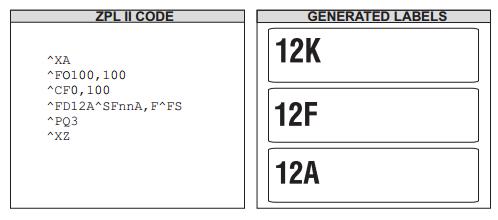
This mask has the first characters (or in firmware version x.14 and later, the first combiningsemantic clusters) as alphanumeric (nn = 12) and the last digit as uppercase alphabetic(A). The decimal value of the increment number is equivalent to 5 (F). The number of labelsgenerated depends on the number specified by the ^PQ command.
In a similar instance, the ^FD string could be replaced with either of the ^FDstrings belowtogenerate a series of label, determined by ^PQ.
Using this ZPL code:
^FDBL0000^SFAAdddd,1
The print sequence on this series of labels is:
BL0000, BL0001,…BL0009, BL0010,…BL0099, BL0100,…BL9999, BM0000…
Using this ZPL code:
^FDBL00-0^SFAAdd%d,1%1
The print sequence on this series of labels is:
BL00-0, BL01-1, BL02-2,…BL09-9, BL11-0, BL12-1…
~TA
Tear-off Adjust Position
Description The ~TA command adjusts the rest position of the media after a label is printed. This changes where the label is torn or cut.
Parameter |
Description |
Accepted Values: |
|---|---|---|
### |
change in media rest position (3-digit value in dot rows) |
-120 to 120 (0 to 120 on HC100 printers). Default: last saved permanent value. |
Important Notes
For 600 dpi printers, the step size doubles.
If the number of characters in the command is less than three, the command is ignored.
Example • This is an example of when the printer is power off, the command will not be saved. ~TA040
^XA
^PW800
^LL640
^LH20,0
^FO0,52,0^GB744,2,2,B,0^FS
^FO0,246,0^GB592,2,2,B,0^FS
^FO0,396,0^GB744,2,2,B,0^FS
^FO128,246,0^GB2,150,2,B,0^FS
^FO602,68,0^GB2,312,2,B,0^FS
^FO0,472,0^GB744,2,2,B,0^FS
^FO8,76,0^BQN,2,6,L^FD www.hprt.com^FS
^FT48,44,0^CFC,36,20^FD Shipment NO: A^FS^FT^SN0405288,1,Y^FS
^FO618,76^BY3^BUB,100,Y,N,Y^FD01234567890^FS
^FO64,487^BY3,2.7^B3N,N,110,Y,N^FD360013990189^FS
^FO8,276,0^A0N,35,27^FD Consignee^FS
^FO8,326,0^A0N,35,25^FD Information^FS
^FO168,72,0^ABN,33,14^FD Shipper information^FS
^FO168,112,0^CFF,26,13^TBN,400,30^FD Contact Person:Andrew^FS
^FO168,142,0^TBN,400,52^FD Address:Huli District,Xiamen,China^FS^FO168,194,0^TBN,400,52^FD Area Code:XXX Tel:0061418705X^FS
^FO136,256,0^FD Contact Person:Jasmine^FS
^FO136,286,0^FD Address:Nanyin District,Dubai^FS
^FO136,316,0^FD Area Code:XXX^FS
^FO136,346,0^FD Tel:0061418705X^FS
^FO168,406,0^AVN,80,71^FD XiaMen China^FS
^PQ1
^XZ
Comments If the parameter is missing or invalid, the command is ignored.
Примечание
Если Вы не нашли ответа на свой вопрос или нуждаетесь в консультации наших технических специалистов, пожалуйста позвоните по телефону бесплатной горячей линии Mertech 8-800-555-7783 или напишите запрос на нашу почту support@mertech.ru